
AppKit quietly shrinks views taller than 10 billion points
Mardo 0.9.12 · September 4, 2026 · Adam and Truly Floof
AppKit stops a constraint-sized view at ten billion points. Past that limit, Mardo 0.9.12 opens a 50 GB Markdown file, reaches its last byte and searches it in 37 s.
On September 2 we asked Mardo to jump to the exact middle of a 50 GB Markdown file, and it stopped about 177 MB short. Then we asked it to jump to the end, 27 GB further on, and it went to exactly the same place, down to the byte.
So did every other jump past the middle. Eight jumps aimed across the back half of the file were all delivered to the same 10,418 bytes a little before halfway, like a lift that will take you to any floor you like, as long as you like the twenty-sixth.
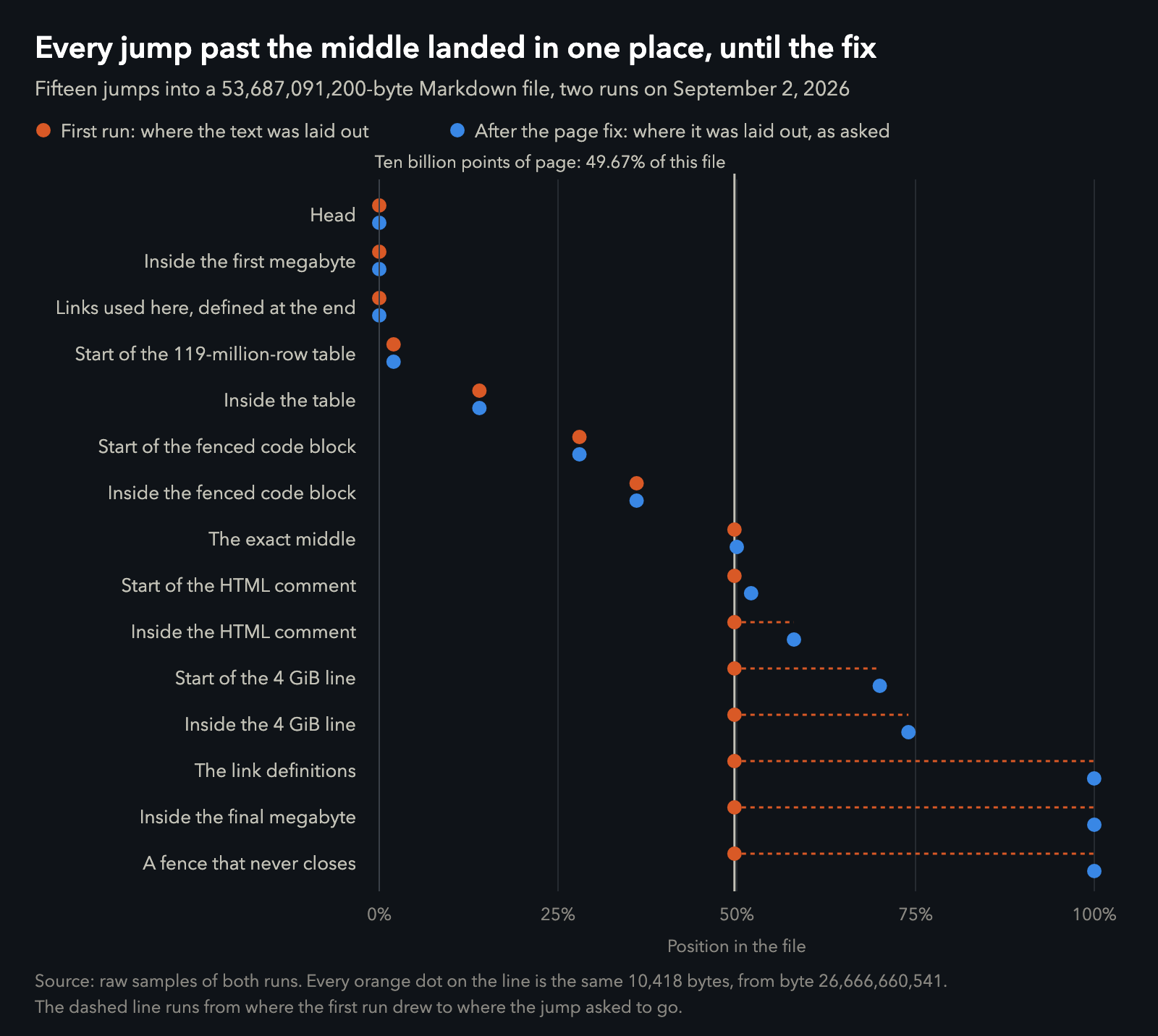
Where each jump landed in the first run, and after the page fix that went into 0.9.12. Data, after the fix.
Nothing crashed, and nothing was lost. The bytes past the middle were all still there, and we could read every one of them and copy them out exactly. Mardo just couldn't show them to you, which for a Markdown reader is most of the job.
If you keep huge text files on a Mac (logs, data exports, the transcripts an AI agent writes while you sleep), you've probably learned not to double-click them. Mardo is a native Mac app for reading and editing Markdown, and since August it has been built on one rule: memory should follow your eyes, not the file. Until this week that rule had been tested on files up to 16 MB, plus one sparse 2 GB file, which is mostly a length and a promise. This is what it took to open a huge text file on a Mac for real.
Here is where it ended. Mardo 0.9.12 opens a real 50 GB Markdown file in a few megabytes more memory than a 32 MB copy of the same file, paints the first screen in about a fifth of a second, takes you to any byte in it including the last, and searches all of it in 37 seconds. Four problems stood in the way. Three were ours. The one in the title belongs to AppKit.
Fifty gigabytes, on purpose
A design that works at 16 MB and one that works at 50 GB look exactly alike from inside a unit test. So we wrote a generator for the most unpleasant Markdown file we could think of. It's written in C, because it has to stream tens of gigabytes through one small buffer, and it took 278.5 seconds to write 53,687,091,200 bytes, every one of them physically on the disk rather than promised by a sparse file.
The file has eleven named stations, and most of them are traps. There's a table of 119 million rows with not one blank line anywhere between them. There's a fenced code block about 8 GB long, full of shorter fences that look as though they might close it and can't. An HTML comment opens and closes about 6 GB later. One line of text runs for about 4 GB without a line break. The links on the first page are defined on the last, and at the very end a code fence opens and never closes, to see what happens.
Beside it we generated a matched control: the same generator, the same seed and the same stations, squeezed into 32 MB. A control is how we find out what a thing costs before we blame anyone for it, and this one would tell us what 50 GB costs.
Just getting ready turned up places where memory had quietly followed the size of the file. On a 1 GB version it climbed to 983 MB over the tour; after the fixes it stayed flat between 45 and 55. The parser's bookmarks, the places it can resume from, had simply stopped after the first 128 MB, like a road atlas that gives up at the county line and leaves you to walk the rest.
The part that worked
The claim the whole exercise existed to test held up on the first run. Cold-opened in the optimized app, the 50 GB file settled at 41.84 MiB. The 32 MB control settled at 39.20 MiB. So a file sixteen hundred times bigger cost Mardo 2.63 MiB more to open, and it painted its first screen in 198 ms. Ten round trips from the top of the file to the middle to the tail and back moved the settled figure by 16 KB, and it moved down. After the page, search and seek fixes that follow, a second cold open measured 44.24 MiB against the control's 39.66: still a few megabytes, for a file sixteen hundred times the size.
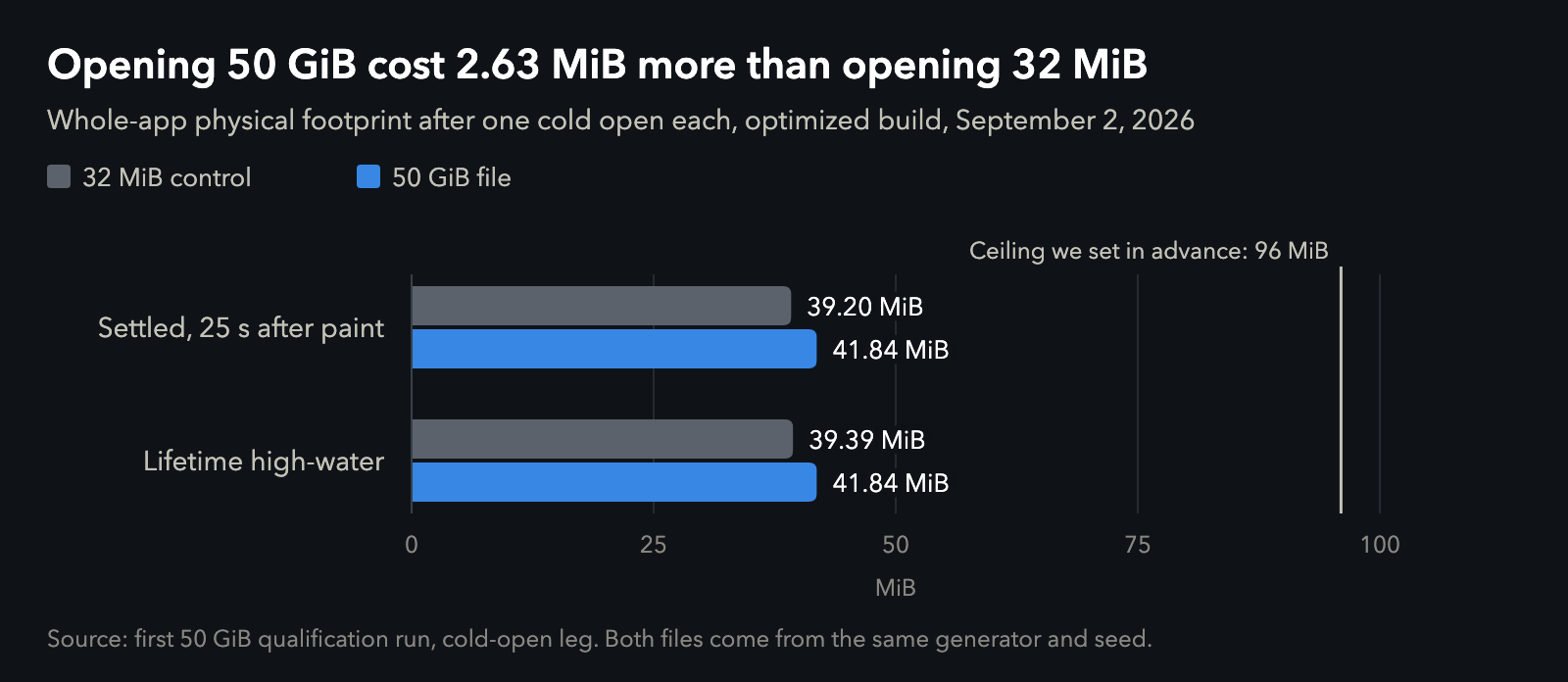
Whole-app physical footprint, one cold open each, first run. Data.
That is the number the rest of this post protects. The four problems were all about getting you to the bytes.
A number that is too small
The frozen jumps had a fingerprint, and it was exact. A working jump laid out text around its target once. A failing jump did that too, and then a second layout came along, worked out where to draw from the current scroll position, and replaced the first with the same 10,418 bytes every time. So the scroll position itself was stuck.
The obvious suspect was the numbers. Fifty gigabytes is a lot of bytes, and an offset that quietly wrapped around somewhere would explain a band that refused to move. We wrote a test that converts byte offsets to page positions and back at every density up to 8 TB. It stayed within a kilobyte, never wrapped and never went backwards. The offsets were fine.
The log had been saying something since the very first run, though. When the file opened, AppKit printed "This NSLayoutConstraint is being configured with a constant that exceeds internal limits. A smaller value will be substituted, but this problem should be fixed." It doesn't say what the limit is or what it substituted, and it promises to say so only once. When a developer asked about that warning on Apple's developer forums in 2022, an Apple engineer replied that the limit "should be at least 1 million (it varies by platform for various mathematical reasons)."
At 11:22 that morning we wrote down the mechanism: the page was asking AppKit for a height it wouldn't get. At 11:34 we retracted it. We'd measured AppKit directly, and it had cheerfully accepted a document view 17,592,186,044,416 points tall, a page that, printed at 72 points to the inch, would reach the Moon and back about eight times. The retraction said the ruled-out ground was now written down, "which is worth more than a confident wrong cause." The sentence has aged better than the retraction.
The afternoon went to ruling things out one at a time. The bytes, the parser and the seeking code all handled the freezing offset perfectly in isolation, and a 32 GB version of the same file ran clean all the way past the byte where 50 GB froze.
Then the diagnostics started recording the page height on every jump. It read exactly 10,000,000,000 points every time, even across jumps whose estimated heights were different, and a number that stays put while its inputs change isn't being calculated. It's being clamped.
The morning's probe had tested a view with no constraint on its height. Mardo's page, the document view inside its scroll view, has one. On macOS 15.7.4, a view whose height comes from an Auto Layout constraint is honoured up to exactly ten billion points and clamped above it, while the same view with no constraint happily took forty billion. At 2:42 that afternoon the log named the cause of the frozen band, "which is a number that is too small," and the retraction was itself retracted.
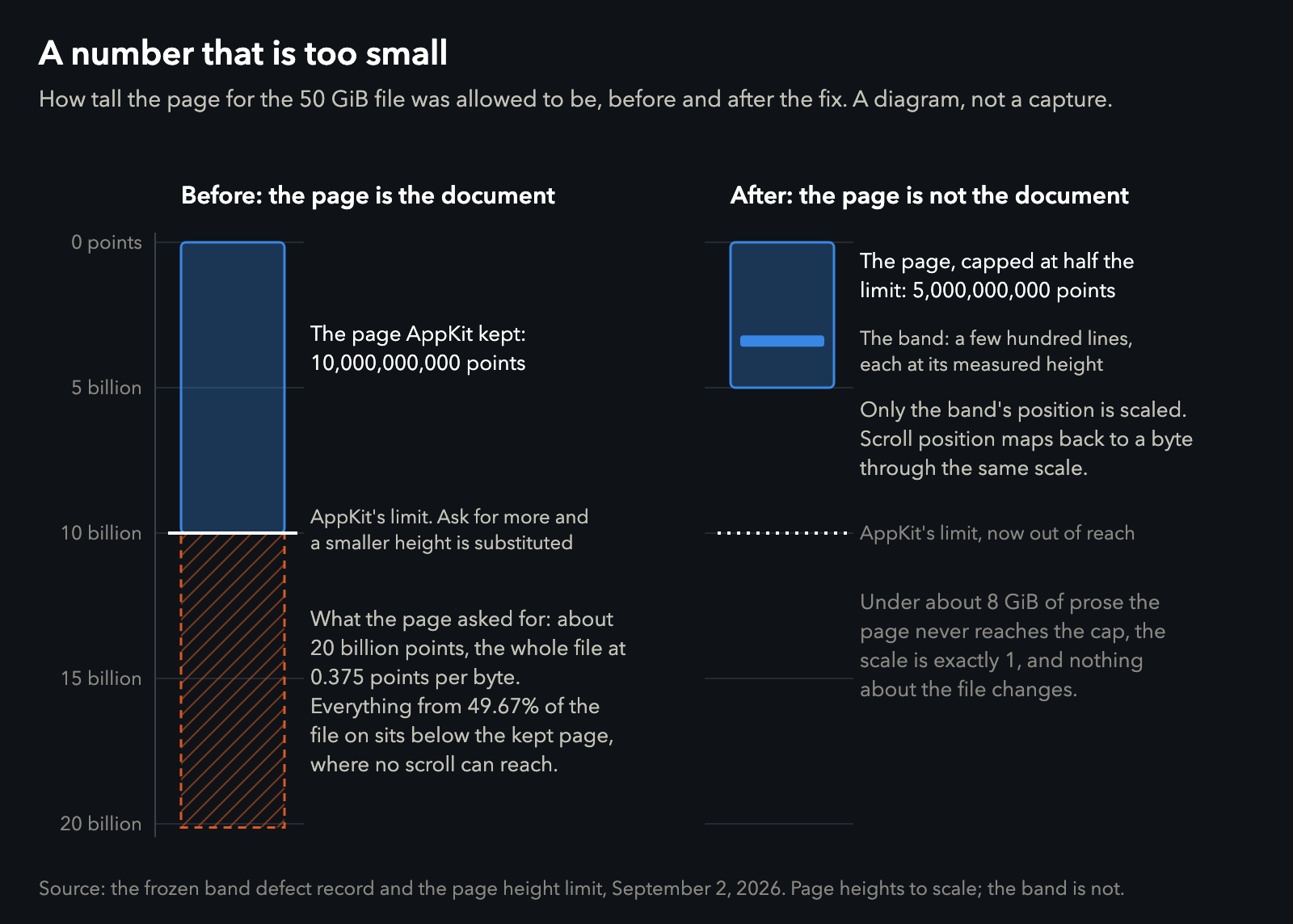
A diagram, not a capture. Page heights are to scale; the band of laid-out lines is not.
Mardo sizes its page from an estimate of how tall the whole document would be if you ever laid all of it out. For this file that was about 0.375 points per byte, so the page wanted to be at least 20 billion points tall, and AppKit gave it ten. Ten billion divided by 0.375 is 26,666,666,666, and the band froze at byte 26,666,670,959. Everything past that sat below the bottom of the page, where no scrolling could reach it. Each jump scrolled as far down as the page went, and the layout that followed drew whatever was there. The 32 GB file had passed because what crosses the limit is the estimated height, not the byte count, and its lines happened to measure short enough to stay under.
Ten billion points is a very tall page. Printed, it would be about 3,500 kilometres long, and it still held only half of this file.
The fix came from noticing that the page had been doing a job nobody needed. Only a few hundred lines are ever laid out at once. What had grown was the space they were placed in, a second way of saying where you are in the file, next to the byte offset that actually matters. So the page is now capped at five billion points, half of AppKit's limit, and only the placement of the laid-out band is scaled to fit. Every line inside the band keeps the height it was measured at, and a scroll position maps back to a byte through the same scale. A file with less than about 8 GB of prose never reaches the cap, so for nearly every file anyone owns, nothing changed.
On the same 50 GB file, every jump that had frozen now landed where it asked, including the exact middle and the last byte. Only the searches still failed.
If you build a Mac app with a very tall document view, this is the one to remember: size it with a constraint and AppKit will stop it at ten billion points, and tell you once, in a sentence about constraints.
Fifteen minutes at 0%
All three whole-file searches in the first run hit their fifteen-minute timeout with the find bar still saying "Searching 0%". On the 32 MB control the same searches took about 1.6 seconds. Our defect notes were fair to the find bar: "The readout was honest." Less than one percent of the file had been searched.
We blamed the decoding of each character first, and then tried a shortcut that only worked while every byte was plain ASCII. Our file, on purpose, has a non-ASCII byte about every 31 bytes, so the shortcut gave up every 31 bytes and managed 46 MiB/s.
The cost was in the shape of the work around the search. Before comparing anything at all, it translated every byte of the document into a folded copy with a note of where each byte came from, which is seventeen bytes written for every byte read. The commit that fixed it did the arithmetic: "Fifty gibibytes of document meant eight hundred and fifty gibibytes of writes before the first comparison." It was a bit like copying out the entire phone book by hand, with footnotes, before looking up one name.
The new search looks at the bytes where they already are, and only does the Unicode work at the few places a quick filter can't rule out. On a 4 GB file built the same way, the default search went from 24 MiB/s to 1,994, which is 83 times faster, and a search that matches case and accents exactly went to 11,381 MiB/s.
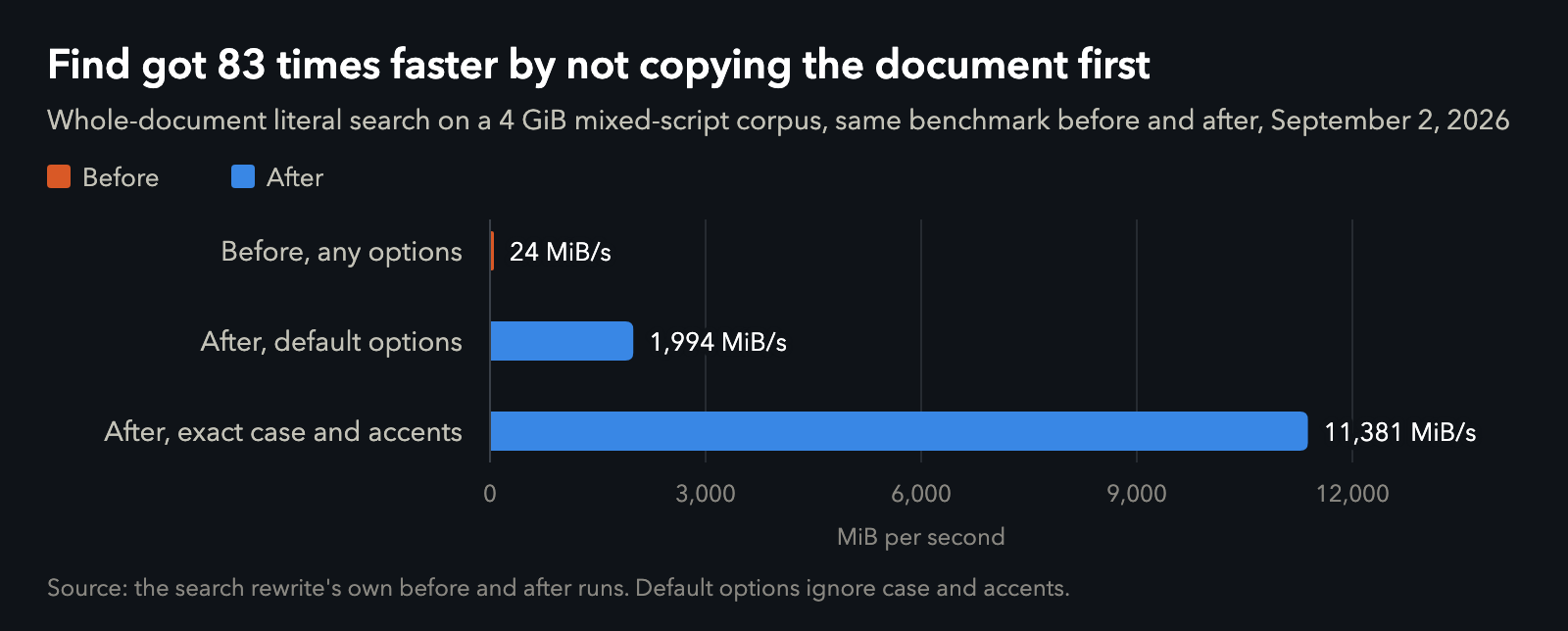
Same benchmark before and after. Data.
The whole 50 GB file then searched in about two minutes, which beat never. A memory-mapped file is the right shape for a viewport, which wants a few pages from anywhere, and the wrong shape for reading 50 GB in order, because the pages arrive one fault at a time. Mapped, the search ran at about 400 MiB/s; reading the same bytes straight off the disk ran at 3,171. Apple's guide to mapping files lists the times you shouldn't map a file, and the first is "You want to read a file sequentially from start to finish only once," which is as good a description of a search as you'll find.
So the search reads the file in blocks now, and the viewport keeps its mapping. The next day the search engine alone got through all 50 GB in 27.9 seconds. In the app, with the find bar's defaults, it took 36.6, plus another 31.9 to travel to a match near the end without the window freezing on the way.
Almost six minutes to the last page
The first visit to the link definitions near the end of the file took 342.6 seconds. The next station, 7.5 MB further on, took 0.4 seconds. Same file, same run, more than eight hundred times apart.
The obvious suspicion was that the bookmarks had thinned out across 50 GB and left huge gaps. We measured it before believing it: the typical gap back to the nearest bookmark was under a megabyte. The trouble was that a bookmark can only exist where the parser has already been, so the first visit to anywhere new walked the full Markdown grammar all the way there, at about 25 MB a second, a speed at which crossing 50 GB takes more than half an hour.
The fix finds a safe place to start near the destination instead of parsing everything on the way. Most of a Markdown document can be picked up cold at the right blank line, and finding one means reading bytes, which is much faster than parsing them.
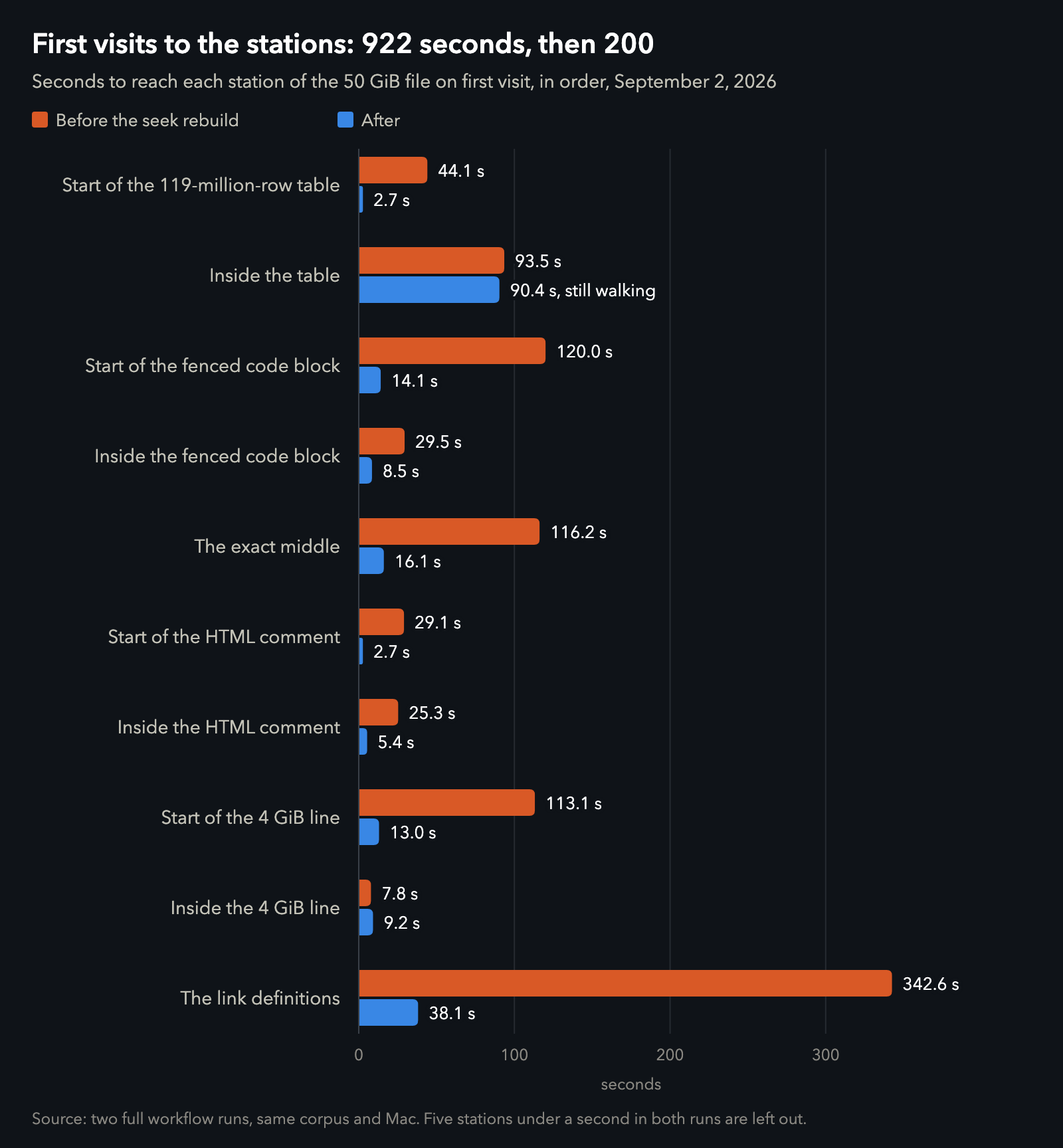
Two full runs on the same file, September 2. One station, inside the 4 GiB line, got slower, from 7.8 to 9.2 seconds. Data.
First visits to every station, in order, went from 922 seconds to 200, which is from more than fifteen minutes to a little over three. The one row that didn't move is inside the table, and that's the price we'll come back to.
The scrollbar that froze
Whether scrolling a 50 GB file feels right is a judgment, not a number, so the last part of the test was mine: I opened the file in the installed app and used it. Flinging through it was smooth. Dragging the scrollbar thumb to the middle froze the window before the thumb could even move.
Ordinary jumps and Find went through a seek that works for ten milliseconds, hands the Mac back, and carries on next turn. The scrollbar went through a different call to the same function, sixty-nine lines further down, which had no time limit at all, so it walked the whole distance in one go while the window waited. Now a scrollbar drag goes through the same bounded seek as everything else. There's no second one. A test drags a thumb across a document and counts the bytes walked without a time limit: 1,094,913 before the fix, and 0 after.
Getting there took two wrong versions that no byte-counting test could see, one with an empty window and one with the text laid out just above where you were looking. The log summed them up: "Right bytes, wrong pixels, blank screen."
| The numbers | Value |
|---|---|
| Test file | 53,687,091,200 bytes (50 GiB), physically written in 278.5 s |
| Matched control | 33,554,432 bytes (32 MiB), same generator, seed and stations |
| Cold open, settled, first run: 50 GiB and control | 41.84 and 39.20 MiB |
| The same, after the page, search and seek fixes | 44.24 and 39.66 MiB |
| First paint, 50 GiB, first run | 198 ms |
| Drift across ten top, middle and tail round trips | 16 KiB, downward |
| Where every jump past the middle landed, first run | bytes 26,666,660,541 to 26,666,670,959 (49.67%) |
| AppKit's limit on a constraint-driven view height | 10,000,000,000 points |
| The same view with no constraint | accepted 40,000,000,000 points |
| Mardo's page height cap now | 5,000,000,000 points |
| Search, 4 GiB file, default options | 24 → 1,994 MiB/s |
| Search, exact case and accents | 24 → 11,381 MiB/s |
| Reading the 50 GiB file mapped, and straight off the disk | about 400 and 3,171 MiB/s |
| Search the whole 50 GiB file | 900 s timeout at 0% → 36.6 s in the app |
| First visits to all fifteen stops across the eleven stations | 921.8 → 200.2 s |
| First visit inside the giant table | 93.5 → 90.4 s |
| Bytes a scrollbar jump walks with no time limit | 1,094,913 → 0 |
What it cost
The price is the first visit. Going somewhere new in a 50 GB file still means reading toward it, which is why the exact middle takes 16 seconds the first time and the link definitions 38. It also means finding a safe place to start, and the giant table has none: a spot about 6 GB inside it, with no blank line anywhere, takes 90 to 130 seconds the first time. Restarting in the middle of a table would read its rows as paragraphs, so the new seek declines to invent a place to start, and walks. The cost grows with how far you are into an unbroken run of lines: nothing with a blank line every 4 MB, about a second 100 MB into one, about ten a gigabyte in. The walk leaves bookmarks behind it, so the second visit is quick. We asked for that table by name when we designed the file, and the record says so plainly: "It was built to break this." We closed it on that basis. It isn't a defect until somebody turns up with a document shaped like that.
What it takes to open a huge text file on a Mac
Mardo 0.9.12 went out in the small hours of September 4 with all of this in it. It opens a 50 GB Markdown file in about the memory it takes to open a 32 MB one, gets you to any part of it, searches all of it in well under a minute, and lets you drag the scrollbar to the middle without the window freezing. A ten-page note and a 50 GB export go through the same machinery, and the screen only ever holds what you can see.
The rule we took from it is now written into the design: the page is not the document. Ask AppKit for a view taller than ten billion points and it will hand you a shorter one and mention it once, in a sentence about constraints. We've stopped asking.
Nobody asked for a Markdown app that can reach the last byte of a 50 GB file. We built the file anyway, which is how Floof Logic does most things. Good for no reason.
How we measured
Everything here was measured on our development Mac, an M4 MacBook Air with 32 GB running macOS 15.7.4, using optimized builds of the commits that went into 0.9.12. Memory is the whole process's physical footprint as macOS reports it, the figure Activity Monitor shows as Memory; settled means 25 seconds after the first screen was painted. One harness drives the whole tour (open, every station, copy, an edit and its Undo, search, round trips, close) with the 50 GB file and its control in separate processes, so neither can leave pages in the other's footprint. A second cold-opens the app on each file and reads its footprint from the kernel.
The tour chart compares two full runs on September 2, one after the page fix and one after the seek and search rebuilds; its totals add up each run's fifteen raw samples. The search speeds come from a 4 GB file built the same way, searched warm, and the whole-file search times from single runs on September 3. The scrollbar drag was done by hand, in the installed app. The raw numbers are in jumps.csv, jumps-after-page-fix.csv, memory.csv, search.csv and tour.csv.
About Mardo. Mardo is a native Mac app for reading and editing Markdown, made by Floof Logic and built on MarkEngineV3, its own Markdown engine, with no web view inside. It launches faster than Apple's own text view, and it opens a 50 GiB file ready to edit in about an eighth of a second. When an AI agent or another app saves the file you have open, Mardo adopts the new version in place, merges it under your unsaved edits when the two don't overlap, and keeps your place; Timewarp lets you step back through the file's past versions while it's open. Claude Code, Codex, ChatGPT and Claude Desktop can open a file in Mardo at the exact lines that matter, over a local MCP connection with no network port. Press Space on any Markdown file in Finder for a rendered Quick Look preview.
Reading, Quick Look, Find, Outline, Print, Follow Live Edits and Timewarp are free, with no time limit and no account. Mardo Pro adds editing and export for US $29.99, paid once, after a trial of 14 days of use that starts the first time you open Mardo. Documents never leave your Mac. Mardo runs on macOS 14 or later, on Apple silicon and Intel. Download it from mardo.app, or install it with brew install --cask flooflogic/tap/mardo.
Every Mardo release · Star Mardo on GitHub · Written in Markdown. Exported by Mardo. Good for no reason.