
The hidden architecture of Copy and Paste
Mardo 1.1.2 · · Adam and Truly Floof
The Mac clipboard is a data exchange between applications. Copy offers representations of a selection; Paste chooses one and turns it into something the next app understands.
We call it the copy buffer, as though the computer puts some text in a drawer and takes it out again. Somewhere in that wonderfully reassuring description, we have misplaced a system service, several possible versions of the data, and the fact that the receiving application has its own ideas about what a document is.
There are buffers underneath, of course. But calling the whole thing a buffer is about as informative as calling an airport a place to put a suitcase.
Mardo is our native Markdown reader and editor for the Mac, built on MarkEngineV3. Making its copied content work outside Mardo means dealing with this architecture. The surprising part is how much software has to cooperate to make two keyboard shortcuts feel like moving the same thing from here to there.
Two apps and a system service
On macOS, the ordinary clipboard is the general pasteboard. Apps reach it through AppKit, which communicates with a shared pasteboard server. The exchange has a home outside either application's document window.
There are three participants. The source app knows what you selected in its document. The pasteboard manages the offered items and their types. The destination app decides what it can read and what to do with the result.
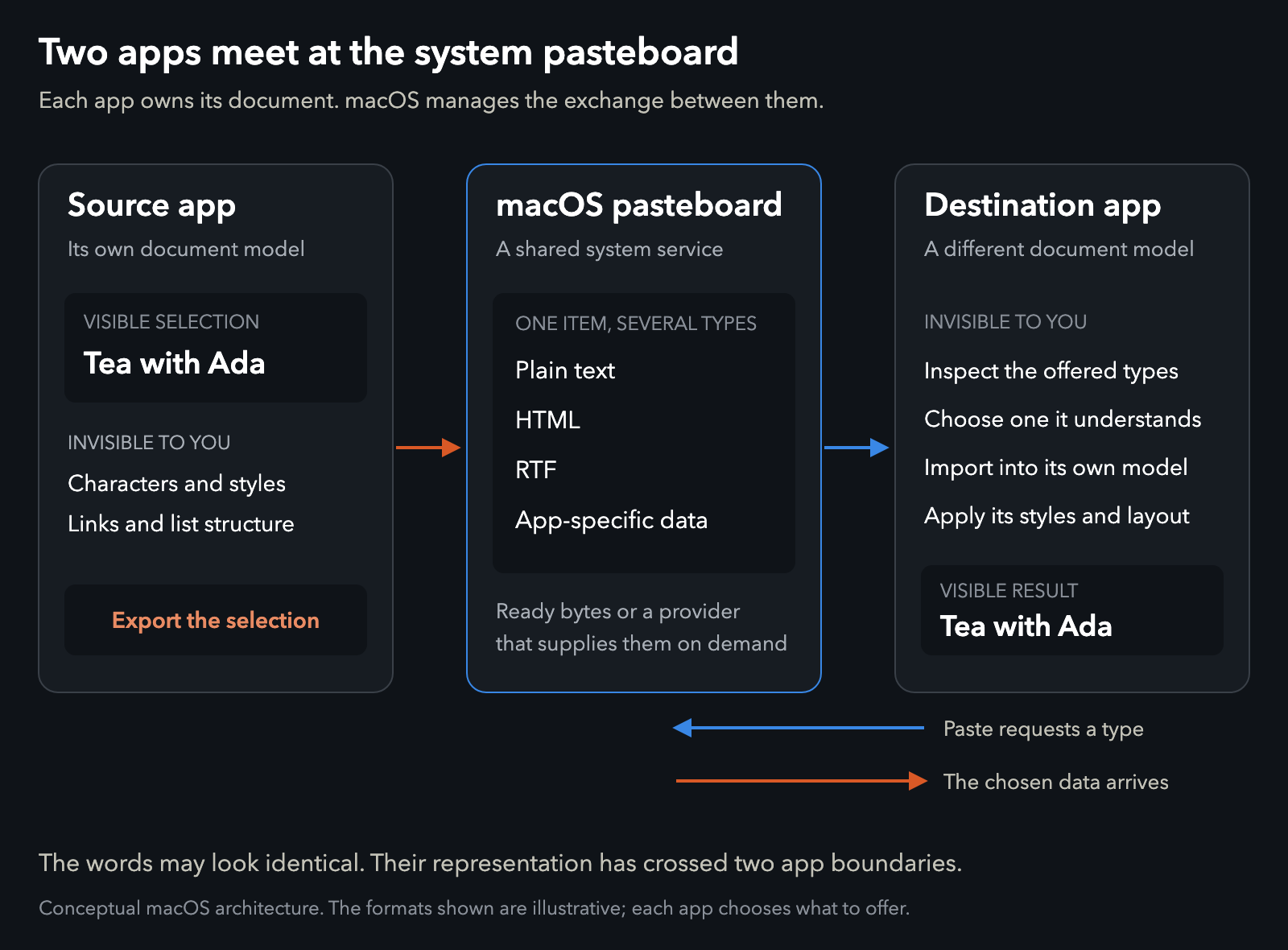
The responsibilities behind a cross-application copy and paste. A conceptual diagram of the public macOS interfaces, not a capture or a trace of internal messages.
The source and destination may be a word processor and a web browser. They have different document models, meaning different internal ways to store paragraphs, styles, links and tables. Their memory is separate, too. Passing a pointer to the source app's paragraph object would not teach the browser how to use it.
So the source offers portable representations. The destination imports one of them. The screen does a remarkably good job of hiding both operations.
One copied item can offer several different things
A pasteboard has items, and an item can have several typed representations. Those are two separate dimensions. Several items can travel together; several formats can describe one item. “What's on the clipboard?” therefore has a rather more elaborate answer than “the thing I just copied.”
Mardo, for example, publishes one selected passage as four representations together: its exact private Markdown, HTML, RTF and readable plain text. The private representation keeps the source for a paste back into Mardo. The other versions let receivers use the selection without understanding Mardo's own document model.
Those versions really are different data. A bold word can be Markdown punctuation around the word, an HTML element, an RTF formatting instruction, or plain text with the boldness removed. A link can carry a destination you never saw written out. A list can carry numbering instructions instead of number characters.
The source app has to decide how to express that information. Apple's pasteboard-writing interface separates the types an object can offer from the representation supplied for a chosen type. The transfer is already more involved than copying the letters visible on the screen.
And the source cannot assume which app will paste next. The same copied passage might go into an email, a code editor or another window of the original app. It has to send something each of those readers can make sense of. The suitcase has acquired several passports.
Paste is an import operation
The destination inspects the available types and picks a representation it understands. It then has to turn that representation into its own objects. Apple's pasteboard-reading interface explicitly describes initializing objects from pasteboard data.
A rich text editor might reconstruct styled text. A plain text editor can accept the characters and discard the possibility of bold. A web composer importing HTML has to decide which structure and styling to keep before its own layout places the result on screen.
That last stage is easy to overlook. The recipient is making a document again, inside a different environment. Its font can be different. Its column can be narrower. Its paragraphs can have their own default spacing. Copying a table cannot reserve the same width in somebody else's email window.
This is how a paste can preserve every word while changing the result around them. The data transfer can succeed, and the two applications can still disagree about how the transferred information should become a document.
The requested bytes may not exist yet
Some representations can be supplied on demand. The source registers a data provider that can produce a particular type when asked. Advertising a type and generating its bytes can happen at different times.
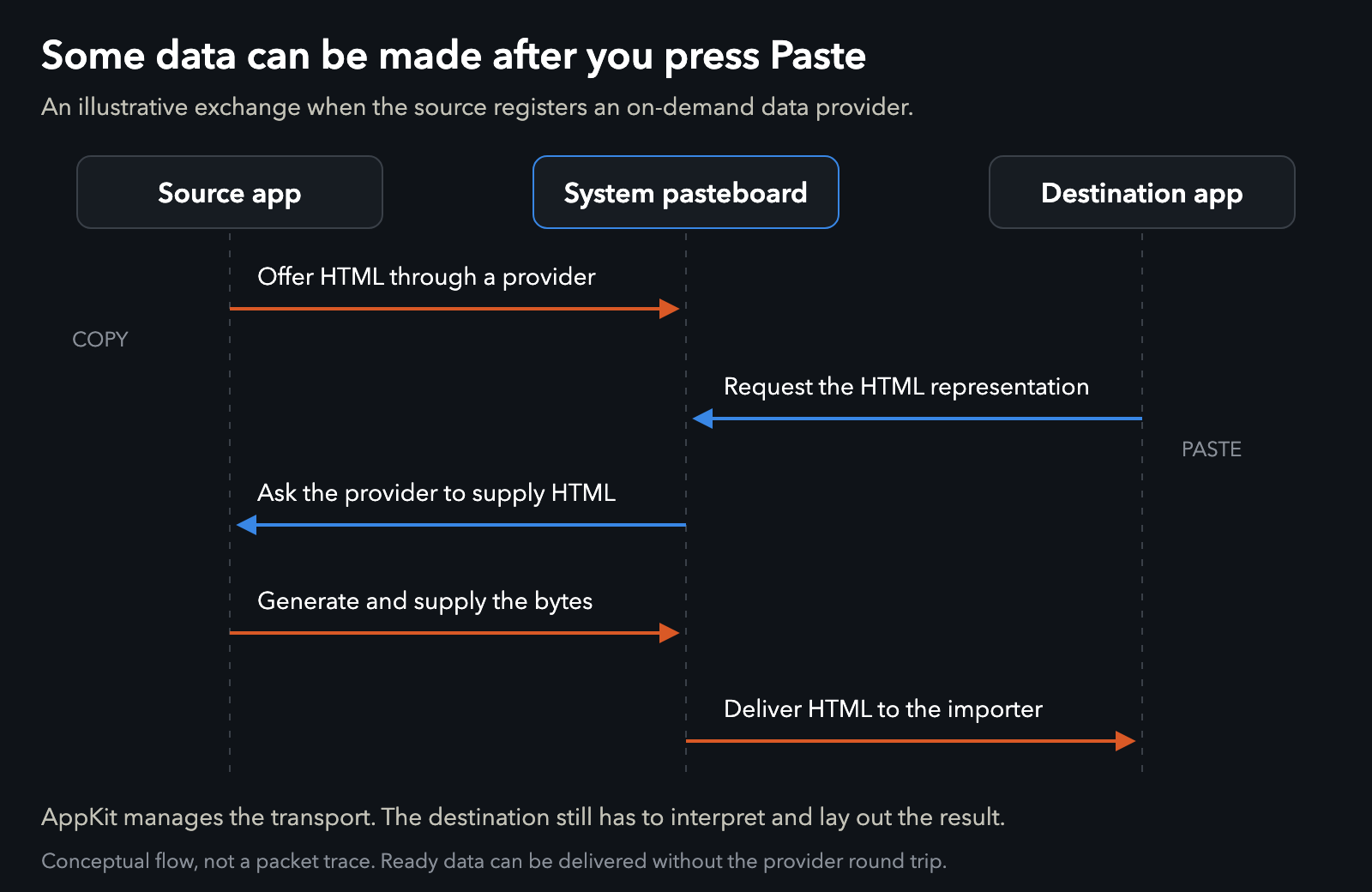
One possible path when an app uses an on-demand provider. Ready data can be delivered without that round trip. AppKit hides the transport; the diagram shows the logical exchange.
Consider an image that could be offered in several encodings. Producing all of them at Copy would spend time and memory on versions no receiver may ever request. Apple's promised-data design lets that work wait until a representation is needed.
This means pressing Paste can involve work by the source application's provider, as well as work by the destination. The action can reach backward to get the data it is about to import. Our imaginary drawer has started taking orders.
Mardo's ordinary text Copy supplies its four representations together. The deferred path is part of the wider clipboard architecture, and one reason “a buffer full of text” is such an incomplete description of the system.
There are several pasteboards too
The general pasteboard is the one behind ordinary Cut, Copy and Paste. macOS also defines named pasteboards for Find information, drag operations, font information and paragraph formatting. Apps can create named pasteboards as well.
The familiar clipboard is one use of a more general exchange mechanism. Even dragging something across the screen belongs to this family. The pointer makes it look as though an object is travelling; underneath, applications still have to agree on transferable data.
The invisible work shows up in small details
This architecture explains the apparently unreasonable amount of care that goes into copying out of a Markdown app. We control the representations Mardo offers. We do not control the next application's importer or its document model.
A visible HTML bullet, for example, can be drawn from list instructions with no bullet character in the item's text. If an importer keeps the words and discards that structure, there is no character left to represent the marker. Mardo's clipboard HTML therefore includes literal markers in ordinary text blocks. Its RTF version keeps real list semantics. The HTML choice preserves visible numbering, at the cost of automatic renumbering in that pasted representation.
Paragraph spacing is another invisible property. A receiver can add space through layout without adding a newline character. Our recent email-copy work removes extra paragraph margins from the clipboard HTML while retaining the writer's explicit breaks. The table work supplies a readable grid, header and alignment, with wrapping appropriate to the receiving width.
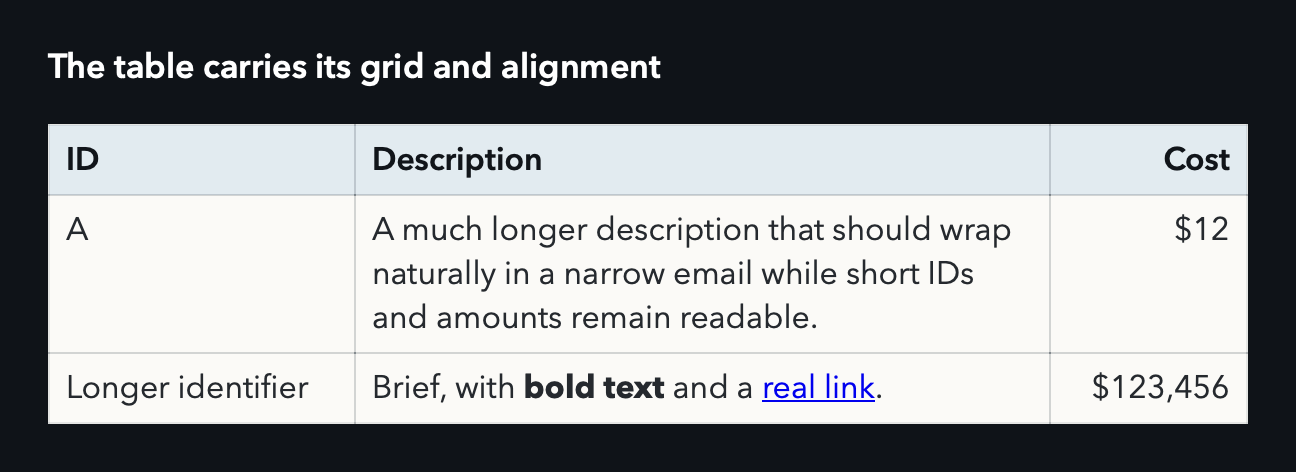
A browser rendering of the actual table representation Mardo supplies, at 600 pixels wide. The receiving app still imports and lays it out in its own environment.
Those spacing and table improvements are in Mardo 1.1.2. They are examples of doing the export side carefully so the import side has useful information to work with. Copying from Mardo is free, like reading.
When you paste rich content into Mardo, the job reverses: Mardo becomes the importer, turning supported HTML or RTF into Markdown. When its own private Markdown representation is available, it can use that exact source instead. The same keyboard shortcut hides different work depending on which side of the exchange Mardo is on.
About the diagrams
The diagrams describe the public macOS pasteboard architecture. They show responsibilities and a possible deferred-data exchange, rather than exact internal message traffic. Mardo's ordinary text-copy behavior is identified separately. The table image is an offscreen browser rendering, not a capture of an email composer.
The machinery gets to be complicated. Your part still takes two keyboard shortcuts.
About Mardo. Mardo is a native Mac app for reading and editing Markdown, made by Floof Logic and built on MarkEngineV3, its own Markdown engine, with no web view inside. It launches faster than Apple's own text view, and it opens a 50 GiB file ready to edit in about an eighth of a second. When an AI agent or another app saves the file you have open, Mardo adopts the new version in place, merges it under your unsaved edits when the two don't overlap, and keeps your place; Timewarp lets you step back through the file's past versions while it's open. Claude Code, Codex, ChatGPT and Claude Desktop can open a file in Mardo at the exact lines that matter, over a local MCP connection with no network port. Press Space on any Markdown file in Finder for a rendered Quick Look preview.
Reading, Quick Look, Find, Outline, Print, Follow Live Edits and Timewarp are free, with no time limit and no account. Mardo Pro adds editing and export for US $29.99, paid once, after a trial of 14 days of use that starts the first time you open Mardo. Documents never leave your Mac. Mardo runs on macOS 14 or later, on Apple silicon and Intel. Download it from mardo.app, or install it with brew install --cask flooflogic/tap/mardo.
Every Mardo release · Star Mardo on GitHub · Written in Markdown. Exported by Mardo. Good for no reason.