Syntax color and custom Markdown themes on the Mac that never move your caret
Mardo 0.9.10 · September 1, 2026 · Adam and Truly Floof
Mardo 0.9.10 adds syntax color to Source Code and custom Markdown themes you can make and share, and both change only the ink, never a caret, a click or a byte.
Turn on color in Mardo's Source Code and every character stays exactly where it was. The caret, every click target and Core Text's own measurement of every line come out identical with color on and color off, on every frame we tested. The only thing that changes is the ink.
Mardo 0.9.10 brought two things on the evening of September 1: color for the raw Markdown you see in Source Code, and custom Markdown themes on the Mac that you can make yourself and hand to a friend as a file. The colors come from the theme, so a theme you made yourself colors your Source Code too.
Mardo is a native Mac app for reading and editing Markdown, and Source Code is its mode for the raw file: every pound sign and asterisk, the exact bytes you saved, with the caret exactly where a byte is. Without color, that's a wall of punctuation. One of our first testers had said as much, that Source Code would be nicer with a syntax highlighter, and the answer we wrote down the day before was short: "working on it, gotta be careful with this, soon."
Careful meant a rule
Color could change how the text looks and nothing else, or, as the contract we wrote before starting put it, "Highlighting may depend on Source Code, but Source Code must never depend on highlighting." The answer key was our own plain Source Code. A harness draws each test frame twice, once colored and once forced plain, and requires the bytes, the caret, the selection, the hit testing and Core Text's own measurements to agree.
The ordinary way to color text on a Mac is to give parts of a string a different foreground color and let Core Text lay out the line. On our real test documents, coloring parts of a line that way changed how wide Core Text measured it. Width is where your caret goes and where a click lands, so a color could have moved your caret, which is a strange thing for a color to do.
So in Mardo, color is not part of layout. Mardo shapes the plain line exactly once, as it always had, and then repaints the colored glyphs in the places Core Text already worked out. Nothing about the line changes except the ink, so it can't get any wider.
A Core Text detail: CTLineDraw moves the pen
If you draw a Core Text line more than once, as a repaint like this does, here's the thing to know. CTLineDraw draws a whole line of text, and when it's done it leaves the graphics context's text position at the end of that line. Apple's documentation warns about this in general terms, the way a hotel mentions that the minibar isn't free: the call "can leave the graphics context in any state."
A second pass that places glyphs by their distance from the start of the line will measure from wherever the pen was left, which is the end, and draw every glyph one whole line's width to the right. Put the text position back at the line's origin before the second pass and the glyphs land where Core Text laid them out, with not one measurement changed. CTLineDraw is a convenience, and it tidies up after nobody.
Only the ink is new
Here's what color changes in Mardo's Source Code: nothing you can put a caret on. With color on, every byte and every caret position is the same as with it off, and so is every selection, every click target and every Core Text measurement, on every frame the harness draws. Our comparison against a stock NSTextView, which checks what each editing key does, ran again with color on and found no unexplained disagreement in 55,140 cases, so every key still does what it did before color arrived.
Source Code shows the bytes and nothing else. None of the rendered view's quote bars or heading rules are drawn there, and a separate test counts quote-bar pixels in Source Code and requires zero. Quoted source takes the theme's muted text color rather than its quote accent, which in the GitHub themes is a fine color for a border and too faint to read as text.
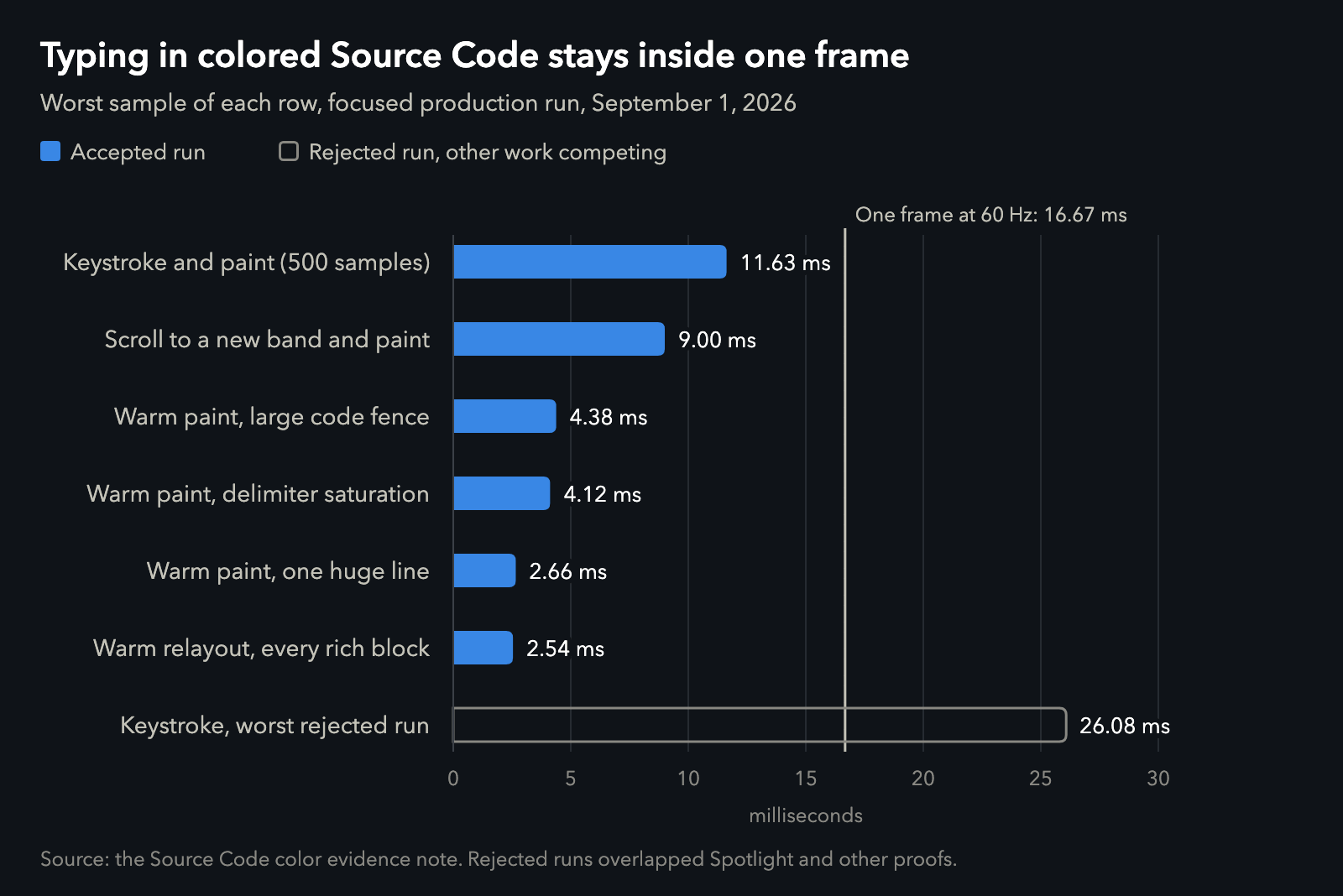
Colored Source Code against one 60 Hz frame, slowest sample of each row. The outlined bar is the worst typing sample from runs that overlapped Spotlight and our other tests, kept in the record and not accepted. Data.
It's fast, too, judged the way all of Mardo's speed budgets are, on the slowest sample. Typing in colored Source Code took 11.63 ms at worst over 500 keystrokes, paint included, against the 16.67 ms that one frame at 60 Hz allows, and the typical keystroke took 6.84. Scrolling to a part of the file you haven't seen yet and painting it in color took 9.00 ms at worst.
Custom Markdown themes on the Mac
The other half of 0.9.10 is yours to play with. Settings has a Themes… button now. It lets you duplicate any of the five built-in themes, change any of its 119 settings against a preview drawn by Mardo's real renderer, and save it, rename it, export it as a small .mardo-theme.json file, or import one a friend sent you. Your theme follows you into Finder's Quick Look previews and thumbnails, too.
A Mardo theme is data, never code. It holds numbers and colors for its 119 settings, with fonts only from a fixed list, in a file of at most 32 KiB, with no CSS and nothing in it to run, so a theme from a stranger can change how your Markdown looks and can't do anything else. We tested each of the 119 settings the same way, by changing it, checking that the preview's pixels changed, changing it back, and checking that the theme and the pixels both came back exactly. In that test, applying a theme took under 0.2 ms, relayout included.
| The numbers | Value |
|---|---|
| Typing in colored Source Code, worst of 500 keystrokes, paint included | 11.63 ms (median 6.84) |
| One frame at 60 Hz | 16.67 ms |
| Scrolling to a new part of the file, worst paint | 9.00 ms |
| NSTextView comparison with color on | 55,140 cases, 0 unexplained |
| Quote-bar pixels allowed in Source Code | 0 |
| Built-in themes | 5 |
| Settings in a theme | 119 |
| Largest theme file | 32 KiB |
| Switching themes, relayout included | under 0.2 ms |
| Growth of the three executables | 1,029,792 bytes |
| Ceiling for that growth | 1,048,576 bytes (1 MiB) |
What it cost
The feature came with a size budget, and it used nearly all of it. Custom themes grew the three programs Mardo ships by 1,029,792 bytes together, against a ceiling of one mebibyte, which leaves 18,784 bytes. The two Finder extensions grew by about 146 and 163 KB, although all they do with themes is read and draw the one you've chosen.
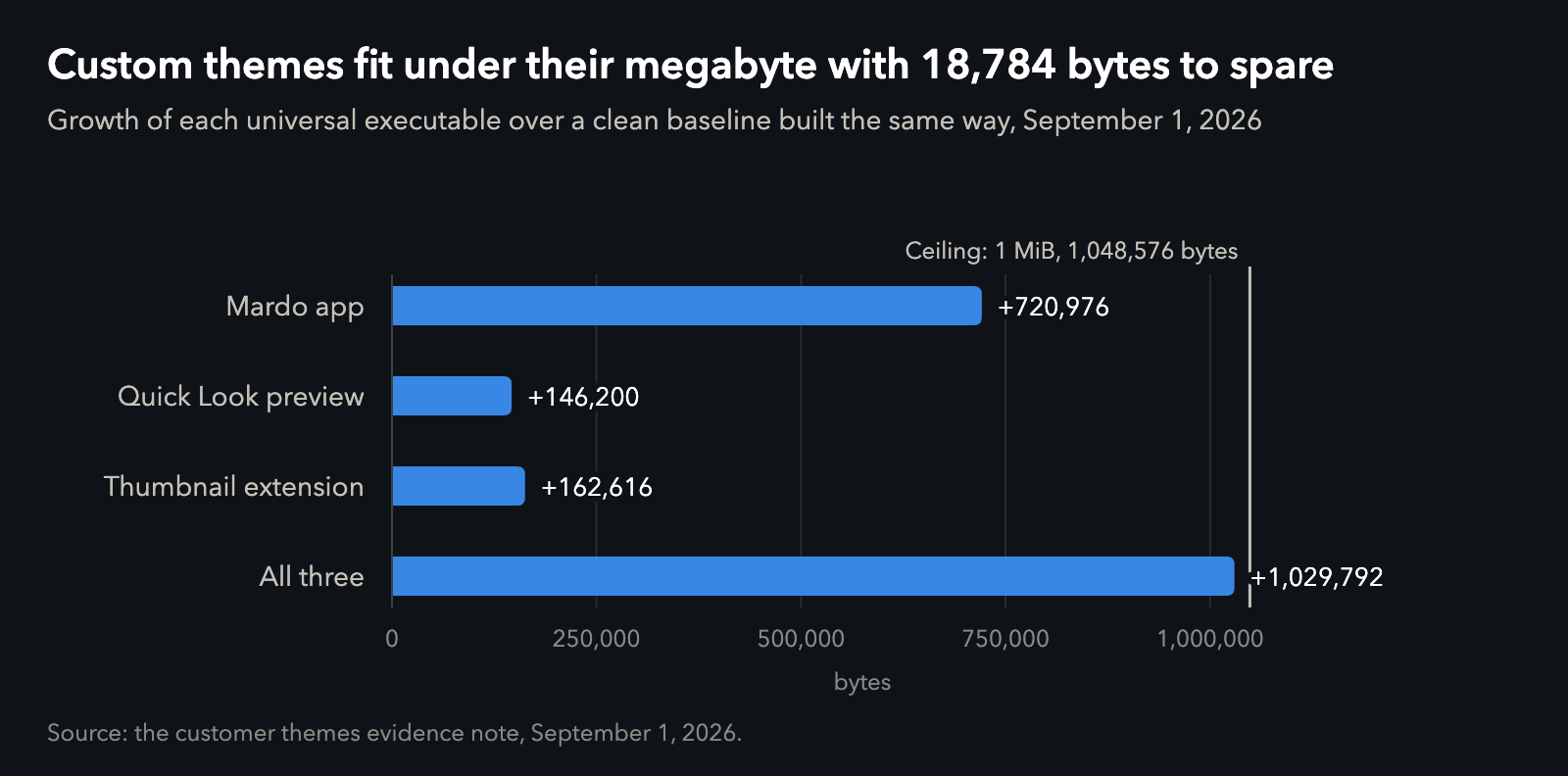
Growth of each universal executable over a clean baseline built the same way. Data.
Open a file, switch to Source Code, and the syntax is in color, from whichever theme you use, including one you made yourself. Every character sits exactly where it sat before.
Only the ink is new.
How we measured
The harness draws the same Source Code frame twice, once with color and once forced plain, over our all-blocks test document and a generated file full of the hard cases: combining marks, emoji, right-to-left text, nested Markdown, unfinished Markdown and long lines. It compares the bytes, Core Text's line measurements, the caret and hit testing, selection in both directions, and what accessibility and input methods see. Then it types something, undoes it and switches modes, and compares again. It also requires visible color when coloring is on, so a harness that quietly drew nothing couldn't pass.
The timings are the worst and median of each row from a focused run of our performance harness with an optimized build, on our development Mac, an M4 MacBook Air with 32 GB on macOS 15.7.4: 500 keystrokes for the typing row and 100 frames for each paint row, each including the draw. A complete run of all 39 timed rows passed the same evening with typing at 11.78 ms worst. Runs that overlapped Spotlight indexing and our own export tests were repeated once the Mac was quiet, without changing any budget or sample count.
The binary sizes compare universal builds of the feature and a clean baseline with identical build settings, down to the build number, and with local linker symbols normalized away. The theme test drove Mardo's real theme editing controls for all 119 settings of the MardoDark theme and checked real pixels from the production preview, and it timed applying a theme, both alone and with relayout.
About Mardo. Mardo is a native Mac app for reading and editing Markdown, made by Floof Logic and built on MarkEngineV3, its own Markdown engine, with no web view inside. It launches faster than Apple's own text view, and it opens a 50 GiB file ready to edit in about an eighth of a second. When an AI agent or another app saves the file you have open, Mardo adopts the new version in place, merges it under your unsaved edits when the two don't overlap, and keeps your place; Timewarp lets you step back through the file's past versions while it's open. Claude Code, Codex, ChatGPT and Claude Desktop can open a file in Mardo at the exact lines that matter, over a local MCP connection with no network port. Press Space on any Markdown file in Finder for a rendered Quick Look preview.
Reading, Quick Look, Find, Outline, Print, Follow Live Edits and Timewarp are free, with no time limit and no account. Mardo Pro adds editing and export for US $29.99, paid once, after a trial of 14 days of use that starts the first time you open Mardo. Documents never leave your Mac. Mardo runs on macOS 14 or later, on Apple silicon and Intel. Download it from mardo.app, or install it with brew install --cask flooflogic/tap/mardo.
Every Mardo release · Star Mardo on GitHub · Written in Markdown. Exported by Mardo. Good for no reason.