
Any jump into a 50 GiB Markdown file reads at most 88 KB before you see it
Mardo 0.9.22 and 0.9.23 · September 16, 2026 · Adam and Truly Floof
Mardo, a native Markdown app, opens a 50 GiB file on a Mac without freezing; any jump puts its text on screen in under 13 ms, reading at most 88 KB to get there.
Drag the scroller of a 50 GiB Markdown file to the middle, and Mardo puts the text that lives there on screen in under 13 milliseconds, as source that turns into rendered Markdown a moment later. To do it, the main thread reads at most 88 KB of the file, wherever you land.
If you've ever opened a multi-gigabyte log in a text editor and met the spinning beach ball, you know the one job a large file viewer for Mac has: show the part you asked for, now, without reading the rest first. Mardo is a native Mac app for reading and editing Markdown, and on September 2 it opened this file in about the memory it takes to open a 32 MB one. That day, a first visit to fifteen places across the file took 200 seconds in all, and 90 of them went to reaching one spot 6 GB inside a table. Since September 11 the fifteen take about five seconds, and the spot in the table takes about one.
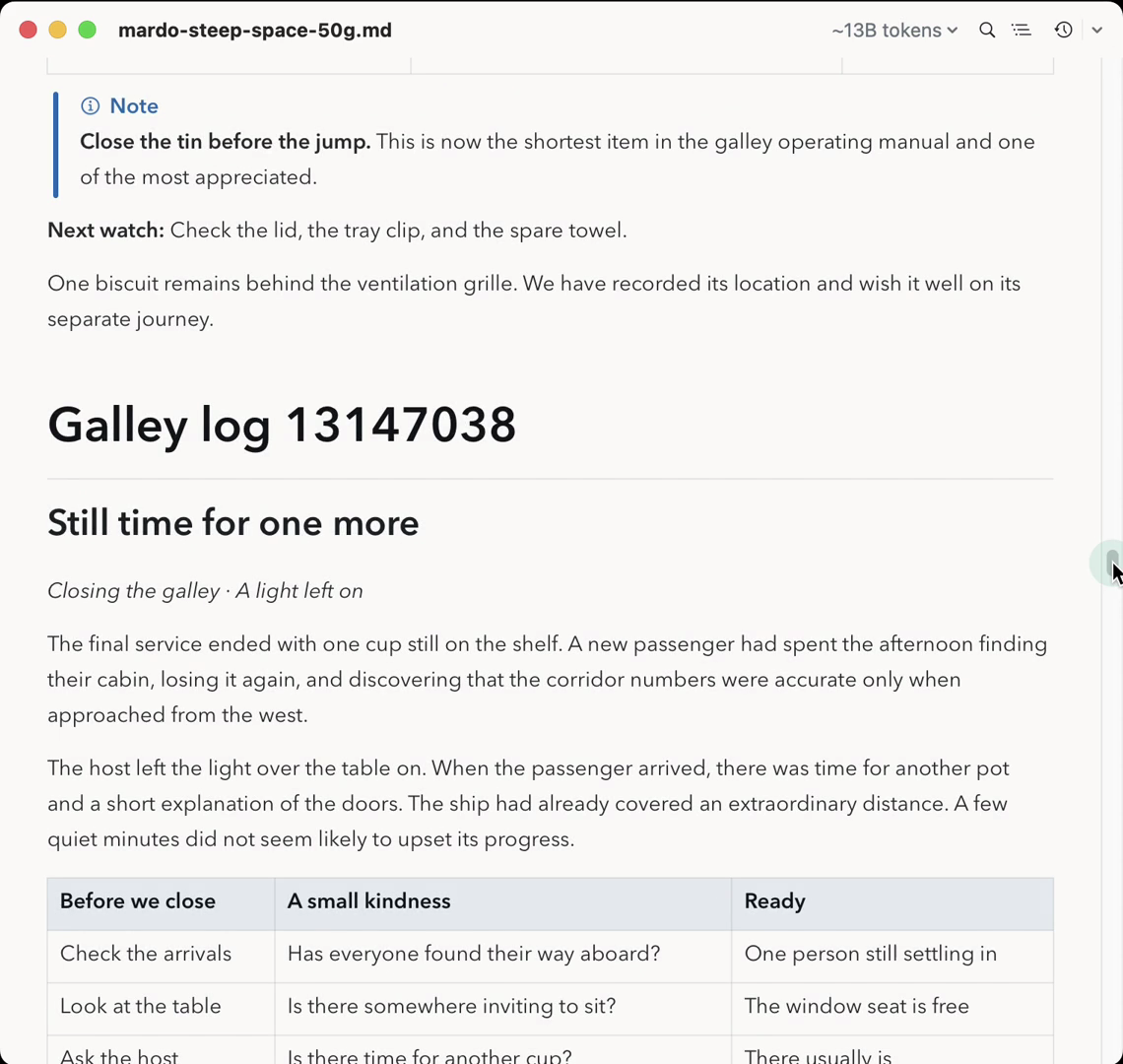
Mardo halfway down a 50 GiB file, a synthetic archive of tea notes we made for our demos, just after a drag of the scroller. One frame from a recording finished on September 14.
Markdown can't be read from the middle
The trouble starts with Markdown itself. A code fence that is never closed runs to the end of the document, so a line of three backticks 40 GB back can decide whether the paragraph in front of you is prose or code. Reading backward, you can prove that something is open the moment you meet it, but you can prove that nothing is open only when you reach the start of the file.
So the design begins with one sentence: "Mardo is a window into a file." Drop the viewport anywhere and the bytes under it go on screen in the same frame, as plain source at half opacity. A reader sets off backward on another thread, and as soon as it knows where a parse can safely begin, usually within about 20 ms, the page fades into rendered Markdown. The reader keeps going, all the way to the start of the file if it has to, and in the rare case that it finds something open all along, like a fence 4 GB back, the page redraws to match. Nobody waits for it.
The band rule
We call the slice of the file under the viewport the band, and every band obeys one rule: "Nothing on the main thread reads a number of bytes that depends on where the viewport came from or on how big the file is." Search is the one exception, because a search has to touch every byte, so it gets a working Cancel instead.
Reading backward hides a trap. The closing line of a fence, read from the wrong side, looks exactly like an opening one, so a reader that goes back over everything whenever it changes its mind can read more file than there is. On the morning of September 11 we measured a design doing just that: about 71 GB read in the background for one jump into a file of 53.7 GB. The reader Mardo shipped that evening, in 0.9.19, reads each byte between the screen and the start of the file once. A cold jump to the middle sends it 27 GB back to byte zero, once, in the background, while the page is already on screen.
A short story from a library
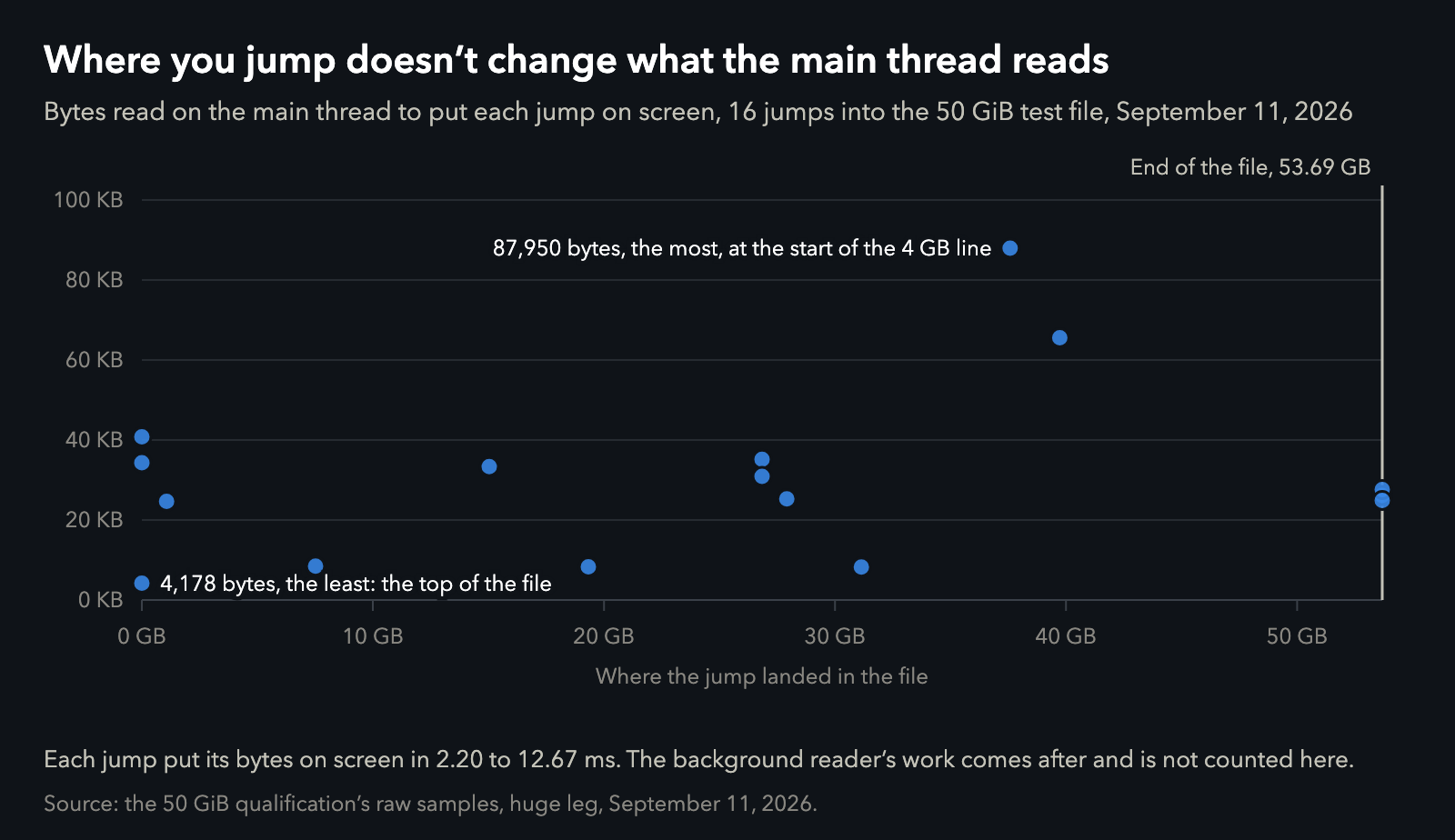
Every jump in the measured run, by where it landed. Data.
All sixteen jumps in our measured run put their text on screen in 2.2 to 12.7 ms, reading 4 to 88 KB on the main thread, wherever each one landed. That's typically 25 to 35 KB, a short story's worth of text, taken from a file the size of a library, and never more than one six-hundred-thousandth of it.
Thirteen of the sixteen had turned into rendered Markdown within 30 ms of the jump. The other three landed deep inside the long stretches this file keeps with no blank line to start from, where the design waits about a second for the reader and then renders anyway. One of them is the spot 6 GB inside the table, which took 90 seconds on September 2 and now takes that one second, the longest first visit anywhere in the file. The fifteen stops on our tour took 200.2 seconds together on September 2, and 5.2 on September 11.
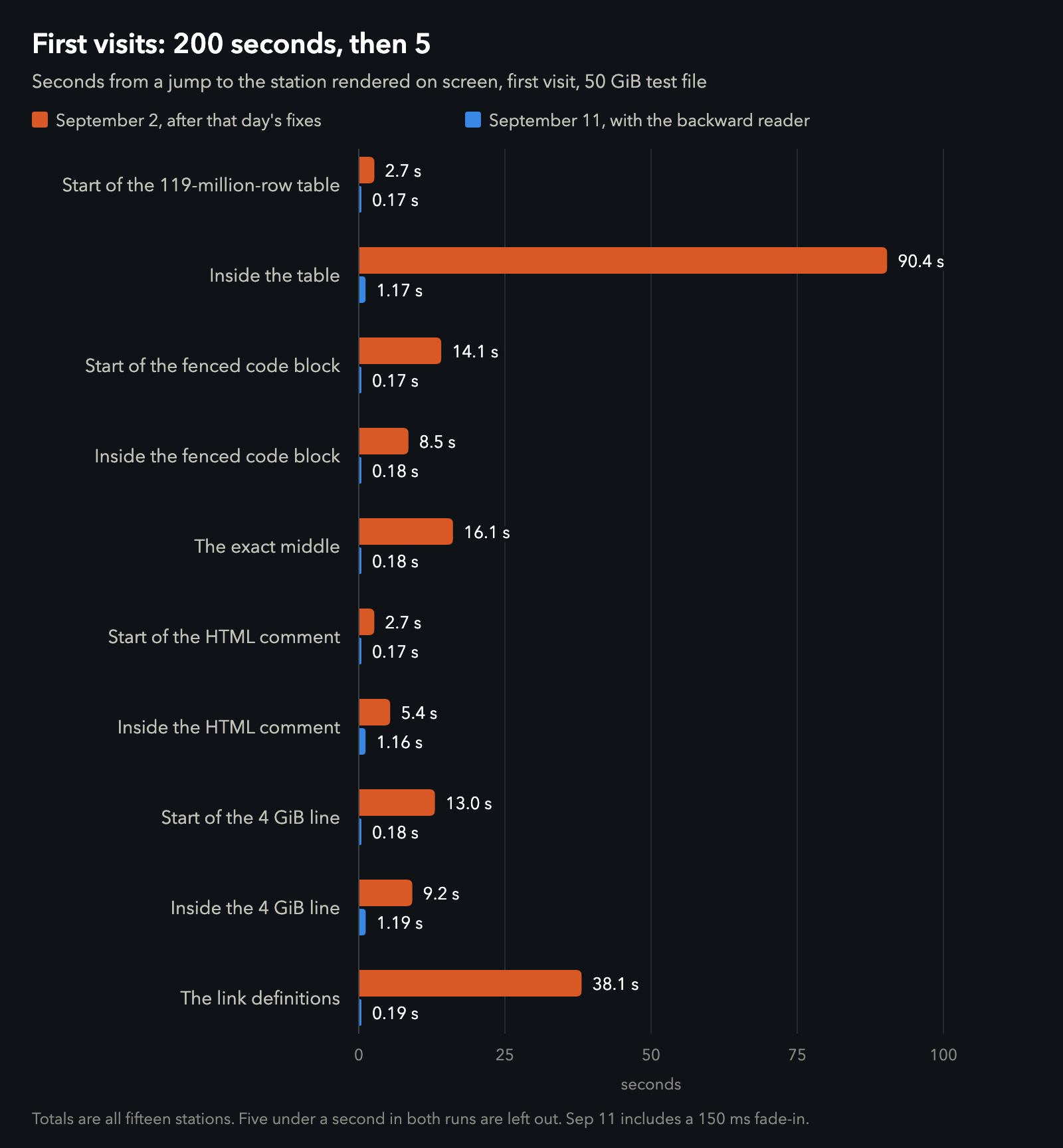
The same stations of the same file on the same Mac, nine days apart. Data.
Opening is quick too. The 50 GiB file reaches an editable, painted page in 124 ms, with 1.84 MiB more memory than the same app opening a 32 MiB control file sixteen hundred times smaller. On September 2, typing waited almost five minutes while Mardo checked that every byte was valid UTF-8. That check is gone, and a bad byte now simply draws as a replacement character.
Search reads everything, as it must. Searching all 50 GiB takes about 38 seconds and never holds the main thread for more than 23 ms at a time. The evidence note put it this way: "A search over 50 GiB is long; it is not a freeze."
The corners of the rule
The band rule reaches the menus too. In 0.9.22 the Outline builds its list from the band that has already been parsed, and opening it took 0.09 ms at worst in 30 runs. In 0.9.23 reference links, whose definitions can live anywhere in a file, get one extra slice of looking and then stop, and the new line numbers work without an index of the whole file. With that release the rule holds everywhere in Mardo, with search as its one declared exception. The same day the engine was named MarkEngineV3 and given a public page of its numbers.
| The numbers | Value |
|---|---|
| Jump to text on screen, 16 jumps | 2.20 to 12.67 ms |
| Main-thread bytes per jump | 4,178 to 87,950 |
| Jumps rendered as Markdown within 30 ms | 13 of 16 |
| The three inside stretches with no blank line | about 1 s each |
| Background reader, cold jump to the middle | 27.47 GB, each byte once |
| First visits to all fifteen stops | 200.2 s (Sep 2); 5.2 s (Sep 11) |
| First visit 6 GB inside the table | 90.4 s (Sep 2); 1.17 s (Sep 11) |
| Open 50 GiB to an editable, painted page | 124 ms |
| Memory above the 32 MiB control after opening | 1.84 MiB |
| Search all 50 GiB | about 38 s; longest main-thread turn 23 ms |
| Outline menu, worst of 30 opens | 0.09 ms |
What it costs
The rule has edges, and you can see them. In a file too big for one band, the Outline shows the headings near where you are and says that ones above or below may not be shown, and a reference link whose definition is far away stays as its brackets. An ordinary document fits in one band and gets its whole Outline.
Anywhere you like
You can drag the scrollbar of a 50 GiB file anywhere you like, and the main thread reads about a short story. The file can be as big as it likes. The screen is still the size of a screen.
How we measured
The 50 GiB file is the adversarial test file from our September 4 post: 53,687,091,200 bytes from a deterministic generator, with eleven stations built to be unpleasant, including a table of 119 million rows, a code fence spanning gigabytes and a single line of about 4 GB. Our tour visits fifteen stops, the eleven stations plus four points deep inside the table, the fence, an HTML comment and the long line. The measured run on September 11 used an optimized build on our development Mac, an M4 MacBook Air with 32 GB running macOS 15.7.4. Each leg ran in its own child process, and the control is the same app on a 32 MiB file made by the same generator.
"On screen" is the main-thread time from a jump to a band holding its bytes, and the byte count is what that turn read. "Rendered" is when the band stopped being half-opacity source, counted from the jump; a 150 ms fade follows. The first-visit comparison times each stop from the jump until its rendered band is painted, which on September 11 includes the fade. The September 2 times are the second of the two runs in our September 4 post, when a jump waited for its seek to finish.
The Outline time is the worst of 30 runs. The screenshot's file is 53,687,091,200 bytes too, made from six fictional galley notes repeated with unique numbers.
About Mardo. Mardo is a native Mac app for reading and editing Markdown, made by Floof Logic and built on MarkEngineV3, its own Markdown engine, with no web view inside. It launches faster than Apple's own text view, and it opens a 50 GiB file ready to edit in about an eighth of a second. When an AI agent or another app saves the file you have open, Mardo adopts the new version in place, merges it under your unsaved edits when the two don't overlap, and keeps your place; Timewarp lets you step back through the file's past versions while it's open. Claude Code, Codex, ChatGPT and Claude Desktop can open a file in Mardo at the exact lines that matter, over a local MCP connection with no network port. Press Space on any Markdown file in Finder for a rendered Quick Look preview.
Reading, Quick Look, Find, Outline, Print, Follow Live Edits and Timewarp are free, with no time limit and no account. Mardo Pro adds editing and export for US $29.99, paid once, after a trial of 14 days of use that starts the first time you open Mardo. Documents never leave your Mac. Mardo runs on macOS 14 or later, on Apple silicon and Intel. Download it from mardo.app, or install it with brew install --cask flooflogic/tap/mardo.
Every Mardo release · Star Mardo on GitHub · Written in Markdown. Exported by Mardo. Good for no reason.