
Mardo launches in 108 ms, faster than a matched NSTextView
Mardo 0.9.25 · September 17, 2026 · Adam and Truly Floof
Mardo's Mac app launch time fell to a median 108 ms, faster than a matched NSTextView, once we saw that whoever touches AppKit first pays for AppKit.
Mardo 0.9.25 opens an editable Markdown window in a median 108 milliseconds from the moment its code starts running, faster than a plain NSTextView reading the same file in the same window. Getting there took some detective work, because the biggest line on our launch ledger belonged to somebody else.
Mac app launch time is the pause between double-clicking a file and seeing it, and you pay it every time you open something. Mardo is a native Mac app for reading and editing Markdown, so opening files is most of what it does. On the evening of September 16 we timed every step of its launch, a hundred launches at a time, beside two controls built into the same app, that plain text view and an empty AppKit window. We like to learn what doing nothing costs before we blame anyone for doing something.
From the moment Mardo's own code started to the moment its window finished painting took about 128 milliseconds, and the biggest line on the ledger, about 52 of them, was custom themes. Further down, the line for creating NSApplication, the object every Mac app is built around, read zero.
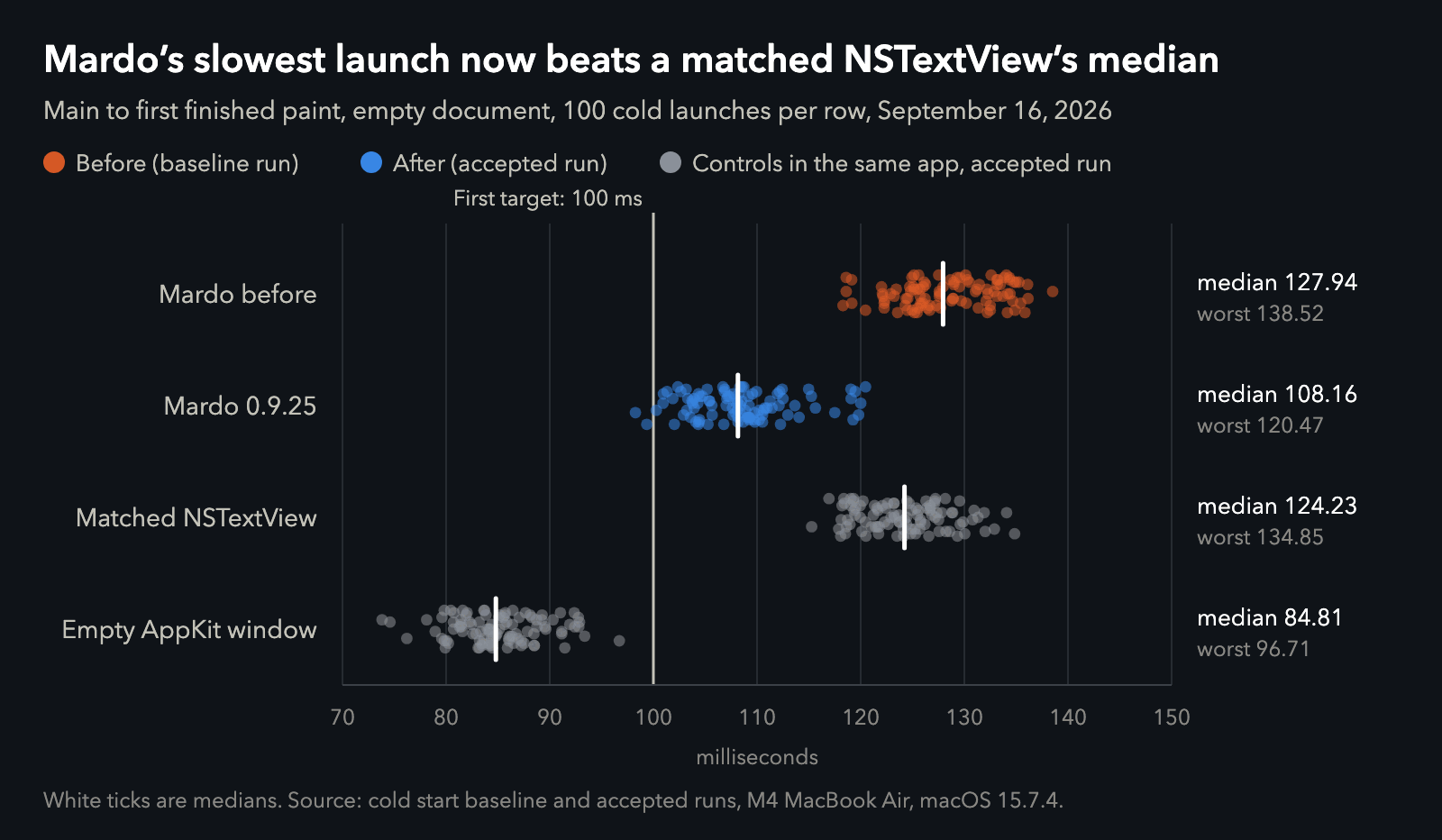
Mardo 0.9.25 against its own baseline and two controls built into the same app. Data.
Two suspects who didn't do it
The first suspect was our renderer. Mardo draws Markdown itself, with MarkEngineV3, our own engine, and Core Text, and a homemade renderer is the natural thing to blame for a slow start. So on September 13 we built that control into Mardo, an editable, plain-text NSTextView in the same window with the same toolbar and theme. Over thirty launches each, Mardo painted about 4 ms sooner on an empty document and about 14 ms later on a small README. That put our renderer in the same class as Apple's own text view and took it off the list.
The second suspect was every window's hidden furniture: a Timewarp strip, a panel for reviewing conflicting edits, an update notice and several pieces of Zen Mode, all built whether or not you'd ever see them. We made each one wait for its first real use. Window construction went from about 35 ms to about 34, which is tidy, and not much.
A Settings window nobody asked for
That left the themes, and they turned out to be mostly innocent too. To tell the Settings window which custom themes you had, Mardo's launch reached for the Settings controller, and creating the controller created every control in it: more than two dozen checkboxes, sliders, pop-up menus and text fields, assembled at every launch and shown to nobody. Every time you opened a Markdown file, Mardo made up a hotel room you hadn't booked, in case you fancied changing the wallpaper.
Custom themes and Settings now wait until you ask for them. The themes line fell from about 52 ms to three hundredths of a millisecond, and the launch got about 20 ms faster, which is a long way short of 52. The missing time turned up further down the ledger, where creating NSApplication had read zero and now read about 37.
Whoever touches AppKit first pays for AppKit
AppKit has to set itself up before anything can use it, and on this Mac that takes about 37 ms. It does so for whichever code touches it first. Our themes had been building Settings controls before Mardo formally started AppKit, so the timer handed them AppKit's bill, the way the first person into the office switches on the lights, starts the coffee machine and is then asked why it took so long to reach their desk. Take the themes out of launch and the bill goes to the next one through the door, which for us is the call to NSApplication.shared that every Mac app makes anyway.
So of those 52 ms, about 15 were really ours. If you time your app's launch in phases and one phase looks enormous, check whether it's the first thing to touch AppKit.
A few smaller things went too. Work nobody sees, like starting the updater, now waits until the first paint is done. We also stopped registering Mardo's fonts by hand, since the Info.plist already asks macOS to with ATSApplicationFontsPath.
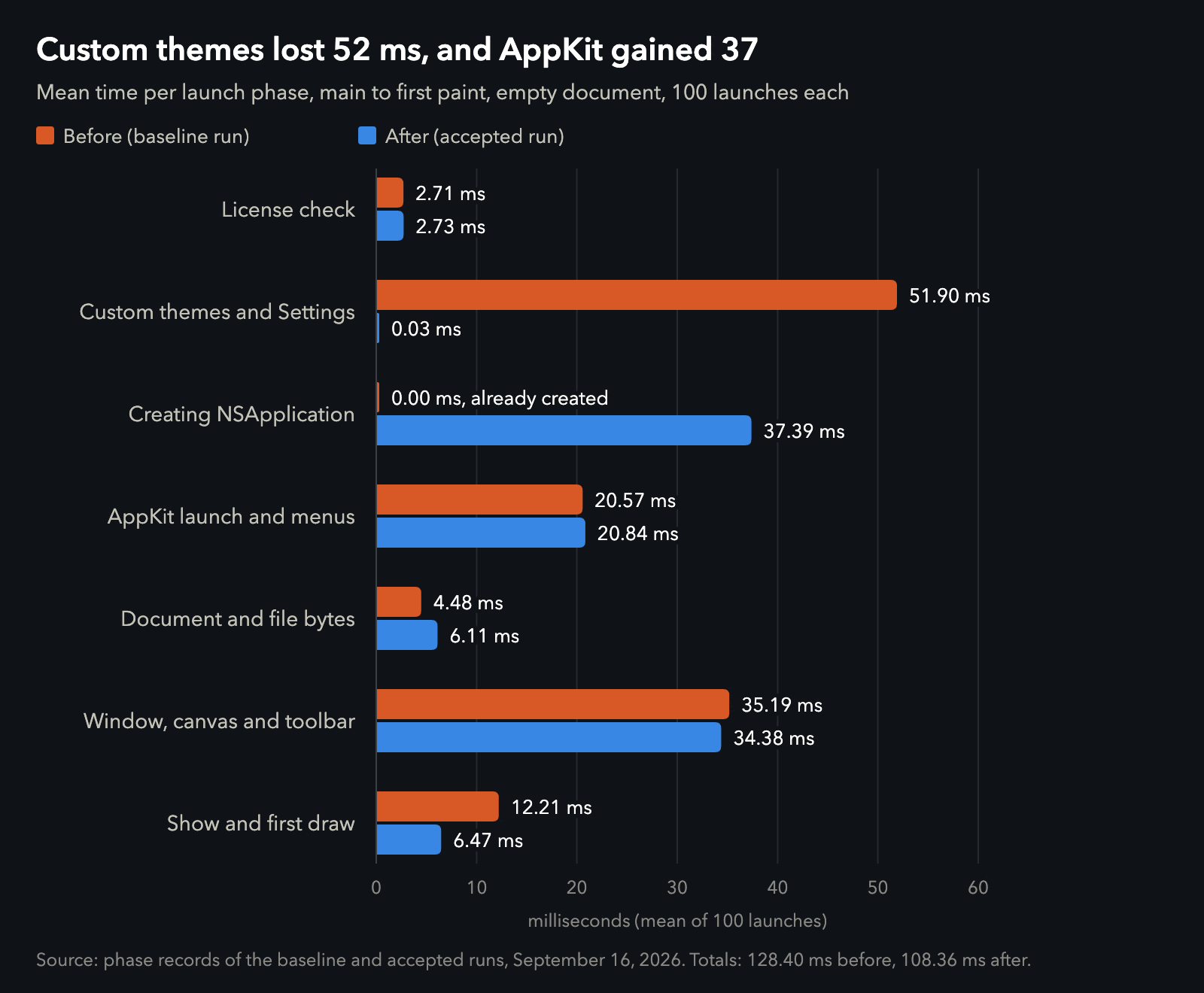
Where the time went, averaged over 100 launches of an empty document in each run. Data.
Faster than the control
From main to the first finished paint, Mardo's median launch went from 127.94 ms to 108.16 ms, and its slowest of 100 from 138.52 ms to 120.47 ms. In the same run the matched NSTextView's median was 124.23 ms, so Mardo's slowest launch now finishes before the control's typical one. With a 767-byte README open, Mardo had been about 7 ms slower than the control, and it's now about 5 ms faster: 121.36 against 126.44. Counting from the moment macOS creates the process adds about 4.4 ms to everything.
The control lives inside Mardo's own executable and pays the same startup, so it measures Mardo's own work rather than NSTextView's reputation. By that measure, a window that renders Markdown, ready for typing, now opens faster than a plain text view wearing the same theme and toolbar.
The line at 100 ms on the first chart was our first target, set on September 13; an empty AppKit window's slowest launch here is already 97 ms, so we hold Mardo to adding as little as possible on top of AppKit, judged on the worst of 100 launches.
| The numbers (median / worst of 100) | Before | After |
|---|---|---|
Mardo, empty, main to paint | 127.94 / 138.52 ms | 108.16 / 120.47 ms |
| Mardo, empty, process start to paint | 132.50 / 143.12 ms | 112.64 / 124.63 ms |
Mardo, 767-byte README, main to paint | 142.65 / 153.14 ms | 121.36 / 132.45 ms |
Matched NSTextView, README, main to paint | 135.42 / 149.23 ms | 126.44 / 140.43 ms |
Matched NSTextView, empty, main to paint | 135.30 / 146.33 ms | 124.23 / 134.85 ms |
Empty AppKit window, main to paint | 93.52 / 104.85 ms | 84.81 / 96.71 ms |
| Custom themes and Settings, mean | 51.90 ms | 0.03 ms |
| Creating NSApplication, mean | 0.00 ms | 37.39 ms |
| Native toolbar, worst | 17.04 ms |
What it cost
The first launch of a new copy is the slow one. In three of the four runs after the change, it spent 67 to 73 ms before Mardo's code started instead of the usual 4, and took 188 to 206 ms end to end. That is macOS starting a copy it has never run, the kind your Mac makes right after an update. Every launch after that one is the fast kind.
A page you can type on
Mardo 0.9.25 went out on the morning of September 17 with this launch in it.
We ruled out the usual tricks on the first day: no splash screen, no placeholder frame, no helper idling in the background to make the app look warm. When Mardo's window appears, it's the real one, with its theme, its toolbar and a caret.
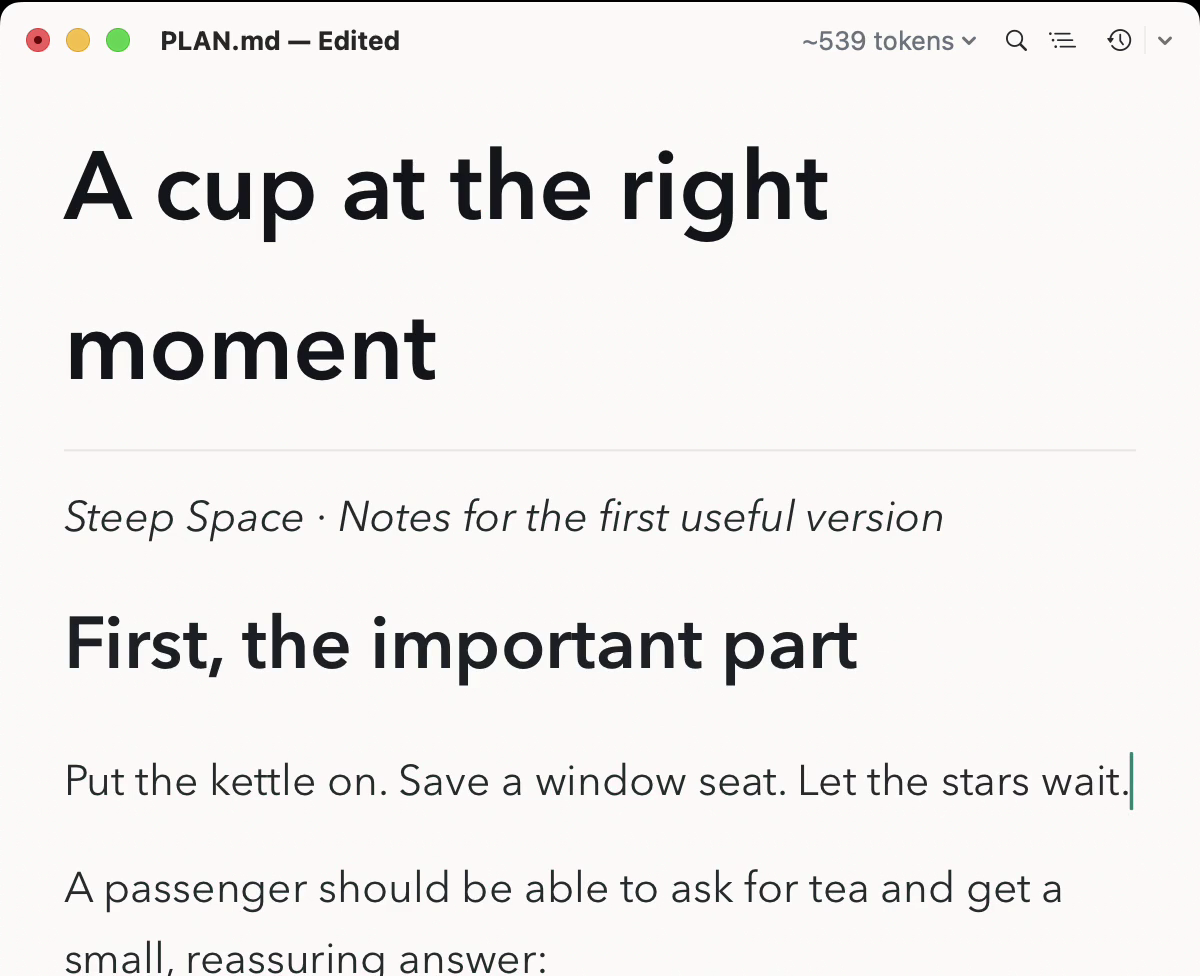
A Mardo window mid-sentence, typing straight into the rendered page. One frame from a demo recording finished on September 14.
On our Mac, an empty window takes about 89 ms to show you nothing at all. Mardo now takes about 24 more to show you a page you can type on.
Nobody times their Markdown app against Apple's own text view. We did, and then we beat it. Good for no reason.
How we measured
Every number here comes from our development Mac, an M4 MacBook Air with 32 GB, on macOS 15.7.4, on AC power with Low Power Mode off and a nominal thermal state. The app was an optimized performance build from the evening of September 16 with timing marks compiled in; the build you download has none.
A launch starts when the test harness creates the process and ends inside the first completed draw of the window's content, so the first paint is the finished window with its caret in place. We also record when Mardo's main starts, and most numbers above run from main to paint, because the part before main belongs to macOS.
Each run launches five cases 100 times each, rotating which one goes first: Mardo with an empty document, Mardo with a 767-byte README, the matched NSTextView with each of those, and the empty window. The controls are modes of the same executable and got faster in the change too, so we only compare Mardo with a control inside the same run. Medians are the harness's own, the 51st fastest of 100. Each run is judged by its worst launch, and no launch is thrown away. The phase times are means, and they fall up to about a millisecond short of the total because some time passes between marks.
Each launch is a new process, but the Mac isn't restarted between them. Every launch of the before and after runs is in launches.csv, with the phases in phases.csv.
About Mardo. Mardo is a native Mac app for reading and editing Markdown, made by Floof Logic and built on MarkEngineV3, its own Markdown engine, with no web view inside. It launches faster than Apple's own text view, and it opens a 50 GiB file ready to edit in about an eighth of a second. When an AI agent or another app saves the file you have open, Mardo adopts the new version in place, merges it under your unsaved edits when the two don't overlap, and keeps your place; Timewarp lets you step back through the file's past versions while it's open. Claude Code, Codex, ChatGPT and Claude Desktop can open a file in Mardo at the exact lines that matter, over a local MCP connection with no network port. Press Space on any Markdown file in Finder for a rendered Quick Look preview.
Reading, Quick Look, Find, Outline, Print, Follow Live Edits and Timewarp are free, with no time limit and no account. Mardo Pro adds editing and export for US $29.99, paid once, after a trial of 14 days of use that starts the first time you open Mardo. Documents never leave your Mac. Mardo runs on macOS 14 or later, on Apple silicon and Intel. Download it from mardo.app, or install it with brew install --cask flooflogic/tap/mardo.
Every Mardo release · Star Mardo on GitHub · Written in Markdown. Exported by Mardo. Good for no reason.