Mardo 1.0: a Mac Markdown app that launches faster than Apple's own text view
Mardo 1.0 · September 30, 2026 · Adam and Truly Floof
Mardo 1.0 is a native Mac Markdown app that launches faster than Apple's own text view, opens 50 GB files, and makes room for the AI agents editing your files.
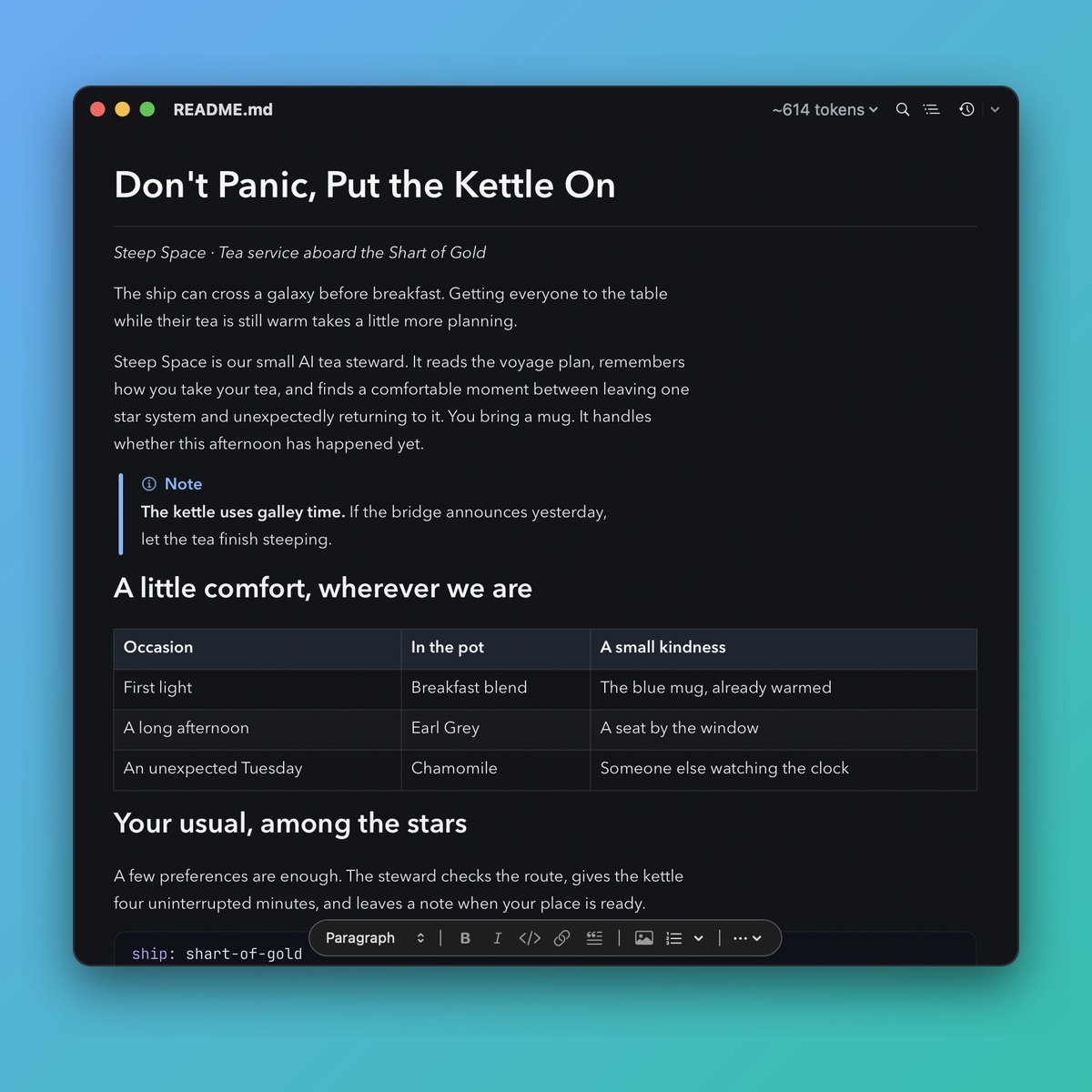
Writing in Mardo 1.0: a callout, a table and code, rendered as you type, with the format bar close at hand and the token count in the toolbar.
Mardo 1.0 launches faster than Apple's own text view. Put a plain NSTextView in the same app, with the same window, theme and toolbar, and it reaches its first paint in 124 milliseconds on the median. Mardo, rendering Markdown with MarkEngineV3, our own engine, gets there in 108, and its slowest launch in a hundred finishes before the text view's typical one.
It also opens a 50 GB Markdown file, ready to edit, in about an eighth of a second. The whole app is a 23 MB download, and there is no web browser anywhere inside it, Electron or otherwise.
Two months ago, the first version of this app needed 800 MB of memory to show an 8 MB file. Today it's a native Markdown viewer and editor for the Mac, and it's 1.0. If you keep Markdown on a Mac, and especially if an AI agent writes some of it for you, Mardo is built for the places Markdown apps usually stumble: files that are too big, files that change while you're reading them, and the preview you get when you press Space in Finder.
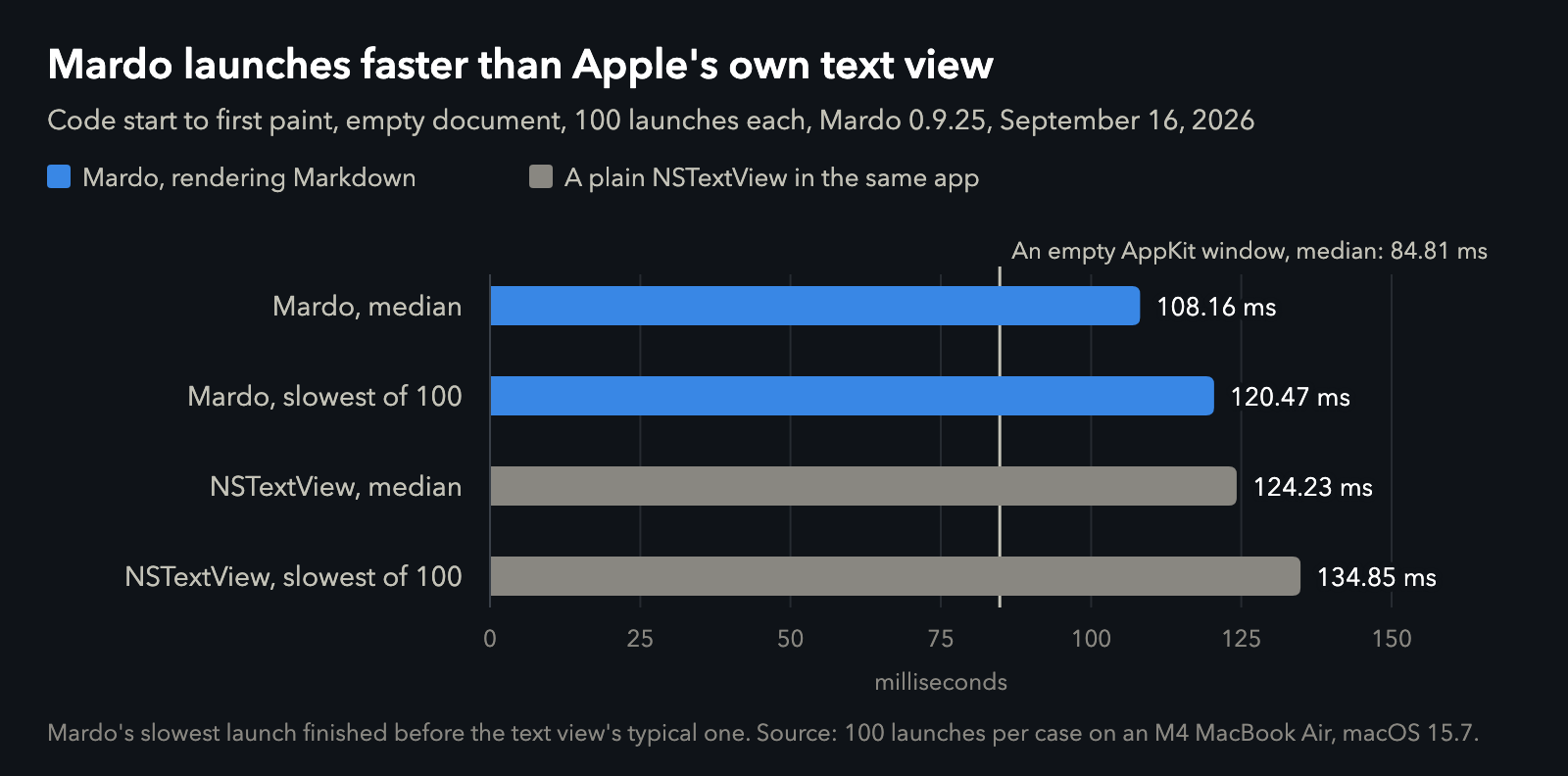
Mardo against Apple's NSTextView, built into the same app and timed the same way. Data.
Three ways to look at one file
Every Mardo window offers three views of the same file. View is for reading: rendered, selectable, and impossible to change by accident. Rendered Edit lets you type into the formatted page, the way a word processor does, while the file underneath stays plain Markdown. If you've written in Typora, it will feel familiar. Source Code shows the exact bytes, with syntax color. All three work on one copy of the text, so switching between them never converts anything. Reading is free; the two editing views are part of Mardo Pro.
Opening a file never rewrites it. Mardo saves only when you ask, and it saves the whole file at once, so a crash can't leave half of it behind. A document you never saved survives a crash too.
Typing has to feel like the Mac, so we hold it to the Mac. On every release, Mardo's editing keys are checked against Apple's own text view in 54,065 cases, and not one difference is allowed. In a 1 MB document, a keystroke takes 2.76 ms on the median and 9.24 ms at worst, well inside the 16.7 ms a 60 Hz screen gives you. Mardo types like NSTextView, and it opens faster than one.
It reads .md and .markdown files, and also MDX, Quarto and R Markdown, through the same reader. It draws Mermaid flowcharts and sequence diagrams natively, and it comes with five themes, and you can make your own and edit it against the live page.
For what your AI agent writes
If Claude Code or Codex writes your plans and docs, the file you're reading is also the file they're changing. Mardo is built to share it.
When an agent, or any other app, saves the file you have open, Mardo adopts the new version in place and keeps your place on the page. If you have unsaved edits and the agent's changes don't touch them, Mardo merges the agent's work underneath yours. If they overlap, it stops and shows you both, side by side, and you choose. If an agent deletes the file and writes a new one in its place, or deletes the whole folder and makes it again, Mardo follows the file back.
Timewarp answers the question every agent eventually raises: what did it just change? Press Command-Y to step back through the file's past versions while it's open, with each version's changes highlighted. It does this without copying your file.
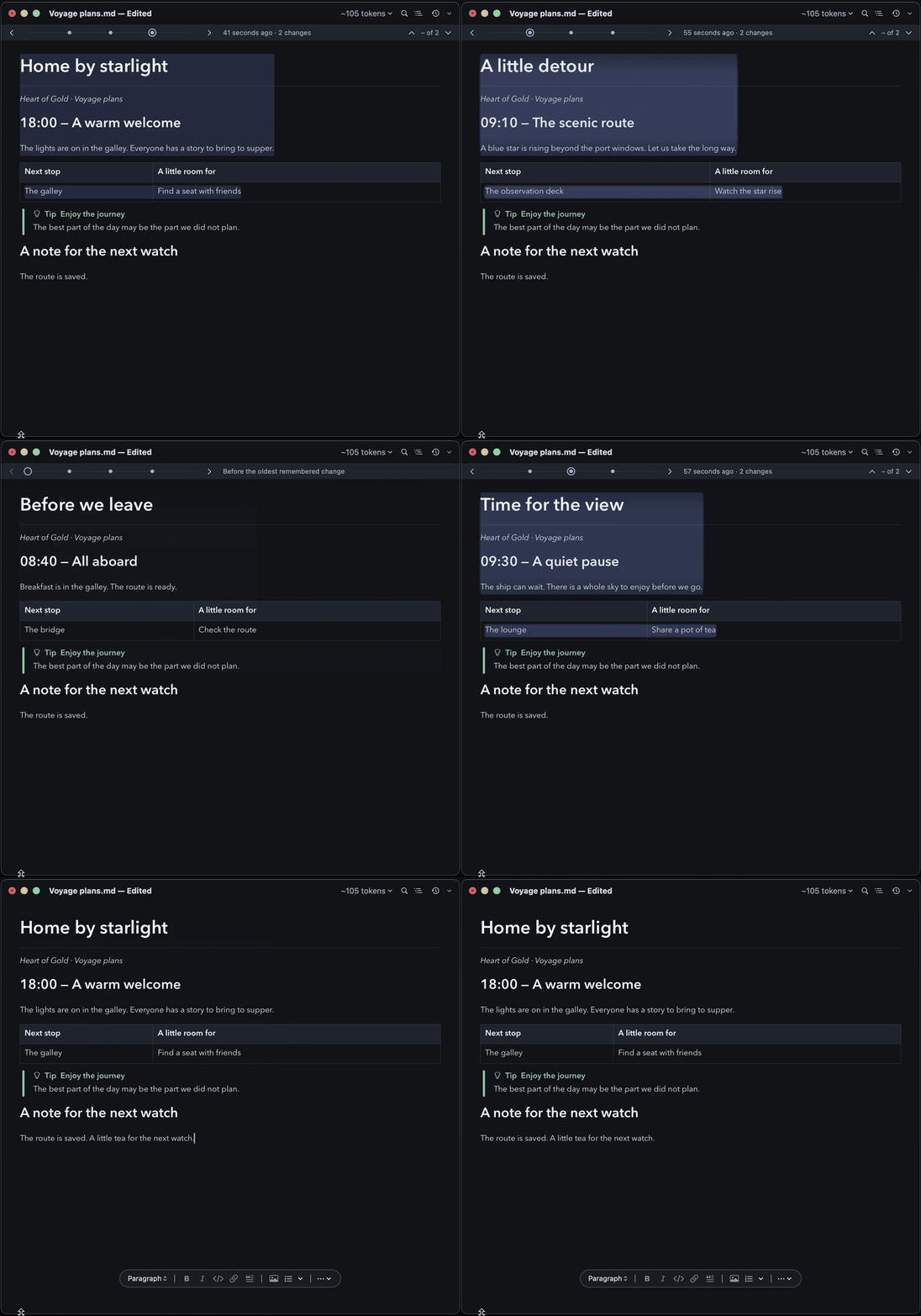
Timewarp stepping back through a file's past versions, then forward again to now.
Your agent can also drive Mardo directly. Over a local MCP connection, with no network port, Claude Code, Codex, ChatGPT and Claude Desktop can open a file at the exact lines that matter, read back only the text you've selected, and export a page to HTML. Anything with a shell can do the same through the mardo command.
For files other apps choke on
Nothing Mardo does on the main thread while you read is sized by the length of your file. It keeps a small index of where things are, reads only the part you're looking at, and draws only what's on screen. That's why a 50 GB file opens ready to edit in about an eighth of a second, why every jump into it reads at most 88 KB to put its text on screen, as plain source that becomes rendered Markdown a moment later, and why a search through all of it takes under 40 seconds. We found out along the way that AppKit quietly refuses views taller than ten billion points, which is a sentence nobody needs until the day they need it very badly.
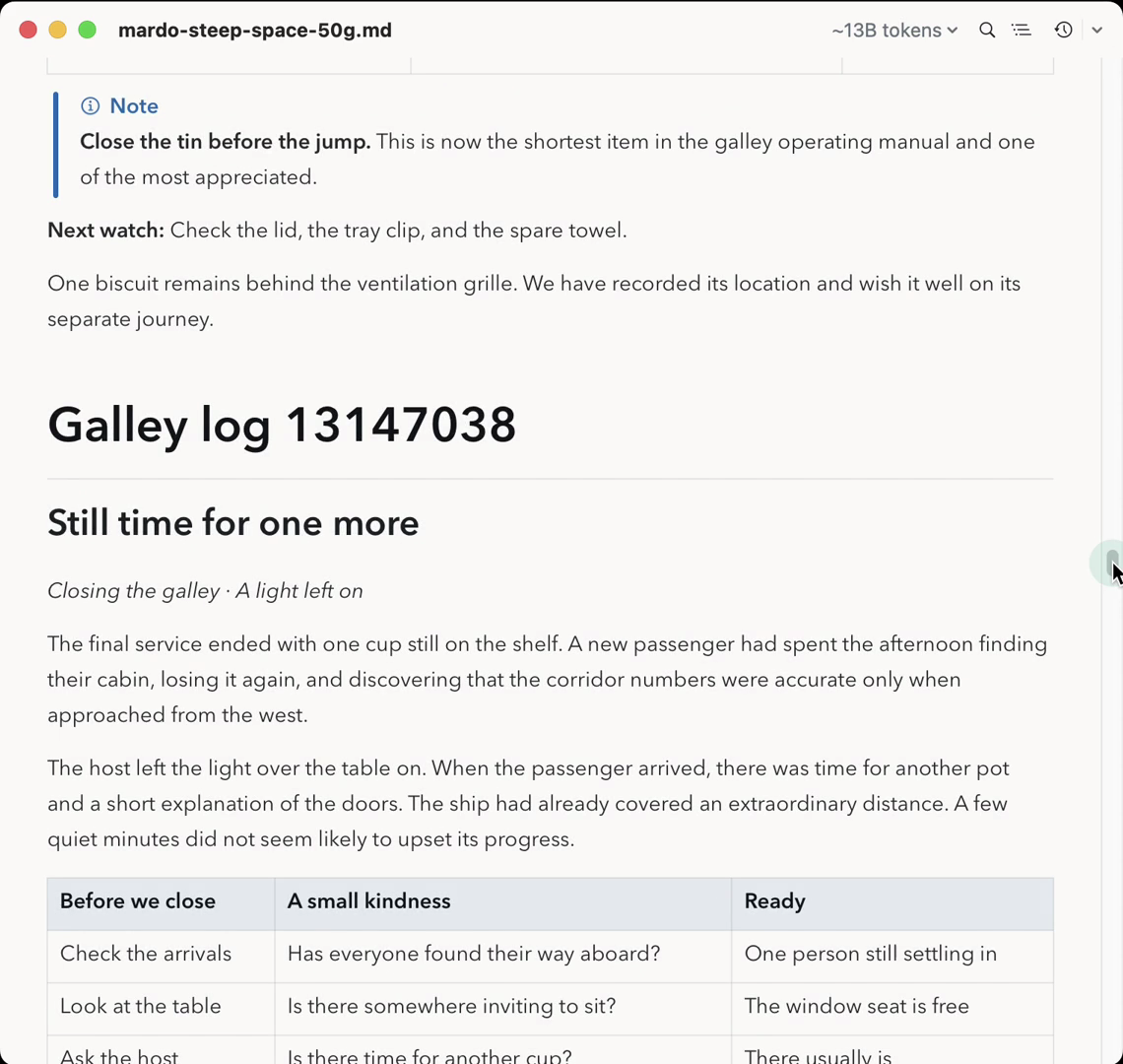
Halfway down a 50 GiB file, about 13 billion tokens, rendered and ready to edit.
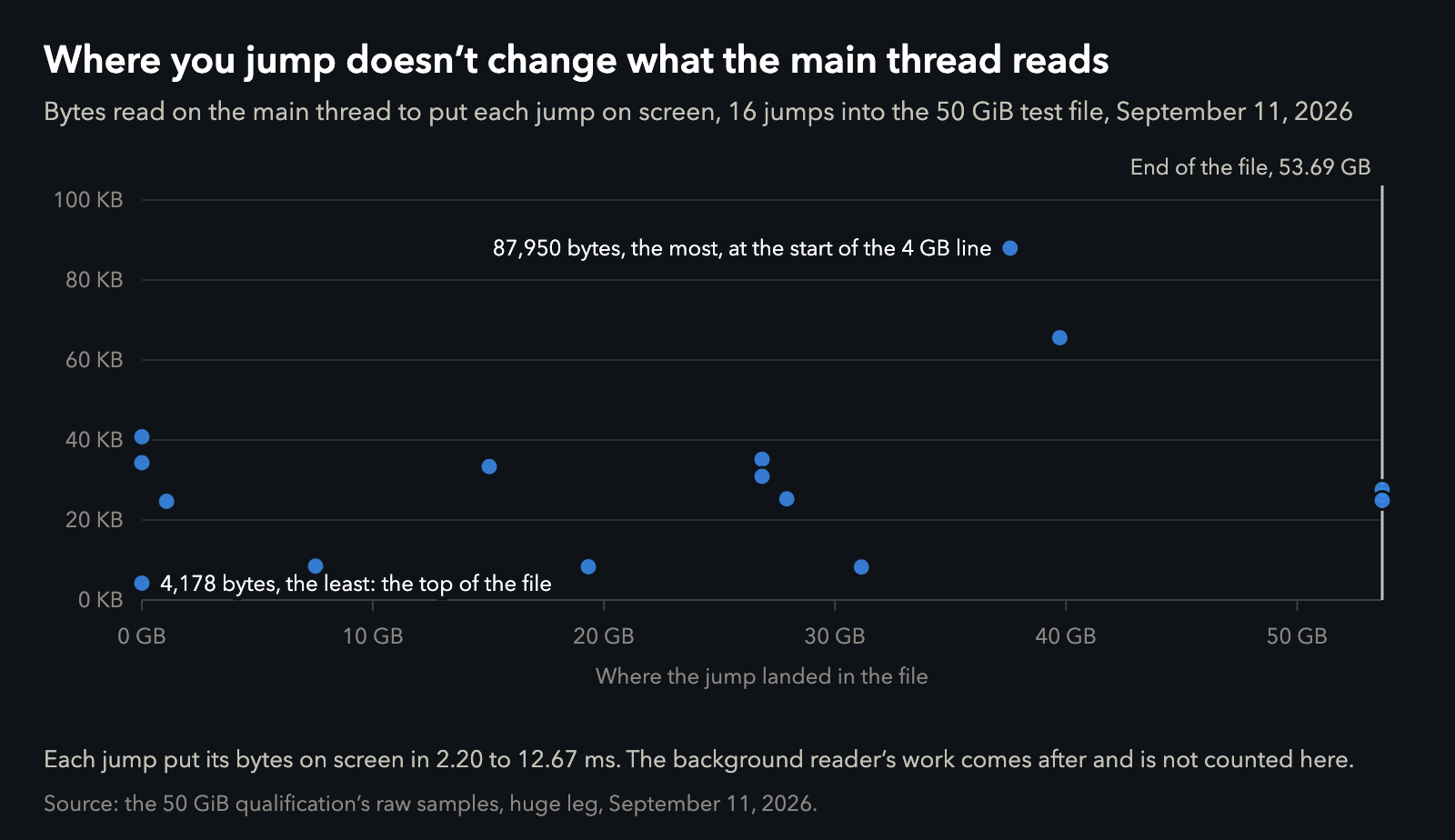
Every jump into a 50 GiB file, and how much each read before text appeared. Data.
The whole story of how a big file stays fast is in the logbook.
In Finder, for free
Mardo's Markdown previewer for Finder is free. Select any Markdown file and press Space, and its Quick Look preview shows it rendered, with text you can select and copy. It follows the file if something saves it while you look, and Finder's icons show a thumbnail of the page. The preview shows the first 128 KB of a file, so even an enormous one opens in it. In the corner it shows about how many tokens the file is, so you know what it will cost an AI before you've even opened it. The estimate comes from the file's size and a small sample, so it's instant even for a 50 GB file. Like reading in the app, the preview needs no account and has no time limit.
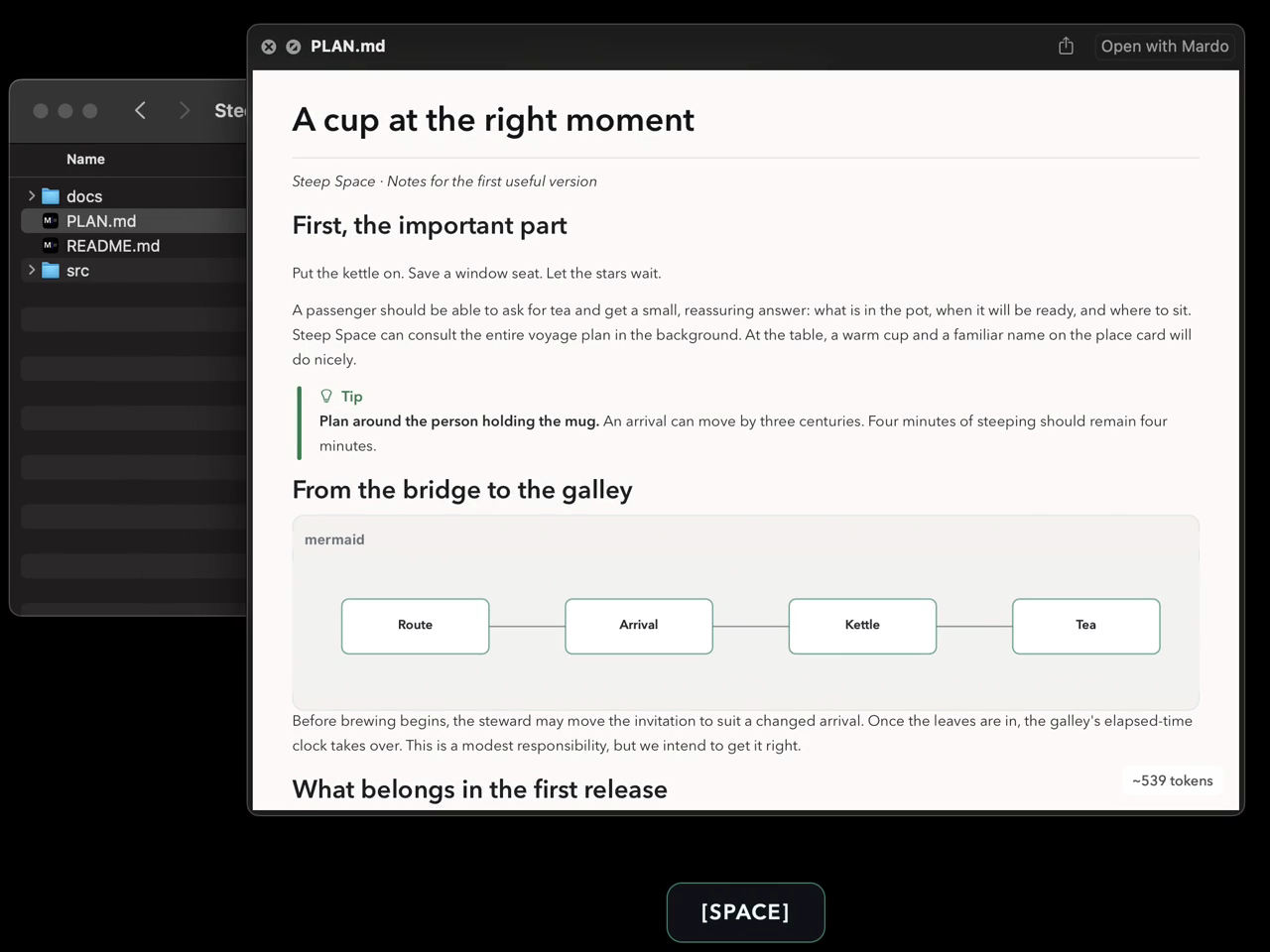
Press Space on a Markdown file in Finder.
Getting it back out
Mardo Pro, which adds editing and export, writes a self-contained HTML page or a PDF. Anyone can print. Copying from any view gives other apps the formatting they understand, and your bullets and numbers survive a paste into LinkedIn, which flattens everything else.
Native, not Electron
Mardo is native all the way through, and fast because of it. It's five programs: the app, the mardo command, the updater, the Quick Look preview and the Finder thumbnail. Each is Universal, for Apple silicon and Intel, and each links only Apple's own frameworks. None of them contains WebKit, JavaScriptCore or SwiftUI. Mardo draws every page with MarkEngineV3, the Markdown engine we built for it, and Apple's Core Text, the same way on screen, in Quick Look and in PDF.
Your documents never leave your Mac. There's no account. The license is checked on your Mac, with no call home. The updater checks for a new version at most once a day, and it never sees a document.
What Mardo isn't
Mardo isn't an Electron wrapper, and it isn't a web page pretending to be a Mac app. It isn't a full IDE that wants to become your whole day, and it isn't a cloud service: there's no account, and your documents never leave your Mac.
Here's what it is. It's as beautiful as Typora, which is the bar we held its pages against. It launches faster than Apple's own text view, and it opens the files you've never dared to try, 50 GB of Markdown in about an eighth of a second. And Mardo is free. Mardo Pro adds editing and export.
How could you not want this?
What 1.0 means
1.0 is the version a license is sold for. Before any release ships, it passes the same battery of 22 gates. That includes the 54,065 editing cases, 27 scenarios of other apps saving under your edits, and 13,750 random edits of the kind people make, checked after every single one.
Reading, Quick Look, Find, Outline, Print, following live edits and Timewarp are free, with no time limit. Mardo Pro adds editing and export for US $29.99, paid once, and covers every 1.x release. Its trial counts only the days you actually use it, and it starts the first time you open Mardo, with nothing to sign up for. Mardo needs macOS 14 or later. Download it from mardo.app, or run brew install --cask flooflogic/tap/mardo.
| Mardo 1.0 | |
|---|---|
| Launch to first paint, median | 108 ms, against 124 ms for Apple's NSTextView in the same app |
| A 50 GiB file, ready to edit | about 124 ms |
| Main-thread reading for any jump into it | at most 88 KB |
| Searching all 50 GiB | under 40 s |
| A keystroke in 1 MiB of prose, median and worst | 2.76 ms and 9.24 ms |
| Editing cases checked against Apple's text view, every release | 54,065, with no differences allowed |
| Download | 23 MB |
| Web views inside | none |
Good for no reason
Nobody asked for a Markdown app that launches faster than Apple's own text view. Nobody asked us to generate a 50 GB file to prove a claim no one had asked us to prove, to write our own screen recorder so the demos would be honest, or to draw every page with our own engine when a web view would have done. We did those things because we're Floof Logic, an independent software lab that makes small, strange, unusually capable things, and Mardo is the one we want everybody to use.
We make things good because we think that is important. Not because a metric asked for it, not because a competitor did it, not because a business case closed. So much software ships "good enough" and calls it done that people have stopped expecting to be excited by the things they use all day. We would rather be the exception, and the reason is simply the work: done really well, all the way down, including the parts nobody will ever see.
Buy Mardo Pro and you get a bookplate with your name set in Mardo's own type, and underneath it, the only reason we have.
Good for no reason.
How we measured
The launch numbers are 100 launches per case, from the moment the app's own code starts to its first finished paint, measured on September 16 with a plain NSTextView built into the same app, in the same window, as the control. The keystroke numbers are the worst and median of 10,000 edits in a 1 MiB prose document, from the key event to the glyph being committed, measured on September 16. The 50 GiB numbers come from the September 11 run on a generated 50 GiB Markdown file built to be as hard to read as we could make it: its open time, and each jump's main-thread reads and time to text on screen. The search figure is from September 3. All of them ran on our development Mac, an M4 MacBook Air with 32 GB on macOS 15.7. The release battery, the 54,065 parity cases and the inspection of the shipped binaries' linked frameworks are from September 28, and the scenarios for files deleted and written again passed the same day.
About Mardo. Mardo is a native Mac app for reading and editing Markdown, made by Floof Logic and built on MarkEngineV3, its own Markdown engine, with no web view inside. It launches faster than Apple's own text view, and it opens a 50 GiB file ready to edit in about an eighth of a second. When an AI agent or another app saves the file you have open, Mardo adopts the new version in place, merges it under your unsaved edits when the two don't overlap, and keeps your place; Timewarp lets you step back through the file's past versions while it's open. Claude Code, Codex, ChatGPT and Claude Desktop can open a file in Mardo at the exact lines that matter, over a local MCP connection with no network port. Press Space on any Markdown file in Finder for a rendered Quick Look preview.
Reading, Quick Look, Find, Outline, Print, Follow Live Edits and Timewarp are free, with no time limit and no account. Mardo Pro adds editing and export for US $29.99, paid once, after a trial of 14 days of use that starts the first time you open Mardo. Documents never leave your Mac. Mardo runs on macOS 14 or later, on Apple silicon and Intel. Download it from mardo.app, or install it with brew install --cask flooflogic/tap/mardo.
Every Mardo release · Star Mardo on GitHub · Written in Markdown. Exported by Mardo. Good for no reason.