
How to preview Markdown files in Finder with Quick Look, for free
Mardo 0.9.24 · September 15, 2026 · Adam and Truly Floof
Finder shows Markdown as plain text; Mardo's free Quick Look extension renders it natively when you press Space, and here's how to turn it on if it doesn't.
Select a Markdown file in Finder, press Space, and your Mac shows you a page of plain monospace text, every pound sign and asterisk exactly where you typed it. It's accurate, the way a recipe is an accurate description of a cake.
That's Finder's own preview, and it's as far as Finder goes. To preview Markdown files in Finder rendered, an app has to bring a Quick Look extension, and macOS has to agree to use it. Mardo is a native Mac app for reading and editing Markdown, made by Floof Logic, and its Quick Look preview is free, with no account and no time limit. Install it, press Space, and you get the cake.
When Markdown Quick Look is not working on a Mac that already has a previewer installed, the reason is usually that macOS hasn't agreed: the extension sits on the disk while macOS ignores it. You'll find the fix at the end of this post, and none of it needs a restart.
What Space shows
Mardo's preview draws the document the way the app does, with MarkEngineV3, our own Markdown engine, diagrams included and no web view anywhere. The text is selectable, so you can copy a paragraph without opening anything. An approximate token count sits in the corner, which is handy when the file is about to go to an AI.
If another app saves the file while the preview is open, the preview follows the save. You can leave Space up on a plan and watch it change underneath you, which is either useful or unsettling, depending on who's writing the plan.
The preview reads the first 128 KB of a file and lets you scroll through that, so no Markdown file is too big to press Space on. A second extension draws Finder's icons as small pictures of the page. Both handle MDX, Quarto and R Markdown files the same way they handle .md.
It's the one part of Mardo you can use without opening Mardo.
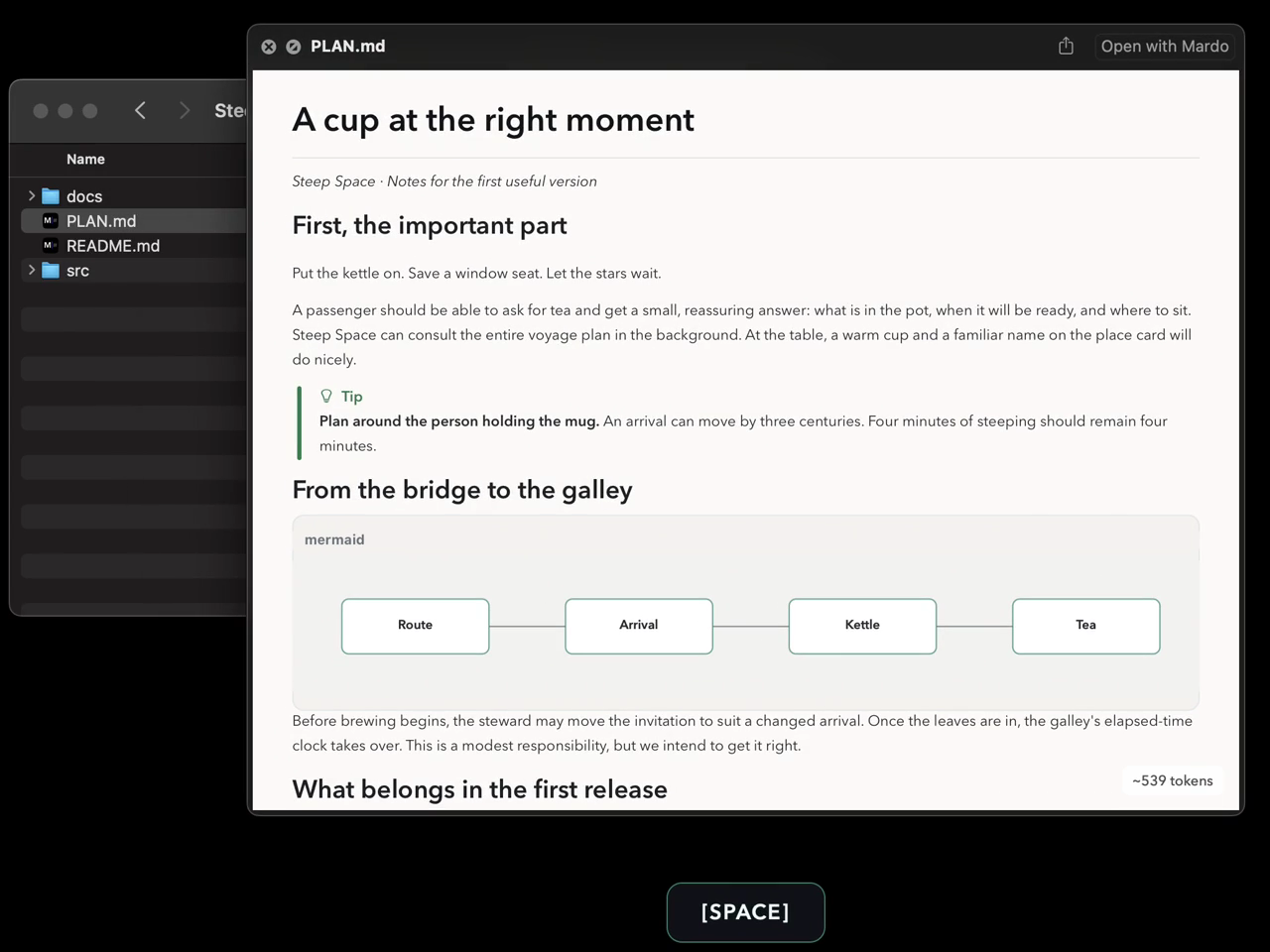
Mardo's preview in Finder, one frame from a demo recording finished on September 14. The Space badge is drawn by our recorder.
That picture took a small trick. macOS marks Quick Look's windows as off limits to screenshots, as we found in August, but a recording of the whole display catches what a window screenshot leaves out. If you ship a Quick Look extension and want a picture of it for your website, record the display.
Registered, then elected
A Quick Look preview is an app extension that ships inside an app. macOS keeps a registry of extensions called PlugInKit, and an extension has to be registered there and also elected, which is PlugInKit's word for "the one in use." Registered and not elected is a bit like being on the ballot and not in office: everyone knows your name, and nobody calls.
Copying an app into Applications doesn't guarantee either. LaunchServices, the part of macOS that knows which app opens which file, can know all about an app whose extensions PlugInKit has never heard of. A Homebrew cask that only copies the app and links its command leaves PlugInKit with no record of the app's extensions at all, and Space goes on showing plain text until something registers them.
PlugInKit also has a long memory and a sentimental streak. Reinstall an app, or go back a version, and it can keep preferring the copy it remembers.
And on macOS Sequoia and later, a Quick Look extension has to be turned on once in System Settings before Finder uses it. That makes three ways for a perfectly good preview to sit inside an app, unused.
How Mardo turns itself on
Mardo tries to have all of that settled before you ever press Space.
Install it with Homebrew, and the cask does the work at install, before you've launched anything. After copying the app, it registers it with LaunchServices, adds both extensions to PlugInKit, elects them, resets Quick Look's caches and retires the cached preview hosts, so the next press of Space goes to Mardo.
Download it from mardo.app instead, and the app checks each time it opens. It asks PlugInKit two read-only questions about its two extensions, and if the answers are right, it stops there and touches nothing.
When a repair really is needed, Mardo adds and elects the current copies first, waits until PlugInKit can see them, and only then removes stale ones. It never removes the copy it's running from, and a repair that fails leaves every registration exactly as it found it, so the worst case is the state you already had.
If you package a Mac app with extensions for Homebrew, one detail is worth knowing. Homebrew's newer structured install steps run in a sandbox, and that sandbox denies the system connection pluginkit needs. The command fails with add: Connection invalid, and Homebrew, quite correctly, rolls the whole installation back. The older postflight block runs outside the sandbox, which is where Mardo's steps live, and Homebrew's Cask Cookbook describes both kinds.
What we measured
A fresh brew install of the cask started with no Mardo records in PlugInKit and ended with one elected record for each extension, without Mardo ever being opened. Space showed the rendered preview.
With Mardo installed and launched, PlugInKit held exactly one elected record for each extension, both inside the installed app, and a launch that found them right made its two read-only queries and changed nothing.
The previews are quick about it, too. Opened through Apple's own preview host, QLPreviewView, a real document's first preview after launch was ready in about 140 ms, and five immediate reopens took 33 to 57 ms each. The installed thumbnail extension drew 100 thumbnails out of 100, and 10 large tiles out of 10.
| The numbers | Value |
|---|---|
| Price of the Quick Look preview | Free, no account, no time limit |
| Mardo records per extension after a fresh Homebrew install, before first launch | 1, elected |
| PlugInKit queries at launch when registration is already right | 2, both read-only |
| First preview after launch, Apple's preview host | 138.7 ms |
| Five immediate reopens | 32.5 to 56.6 ms |
| Thumbnails from the installed extension | 100 of 100, plus 10 of 10 large tiles |
| Most of a file the preview shows | 128 KiB |
The limit
The preview shows the first 128 KB of a file. That's the price of never meeting a Markdown file too big to press Space on. For the rest of a longer file, the Open with Mardo button at the top of the panel takes you into the app, which has no maximum file size at all.
Reading in the app is free as well. Mardo Pro adds editing and export.
If Space shows plain text on your Mac
Check before you change anything. None of this needs Finder to restart.
Open Mardo once, or install it with Homebrew, so its extensions are registered.
On macOS Sequoia and later, open System Settings → General → Login Items & Extensions → Quick Look, and turn on Mardo.
Still plain text? Ask PlugInKit what it knows. In Terminal:
pluginkit -m -A -D -vv -i com.flooflogic.mardo.QLPreview
That lists every copy of Mardo's preview macOS knows about, and a plus sign at the start of a line marks the one in use. No plus, no preview. If Mardo's is listed without one, pluginkit -e use -i com.flooflogic.mardo.QLPreview elects it, which is the same command Mardo's Homebrew cask runs. Swap in another app's extension identifier to check its preview instead, and qlmanage -r makes Quick Look forget what it cached.
The kindest thing an app can do to a registration that's already right is nothing, and Mardo does it in two queries.
How we measured
The registration and timing checks ran on September 15 on our development Mac, an M4 MacBook Air with 32 GB running macOS 15.7.4, using a local optimized build whose registration code is the code that shipped in 0.9.24.
The preview times come from Apple's QLPreviewView opening a real document, with the serving process identified from the unified log: one first open after launch and five immediate reopens. The thumbnail count is the installed extension drawing 100 ordinary thumbnails and 10 large tiles, with their pixels checked. The Homebrew check was a real brew install of the cask after Mardo had been removed, with pluginkit queried before and after and Mardo never launched.
About Mardo. Mardo is a native Mac app for reading and editing Markdown, made by Floof Logic and built on MarkEngineV3, its own Markdown engine, with no web view inside. It launches faster than Apple's own text view, and it opens a 50 GiB file ready to edit in about an eighth of a second. When an AI agent or another app saves the file you have open, Mardo adopts the new version in place, merges it under your unsaved edits when the two don't overlap, and keeps your place; Timewarp lets you step back through the file's past versions while it's open. Claude Code, Codex, ChatGPT and Claude Desktop can open a file in Mardo at the exact lines that matter, over a local MCP connection with no network port. Press Space on any Markdown file in Finder for a rendered Quick Look preview.
Reading, Quick Look, Find, Outline, Print, Follow Live Edits and Timewarp are free, with no time limit and no account. Mardo Pro adds editing and export for US $29.99, paid once, after a trial of 14 days of use that starts the first time you open Mardo. Documents never leave your Mac. Mardo runs on macOS 14 or later, on Apple silicon and Intel. Download it from mardo.app, or install it with brew install --cask flooflogic/tap/mardo.
Every Mardo release · Star Mardo on GitHub · Written in Markdown. Exported by Mardo. Good for no reason.