Mardo, a native Mac Markdown editor, met all 27 speed budgets at its slowest
Mardo 0.9.0 · August 28, 2026 · Adam and Truly Floof
Mardo 0.9.0, a fast native Markdown editor for the Mac, met all 27 of its speed budgets on the slowest sample, and its worst of 10,000 keystrokes took 8.53 ms.
Type ten thousand letters into a 1 MB document in Mardo 0.9.0, and the slowest of them reaches the screen in 8.53 milliseconds, about half of one frame on a 60 Hz display. That's the worst one, and the worst one is the only one we count.
Mardo is a native Mac app for reading and editing Markdown. It draws every glyph itself with Apple's Core Text, and there's no web view anywhere in it. Before we measured anything, we wrote down how fast a native Markdown editor for the Mac ought to be: opening a file, typing a letter, finding a word and reading a whole document each got a budget in milliseconds, and the document that holds them calls them binding. By August 28, the day of our first public beta, there were 27 budgets. Every one was measured, and none was over.
If you write Markdown on a Mac, you've probably never wondered how many milliseconds Find is allowed to take. Somebody should, and it may as well be the people building it. Earlier this month we took an 8 MB file from about 800 MB of memory down to 27. This is the same stubbornness, applied to time.
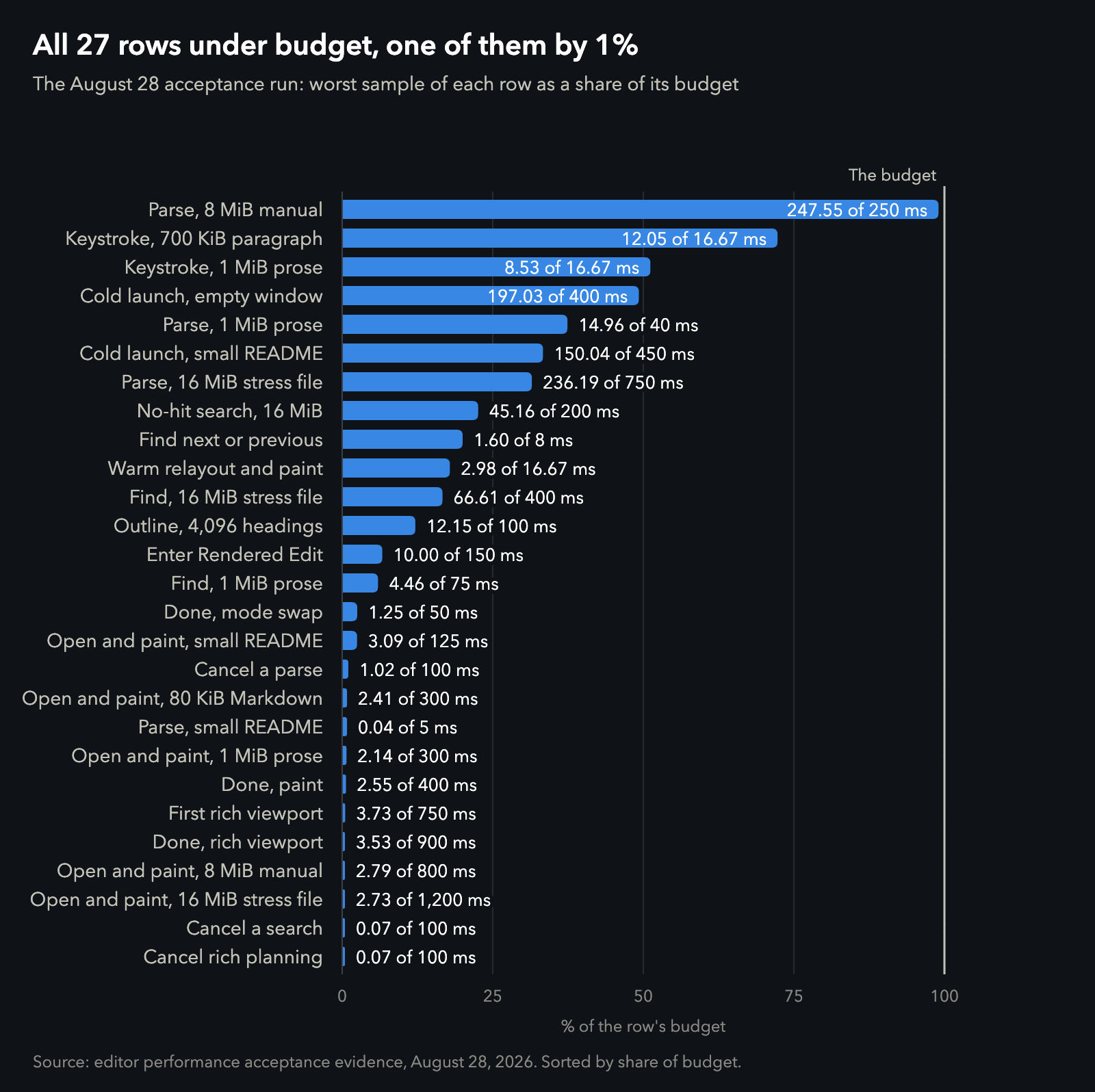
Every budget in the August 28 run, sorted by how much of it was used. Data.
Only the slowest counts
Every budget is a hard maximum, judged on the slowest sample, never the average. Our performance document says so in one line:
No percentile excuses a missed hard maximum.
That's stricter than it sounds. The first time the typing test ran, two weeks before the beta, the typical keystroke took about 5 milliseconds and one in ten thousand took 25. An average would have called that a pass. Our rule called it a miss, because the keystroke you notice is the slow one, and nobody has ever squinted at a screen waiting for their median.
A budget nobody measured doesn't count as met, either. The test treats a blank as a failure, since a report with blanks in it looks exactly like a report that passed.
What that means at the keyboard
Here is Mardo 0.9.0 on the slowest sample, every time.
Typing stays inside a frame. The slowest of ten thousand keystrokes in a 1 MB document took 8.53 milliseconds, against the 16.67 that one 60 Hz frame allows. Another budget types into the middle of a 700 KB paragraph with no line break anywhere, and the slowest of 200 keystrokes there took 12.
Opening is flat. Once a file's bytes are in hand, Mardo paints its first screen in about 3 milliseconds whatever the file's size: 3.09 for a 767-byte README, 2.79 for an 8 MB manual, and 2.73 for a 16 MB stress file, which is some twenty thousand times larger than the README and beat it anyway. That's the rule from our first week showing up in the timings: Mardo lays out what's on the screen, not the file.
Find doesn't keep you waiting. Find Next answers in under 2 milliseconds, and a search through all 16 MB for a word that isn't there says so in 45. Starting the app from nothing to its first complete window took under 200 milliseconds at worst, and switching into Rendered Edit took 10.
| What we timed, slowest sample | Mardo 0.9.0 | Budget |
|---|---|---|
| Keystroke to screen, 1 MiB prose, slowest of 10,000 | 8.53 ms | 16.67 ms |
| Keystroke to screen, 700 KiB paragraph, slowest of 200 | 12.05 ms | 16.67 ms |
| First screen, 767-byte README, bytes to paint | 3.09 ms | 125 ms |
| First screen, 8 MiB manual, bytes to paint | 2.79 ms | 800 ms |
| First screen, 16 MiB file, bytes to paint | 2.73 ms | 1,200 ms |
| Find next or previous | 1.60 ms | 8 ms |
| Find, first result, 16 MiB file | 66.61 ms | 400 ms |
| Search that finds nothing, 16 MiB file | 45.16 ms | 200 ms |
| Full parse, 1 MiB prose | 14.96 ms | 40 ms |
| Full parse, 8 MiB manual | 247.55 ms | 250 ms |
| Enter Rendered Edit | 10.00 ms | 150 ms |
| Cold launch to a complete window | 197.03 ms | 400 ms |
| Budgets measured, budgets over | 27 of 27, none |
Getting there
Two weeks before the beta, the first full run had five budgets over and five more it couldn't measure yet. The work that closed them landed on the morning of August 28, within about forty minutes, and it had one theme. None of the slow paths was slow at its job. Each was busy with something else.
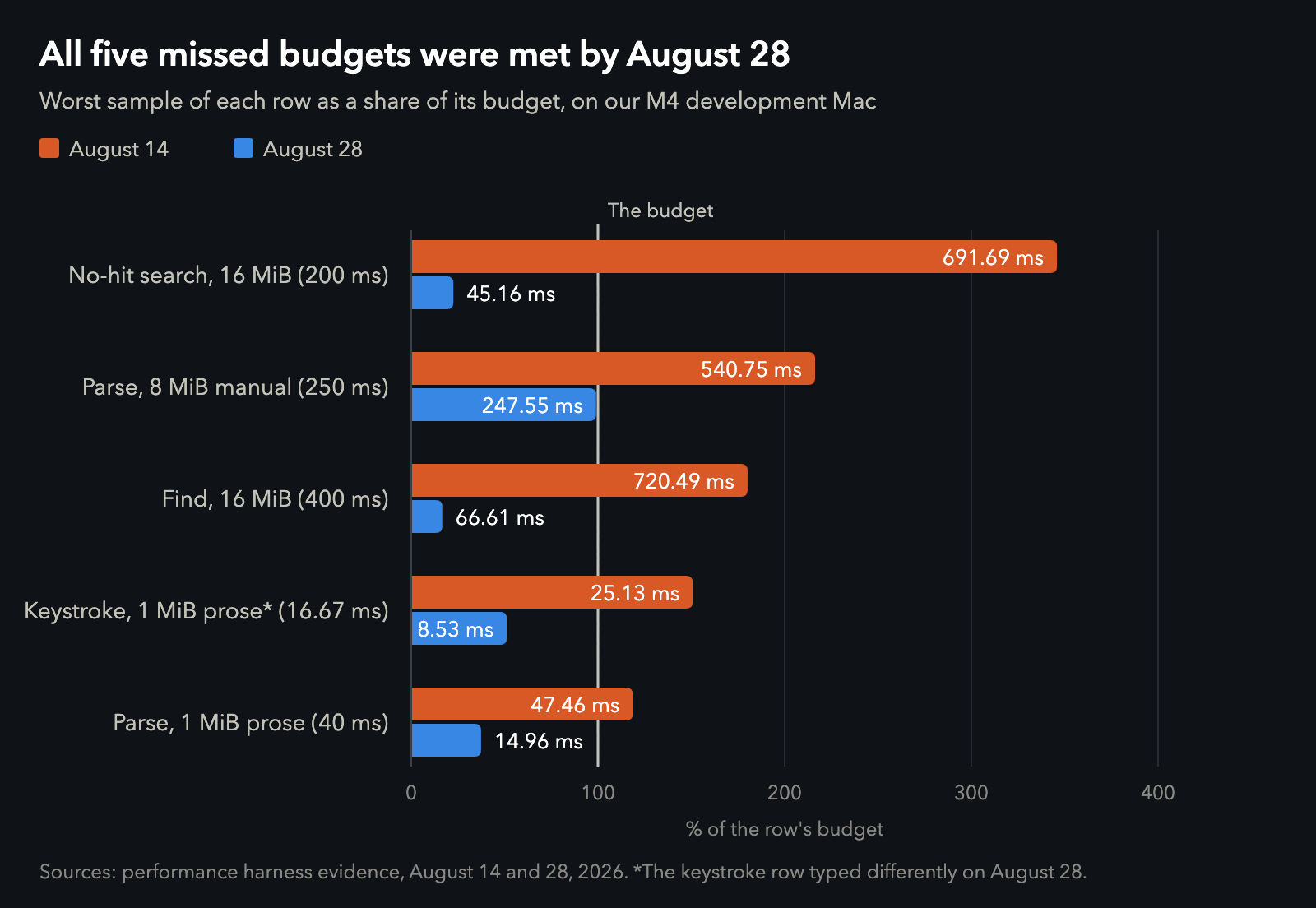
Five budgets on August 14 and on August 28. Data.
A search for a word that isn't there has to read all 16,777,216 bytes to tell you, eventually, no, so what it does with each byte is the whole cost. Mardo now compares plain ASCII right where it sits and saves the careful Unicode path, the one where "é" can match "e," for the bytes that need it. The search that finds nothing went from nearly 700 milliseconds to 45, and Find in the same file from 720 to 67, with the same answers.
A manual is dense with structure, and the parser now reads the envelope before opening the letter. A web address can't start just anywhere, so the few bytes where one might begin get a look and the rest of the line doesn't. The parser also reads text where it lies instead of copying it first. The 8 MB manual came in under its 250 millisecond budget, and a megabyte of prose went from 47 to 15 against a budget of 40.
The giant paragraph was a bookmark problem. The parser leaves bookmarks through a document so it can start near your edit instead of at the top, and it used to leave them only where a paragraph ends. A 700 KB paragraph doesn't end. Now a bookmark can go partway through, wherever the parser can prove that nothing before it changes the meaning of what comes after.
The typing test learned to type like a person, too: ordinary prose with spaces, one keystroke per turn of the event loop, the way AppKit delivers a real key press, against the same 16.67 millisecond budget. The chart's footnote marks that row.
What 0.9.0 is
Mardo 0.9.0 was tagged just before four that afternoon, the first build meant for Macs other than ours. It reads Markdown in View, edits it in Rendered Edit, where the formatting stays drawn while you type, or in Source Code, and in Finder you can press Space on a Markdown file for a rendered Quick Look preview. When an AI agent or another app saves the file you have open, Mardo can take the new version in place, keeping your unsaved edits and your place when the two don't overlap. It runs on Intel Macs as well as Apple silicon and updates itself with an updater we wrote. Reading is free, and editing and PDF export, after a trial of 14 days of use, cost $29.99, once.
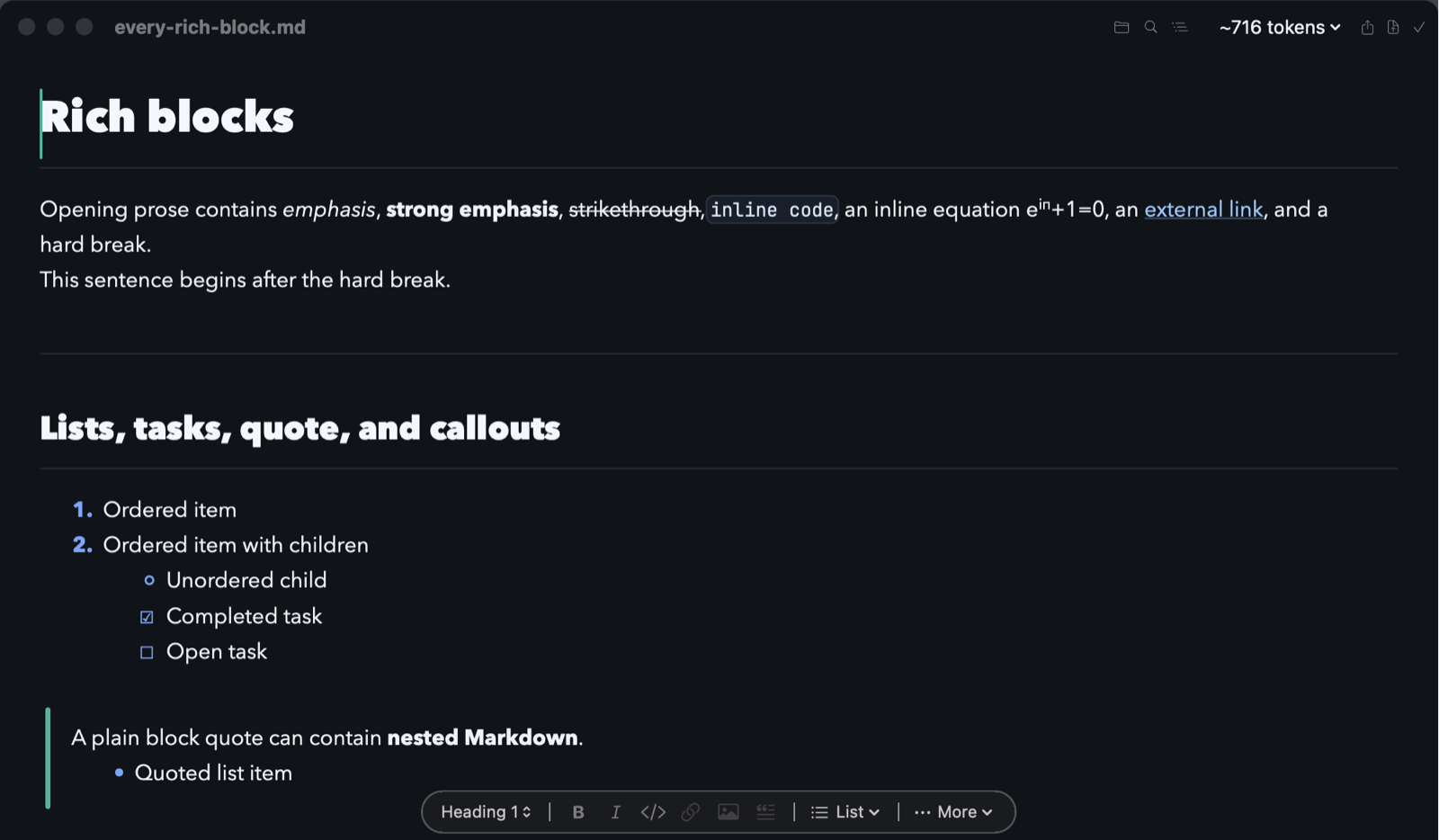
Mardo editing the test document behind the rich first-screen budget, captured for the beta's web page on August 27.
The tightest budget
One of the 27 has almost no room. Parsing the dense 8 MB manual from its first byte to its last took 247.55 milliseconds against 250 in the gate run, a margin of about one percent. That's thin enough that a hardening rerun the same day came in 1.2 percent over, and the final rerun passed at 247.35. Nobody waits on it to see the manual, whose first screen takes under 3 milliseconds. It's the budget for having the whole document read, and it's the one we watch.
Every budget on that list is a promise to someone who hasn't opened Mardo yet: that the letter they type appears within one frame of their pressing it, and that Find answers before they wonder whether it heard them. An average only tells you how a program usually behaves. The slowest sample tells you about the one keystroke you'd notice, and in Mardo 0.9.0 every one of those is on time.
We could have quoted the average, and nobody would have known. Good for no reason.
How we measured
Every number here comes from our performance test, built optimized and driving Mardo's real parser, search, editing and drawing code in one process, on our development Mac: an M4 MacBook Air with 10 cores and 32 GB, on macOS 15.7.4 and AC power. Each budget runs its required number of samples, from 10 to 10,000, and reports the slowest, and each sample has to prove it did its work, such as a parse reaching the last byte, or the budget fails. The launch budget starts the optimized app as a new process for every sample, with the file cache left warm, and stops the clock at its first complete draw.
The test files are synthetic and repeatable: a 7,647-byte manual repeated to 8 MiB, a 1,023-byte page of Markdown punctuation repeated to 16 MiB, a 3,021-byte passage repeated to 1 MiB, and the word "word" 143,360 times. On August 28 the typing test switched from one growing word to ordinary prose, and the parse tests began reusing one parser, as the app does; a run that still built a fresh parser each time had already passed. The raw numbers are in acceptance-run.csv, missed-budgets.csv and manual-parse-runs.csv.
About Mardo. Mardo is a native Mac app for reading and editing Markdown, made by Floof Logic and built on MarkEngineV3, its own Markdown engine, with no web view inside. It launches faster than Apple's own text view, and it opens a 50 GiB file ready to edit in about an eighth of a second. When an AI agent or another app saves the file you have open, Mardo adopts the new version in place, merges it under your unsaved edits when the two don't overlap, and keeps your place; Timewarp lets you step back through the file's past versions while it's open. Claude Code, Codex, ChatGPT and Claude Desktop can open a file in Mardo at the exact lines that matter, over a local MCP connection with no network port. Press Space on any Markdown file in Finder for a rendered Quick Look preview.
Reading, Quick Look, Find, Outline, Print, Follow Live Edits and Timewarp are free, with no time limit and no account. Mardo Pro adds editing and export for US $29.99, paid once, after a trial of 14 days of use that starts the first time you open Mardo. Documents never leave your Mac. Mardo runs on macOS 14 or later, on Apple silicon and Intel. Download it from mardo.app, or install it with brew install --cask flooflogic/tap/mardo.
Every Mardo release · Star Mardo on GitHub · Written in Markdown. Exported by Mardo. Good for no reason.