
Mardo opens MDX, Quarto and R Markdown files on a Mac
Mardo 0.9.21 · September 13, 2026 · Adam and Truly Floof
Mardo 0.9.21 opens MDX, Quarto and R Markdown files on a Mac through the same reader as .md, in the app, Quick Look, Terminal and MCP, and never runs their code.
On a Mac, teaching an app to open a new kind of file is mostly a matter of writing it on a list. Mardo 0.9.21 wrote six more Markdown cousins on its list with 39 lines of product change, and every way into the app learned them at once, one Sunday morning.
Mardo is a native Mac app for reading and editing Markdown, made by Floof Logic. If you want to open MDX files on a Mac, or Quarto and R Markdown, Mardo now reads .mdx, .mdc, .qmd, .rmd, .mdtext and .mdtxt through the same reader as every .md file: in the app, in Finder's Quick Look preview and thumbnails, with the mardo command in Terminal, from an AI agent over MCP, and from a link inside another document. Reading them is free, like reading any Markdown in Mardo.
That makes eleven extensions in all, joining .md, .markdown, .mdown, .mkd and .mkdn.
Shown, never run
Mardo doesn't pretend to understand these files. An MDX component shows up as the tag you typed, an MDC block keeps its colons, and a Quarto or R Markdown code cell is a code block that nobody runs. Mardo has nothing to run it with, since there's no web view or JavaScript anywhere inside.
Everything around those parts is ordinary Markdown, and Mardo draws it exactly as it draws any .md file. A Quarto notebook opened in Mardo is a document you can read, rather than a job waiting to start.
Opening one never changes it. The tests open one file of each kind through the real Terminal command, check that each reaches the same Markdown path as a .md file, and check that every byte on disk is exactly where it was.
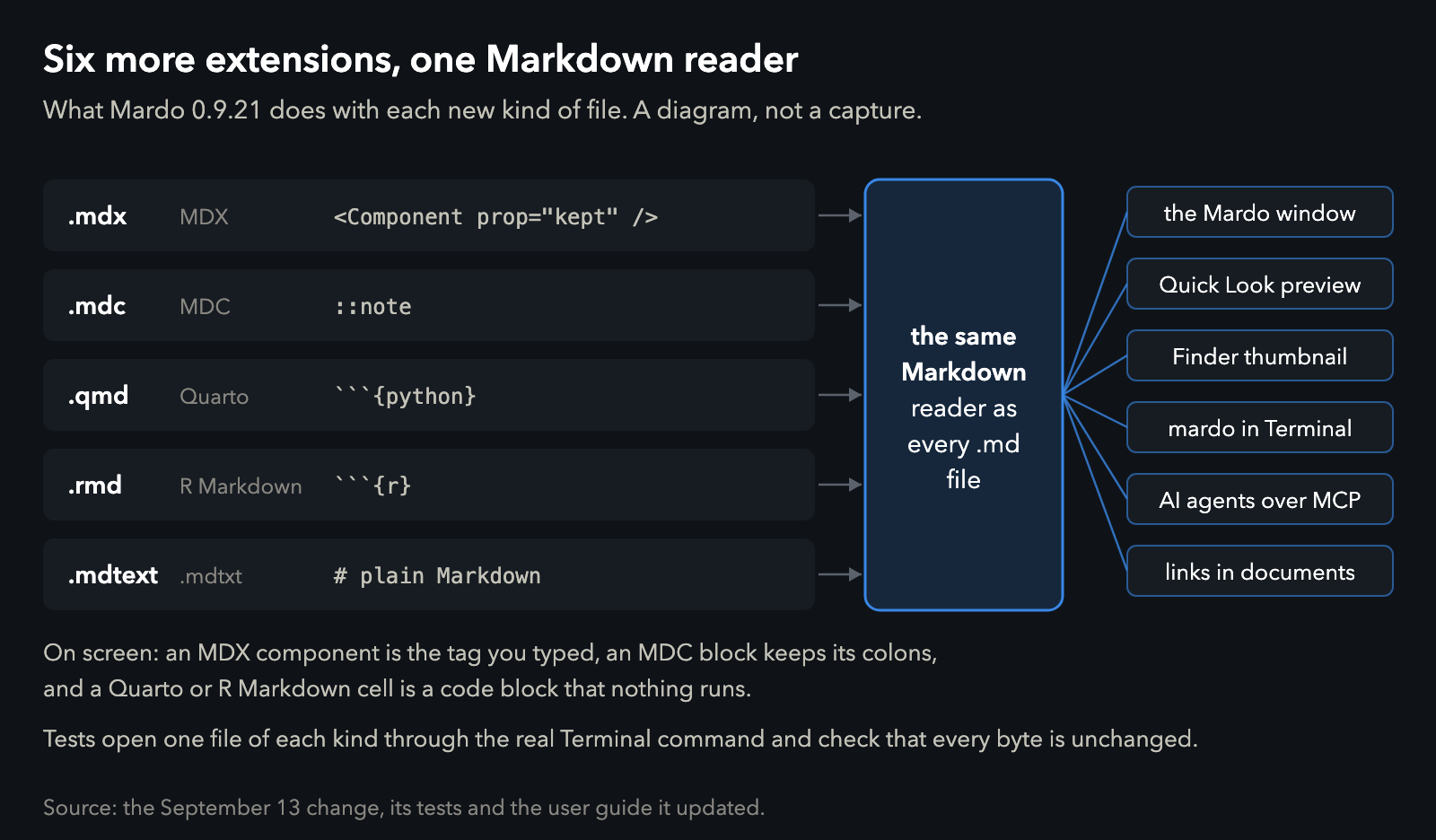
What 0.9.21 does with each new kind of file. A diagram, not a capture.
Why these six
On September 11 we finished reading the feature lists of nineteen other Markdown apps, and some of them listed MDX, MDC, Quarto and R Markdown files. They're common kinds of Markdown, and a Markdown app that shrugs at them has a hole in it.
The issue we filed the next day started from the right end: "This is file admission, not six new grammars." .mdtext and .mdtxt came along because they're plain Markdown under other names and were already on our list.
The plan for Sunday was 26 lines long, and I assigned it. Most of it said what done meant and what not to build: no new grammars, nothing run at all, and "No new document type, renderer, icon, preference, subsystem, or dependency."
Every door reads the same list
A Mac app has more doors than it looks. Finder learns what an app opens from the app's Info.plist, a Quick Look extension is offered only the files its own Info.plist claims, and Mardo's Terminal command and its link handling each keep a list of their own. The same Terminal list also decides what an AI agent can ask Mardo to open.
The issue had a rule about that: "Do not ship a plist-only claim that the other entry points reject." A file that Finder offers to Mardo and Terminal then refuses would be worse than one Finder never offered, so the change updated every door together.
It came to 176 lines in 15 files, and the biggest share, 97 lines, was tests. The product change was 39 lines, 33 of plists and 6 of Swift, and it landed at 8:35 on Sunday morning. The tests check the doors against each other, too: the app, the Markdown type it exports and both Quick Look extensions have to claim the same extensions and the same types.
Mardo's first commit set a house rule of small, boring, bounded and provable. A list is about as boring as software gets, which on this occasion was the compliment.
| The numbers | Value |
|---|---|
| Extensions added | 6, for 11 in all |
| Ways in that admit them | the app, Quick Look preview, Finder thumbnail, Terminal, MCP, links in documents |
| The plan | 26 lines |
| Lines added | 176 in 15 files |
| Product change, plists and Swift | 39 (33 and 6) |
| Tests | 97 lines |
| Bytes changed on disk by opening each test file | none |
LaunchServices keeps very careful books
The part of macOS that decides which app opens which file is called LaunchServices. A few things we learned about its books on our development Mac are worth knowing if you ship a Mac app.
An app declares the file types it handles in its Info.plist, under CFBundleDocumentTypes, and marks the ones it merely tolerates with an Alternate rank. Finder's Open With menu does the rest.
Defaults belong to a content type, never to a file name, so package.json can't open somewhere different from any other .json. Declare a brand new type for an extension no other app claims, and your app becomes its default the moment it registers, even at Alternate rank. The rank is polite. The result is not.
Register test copies of your app under its real bundle identifier, and LaunchServices can't tell them apart. Our development Mac once offered eight apps called Mardo in Open With, all of them test copies, and none of them willing to say which was which. Move a test copy to the Trash and LaunchServices notes its new address and carries on offering it to you, so unregister a copy before you move it, and empty the Trash afterwards.
A Mac believes a file ending in .ts is an MPEG-2 transport stream, which is video, rather than TypeScript. Claim .ts for your code editor and you have volunteered to play movies.
Markdown has no single type name on a Mac, and a Quick Look extension is only offered files whose type it claims, so Mardo's preview already claimed four. .qmd and .rmd have names of their own, org.quarto.qmarkdown and com.rstudio.rmarkdown, and when an installed app declares them they don't conform to Markdown, so an extension that claims only Markdown types never sees them. Mardo names both explicitly.
The limit
Mardo reads these files as Markdown and nothing more. It never runs a component, a directive or a code cell, so if you want a Quarto notebook's charts or an MDX page's components, you still need Quarto or your site's build for that. What Mardo gives you is the source, laid out as Markdown, exactly as written.
Press Space
The same release added pinch zoom, a first-launch guide, one-step links when you paste a web address over selected text, and a command called Open With (⌘E) that hands your file to your other editor, travelling in the opposite direction from everything above.
If you keep MDX docs, Quarto notebooks or R Markdown next to your code, select one in Finder and press Space. Your Python cell will be sitting there in a code block, unrun, exactly as you wrote it.
How we measured
The line counts are insertions as git reports them for the September 13 change, sorted by file into plists, Swift, tests and documents. The six file kinds and the byte check come from the tests in that change, which open one file of each kind through the real Terminal command and compare every byte after opening. The LaunchServices behavior was seen earlier in September on our development Mac, an M4 MacBook Air with 32 GB running macOS 15.7.4, where those tests also run.
About Mardo. Mardo is a native Mac app for reading and editing Markdown, made by Floof Logic and built on MarkEngineV3, its own Markdown engine, with no web view inside. It launches faster than Apple's own text view, and it opens a 50 GiB file ready to edit in about an eighth of a second. When an AI agent or another app saves the file you have open, Mardo adopts the new version in place, merges it under your unsaved edits when the two don't overlap, and keeps your place; Timewarp lets you step back through the file's past versions while it's open. Claude Code, Codex, ChatGPT and Claude Desktop can open a file in Mardo at the exact lines that matter, over a local MCP connection with no network port. Press Space on any Markdown file in Finder for a rendered Quick Look preview.
Reading, Quick Look, Find, Outline, Print, Follow Live Edits and Timewarp are free, with no time limit and no account. Mardo Pro adds editing and export for US $29.99, paid once, after a trial of 14 days of use that starts the first time you open Mardo. Documents never leave your Mac. Mardo runs on macOS 14 or later, on Apple silicon and Intel. Download it from mardo.app, or install it with brew install --cask flooflogic/tap/mardo.
Every Mardo release · Star Mardo on GitHub · Written in Markdown. Exported by Mardo. Good for no reason.