
Why bullets vanish when you paste Markdown into LinkedIn
Mardo 0.9.26 · September 19, 2026 · Adam and Truly Floof
Bullets vanish in LinkedIn because it flattens the pasted HTML list, which never held a bullet character, so Mardo 0.9.26 copies lists with the bullets written in.
Paste Markdown into LinkedIn from Mardo 0.9.25 and the words arrive in order while the bullets stay behind. So do the numbers on a numbered list and the boxes on a checklist. What's left is a column of sentences that no longer know they belong together, and a minute of typing dots back in by hand, every time you post.
The strange part is how many bullets we had sent. Every copy in Mardo puts four versions of your selection on the Mac's clipboard at once. In 0.9.25 the rich text version had a bullet on every item, and so did the plain text version. LinkedIn read the HTML version, and the HTML version didn't contain a single bullet.
Mardo is a native Mac app for reading and editing Markdown, and copying out of it is free, like reading. This is the story of the morning we spent learning where a bullet actually lives, and of the release that now writes one into every list you copy.
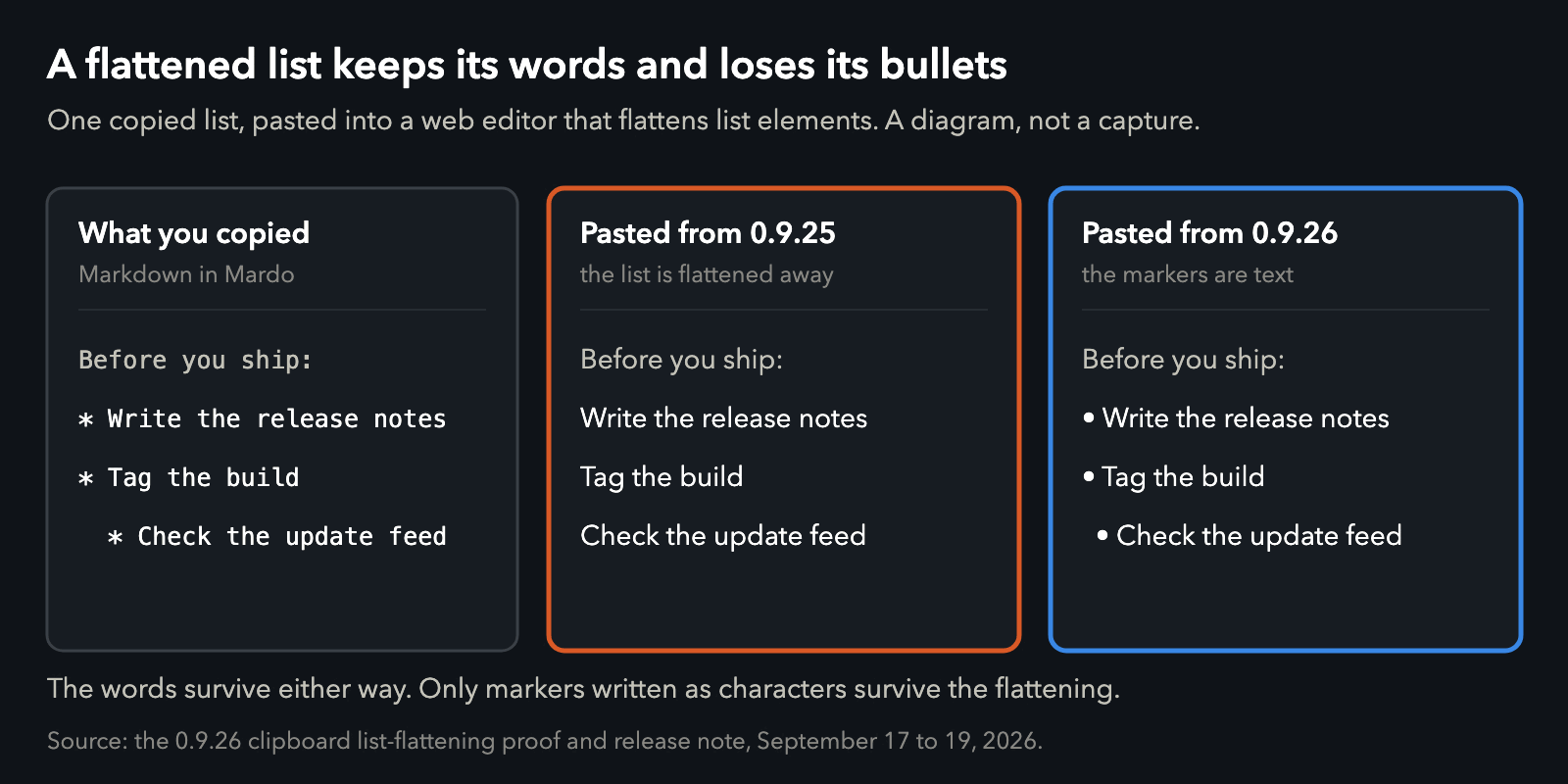
One list, pasted into an editor that flattens lists. A diagram, not a capture of any app.
Four versions of one list
When a Mac app copies, it doesn't put one thing on the clipboard. It puts several versions of the same selection there at once, and the app you paste into picks whichever it likes best. Apple asks the copying app to list them in its own order of preference, richest first, but the choice belongs to the receiver.
Mardo puts four. First comes its own exact Markdown, which only Mardo reads, so a paste back into Mardo loses nothing. Then HTML for the web, RTF for the Mac's own rich text, and plain text for everything else.
Until 0.9.25, plain text came second in that list, and our plain text had no bullets at all. We had treated an unordered list's bullet as decoration rather than text, so a receiver that took the plain version got the words and nothing else. It lost the address of a labeled link, too.
By a quarter to one on the morning of September 17 a report about pasting into LinkedIn was in our inbox, and the branch that went after it was named after LinkedIn. Its plan ruled out, in writing, fixing it for LinkedIn alone: no detecting which app you paste into, no list of receiving apps, no second Copy command. The change went in before eight. HTML and RTF moved ahead of plain text, the plain text gained a real bullet for every item and each labeled link's address in parentheses, and 0.9.25 shipped just after eight.
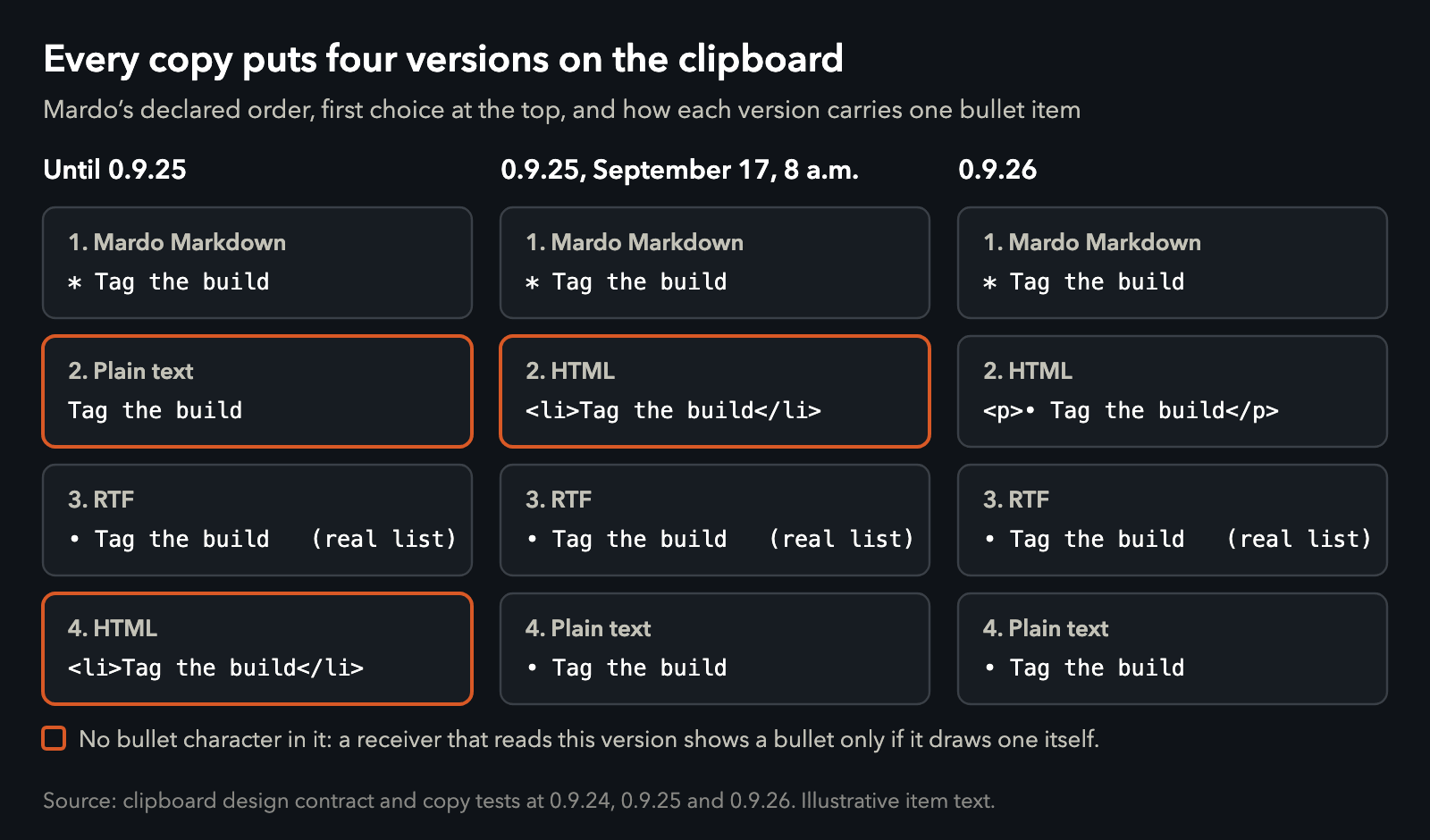
One copied item, four ways, across three releases. Orange marks a version with no bullet character in it. Data.
Every receiver that took the plain version now got its bullets. LinkedIn didn't take the plain version.
Where a bullet lives
An HTML list doesn't contain any bullets. It contains <li> elements, which ask whoever receives them to draw a bullet, the way an invitation to dinner doesn't contain any dinner. In a browser, the page's styling draws each bullet as a marker, and nobody ever types one.
LinkedIn's editor keeps the words of a pasted list and flattens the list elements around them. Once the list is gone, there's nobody left to draw the bullet. Numbers go the same way, because an HTML numbered list keeps its numbers as instructions too, and so do checkboxes, which in HTML are form controls rather than text. Anything that hands LinkedIn a real HTML list is asking it to draw markers it won't draw.
In the version LinkedIn reads, there had never been a bullet to lose.
Write the bullet down
About three and a half hours after 0.9.25 went out, the fix for 0.9.26 was in. The HTML that Mardo puts on the clipboard now writes each list item as an ordinary paragraph that starts with a real bullet character, the number you typed, or a ☐ or ☑ for a task, with a small indent for nested items. If your list starts at 3 and jumps to 99, the copy says 3 and 99, because that's what you wrote.
A web editor can flatten that as much as it likes. The markers are part of the text now, and text is the part a flattening editor keeps.

A list in Mardo's Quick Look preview, captured September 12. In 0.9.26 every item in it keeps a marker in the text you copy.
We didn't write a LinkedIn mode. Copy doesn't know where you're about to paste, and it doesn't try to guess. Everyone gets the same clipboard, and now it survives the most forgetful reader.
A test that pretends to be LinkedIn
Nothing in our test suite can log in to LinkedIn, so a test plays the part, badly on purpose. It deletes every tag from Mardo's clipboard HTML, which is the crudest flattening there is, and checks that each item still carries its marker: a bullet on a nested child as well as its parent, 3, 99 and 100 on a list typed with those numbers, and ☐ and ☑ on a checklist. It also fails if the clipboard HTML ever goes back to asking the receiver to draw its markers.
We already had a referee for the rich text. On September 7, we made Apple's own RTF reader, the one TextEdit uses, the judge of Mardo's clipboard: a copy has to survive being read by it, and a paste it wrote has to survive being read by Mardo. It's a trick worth stealing for any Mac app that puts rich text on the clipboard: Apple's reader is already installed, it's the one your users' apps rely on, and it notices things your own tests won't.
It's the same habit that makes a stock NSTextView the answer key for Mardo's editing keys. When the Mac already has an opinion about how something should behave, we ask it first.
What it cost
The HTML on the clipboard isn't a real list any more. An app that reads our HTML and would have built a proper list from it now gets paragraphs that start with a bullet. They look right, but add a step in the middle of a copied numbered list and the numbers after it won't move. Apps that take the RTF version still get a real list, and HTML you export or publish from Mardo never goes near this path, so it stays a proper list. We chose the copy that survives the worst reader over the one that flatters the best.
Bullets included
Mardo 0.9.26 went out on the morning of September 19. Select a list, press Command-C, paste it into a LinkedIn post, and the bullets, the numbers you typed, the checkboxes and the indents are written into the text itself, so they survive the flattening LinkedIn does. You don't even have to open the file: press Space on a Markdown file in Finder, and the preview Mardo draws there copies the same way. None of it asks for Mardo Pro.
If you build anything that copies, the lesson cost us two fixes in one morning, and it's an old one: when you can send the thing itself, don't send instructions for it. A bullet written into the text doesn't need anyone to remember to draw it.
How we tested
These are correctness checks, not timings. The flattening test strips every tag from the clipboard HTML that Mardo 0.9.26 writes and checks the marker on every item of bulleted, numbered, task and nested lists. The RTF check sends copies and pastes through the RTF reader in Apple's NSAttributedString. Both run before every Mardo release. The clipboard diagrams are drawn from the clipboard design and its tests at 0.9.24, 0.9.25 and 0.9.26, and every version is in clipboard-formats.csv.
About Mardo. Mardo is a native Mac app for reading and editing Markdown, made by Floof Logic and built on MarkEngineV3, its own Markdown engine, with no web view inside. It launches faster than Apple's own text view, and it opens a 50 GiB file ready to edit in about an eighth of a second. When an AI agent or another app saves the file you have open, Mardo adopts the new version in place, merges it under your unsaved edits when the two don't overlap, and keeps your place; Timewarp lets you step back through the file's past versions while it's open. Claude Code, Codex, ChatGPT and Claude Desktop can open a file in Mardo at the exact lines that matter, over a local MCP connection with no network port. Press Space on any Markdown file in Finder for a rendered Quick Look preview.
Reading, Quick Look, Find, Outline, Print, Follow Live Edits and Timewarp are free, with no time limit and no account. Mardo Pro adds editing and export for US $29.99, paid once, after a trial of 14 days of use that starts the first time you open Mardo. Documents never leave your Mac. Mardo runs on macOS 14 or later, on Apple silicon and Intel. Download it from mardo.app, or install it with brew install --cask flooflogic/tap/mardo.
Every Mardo release · Star Mardo on GitHub · Written in Markdown. Exported by Mardo. Good for no reason.