What did the AI agent just change in my file?
Mardo 0.9.19 and 0.9.20 · September 11, 2026 · Adam and Truly Floof
Mardo's Timewarp lets you see what an AI agent changed in a file you have open, save by save, without copying the file once, using clones it used to throw away.
Mardo 0.9.19 keeps the past versions of the file you have open, including every one an AI agent saved while you were reading, and it copies nothing to do it. The history was already on disk. We had been making it since August and throwing it away every time.
If you read plans and reports while Claude Code or Codex writes them, you know the moment when you want to see what an AI agent changed in a file. The text moves, the paragraph you were halfway through is now a different paragraph, and the version you were reading has gone wherever old versions go. Mardo is a native Mac app for reading and editing Markdown, with no web view inside, and since its first public beta it has followed live edits: when another program saves the file you have open, Mardo takes in the new version where you are, washes what changed in a soft color, and keeps your place. Then the wash fades, and with it your last look at what used to be there.
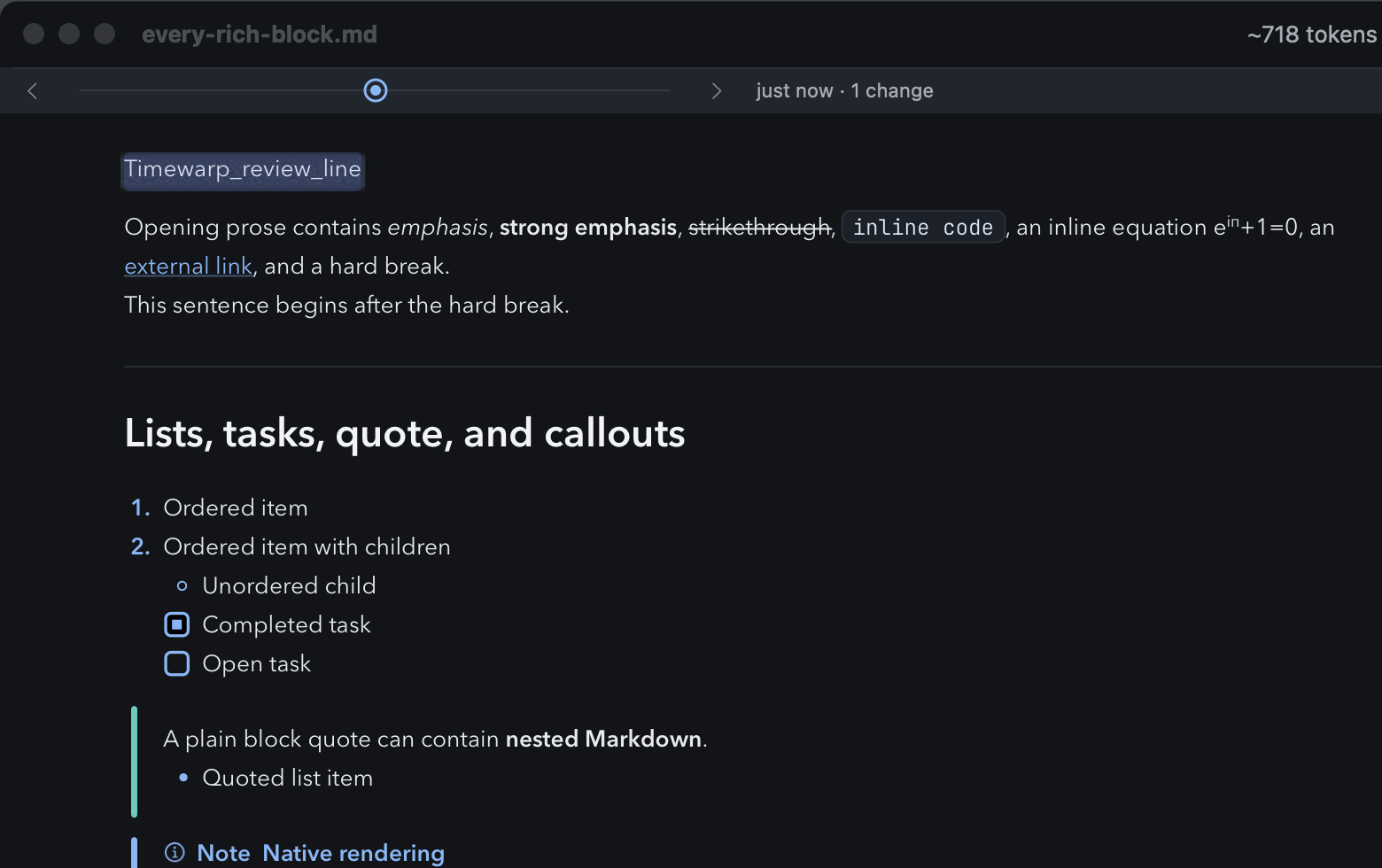
A version from the past in Timewarp, captured by our test harness on September 10 from a development build on the way to 0.9.19. The row of dots sits under the titlebar; the changed line is washed.
The history of a 50 GB file
A history feature has two obvious designs, and both of them get expensive. You can keep copies, which is simple until someone opens a 50 GB file, because Mardo opens those, and a history made of copies would fill the disk long before it was useful. Or you can keep the differences and replay them, which means reading and writing of its own, a timer to decide when to record, and a queue for when recording falls behind.
We had the pieces for something else, and they came from how Mardo follows a file at all. Since late August, Mardo hasn't mapped the file you open. It maps a clone of it. On APFS, the Mac's file system, a clone is, in Apple's words, "a copy of a file or directory that occupies no additional space on disk": the two share every block until somebody changes one of them. Mardo needs the clone because the bytes under an ordinary memory map can change when another program rewrites the file in place, and a clone's bytes can't. Every time another tool saves the file, Mardo clones the new version, works out which bytes changed, and moves over to it.
And then it let the old clone go.
Every one of those old clones was a complete, exact, unchangeable version of your file, sitting on disk and costing almost nothing, and we released each one the moment we'd finished with it. Apple's own page suggests clones for exactly this, to "reduce storage space required for document revisions and copies." We had the revisions and the storage, and we'd been handing both back.
We didn't build a history. We stopped throwing one away.
The design note puts it more drily: "Timewarp has no timer, no diff, no queue, and no I/O of its own." Each version it records is two things Mardo already had: the list of changes Follow Live Edits had just worked out, and the clone it was about to let go. A version from the past is the present, with a few pieces borrowed back from clones we kept.
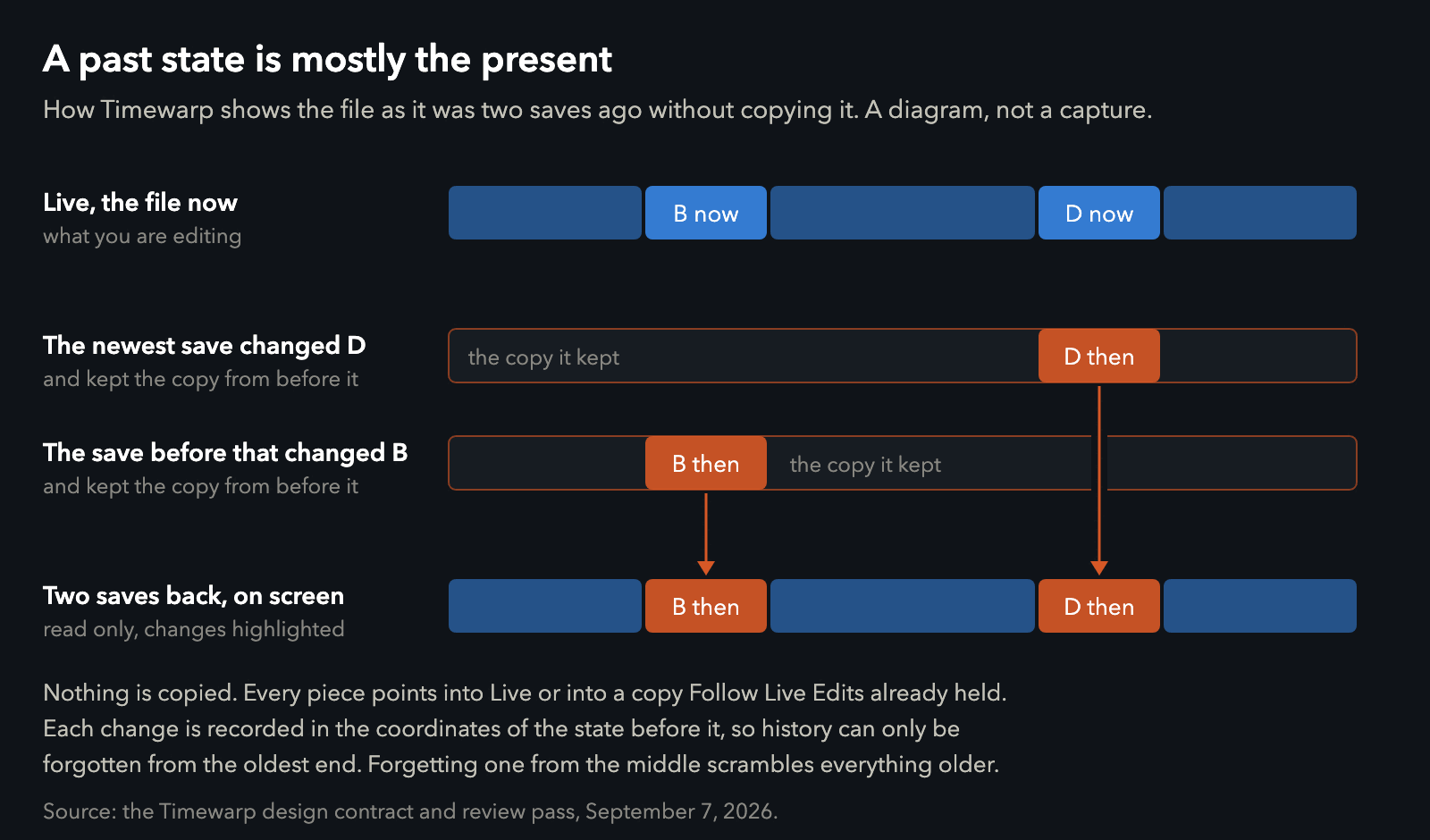
How a past version is put together. The changed pieces come from clones Follow Live Edits was already holding.
Borrowing pieces is cheap. Building the oldest version Timewarp keeps took 0.32 milliseconds when each save had changed 100 places and 2.25 milliseconds when each had changed 5,000, against budgets of 1 and 4. A frame at 60 Hz lasts 16.67 milliseconds, so even the heavy case leaves most of a frame for drawing.
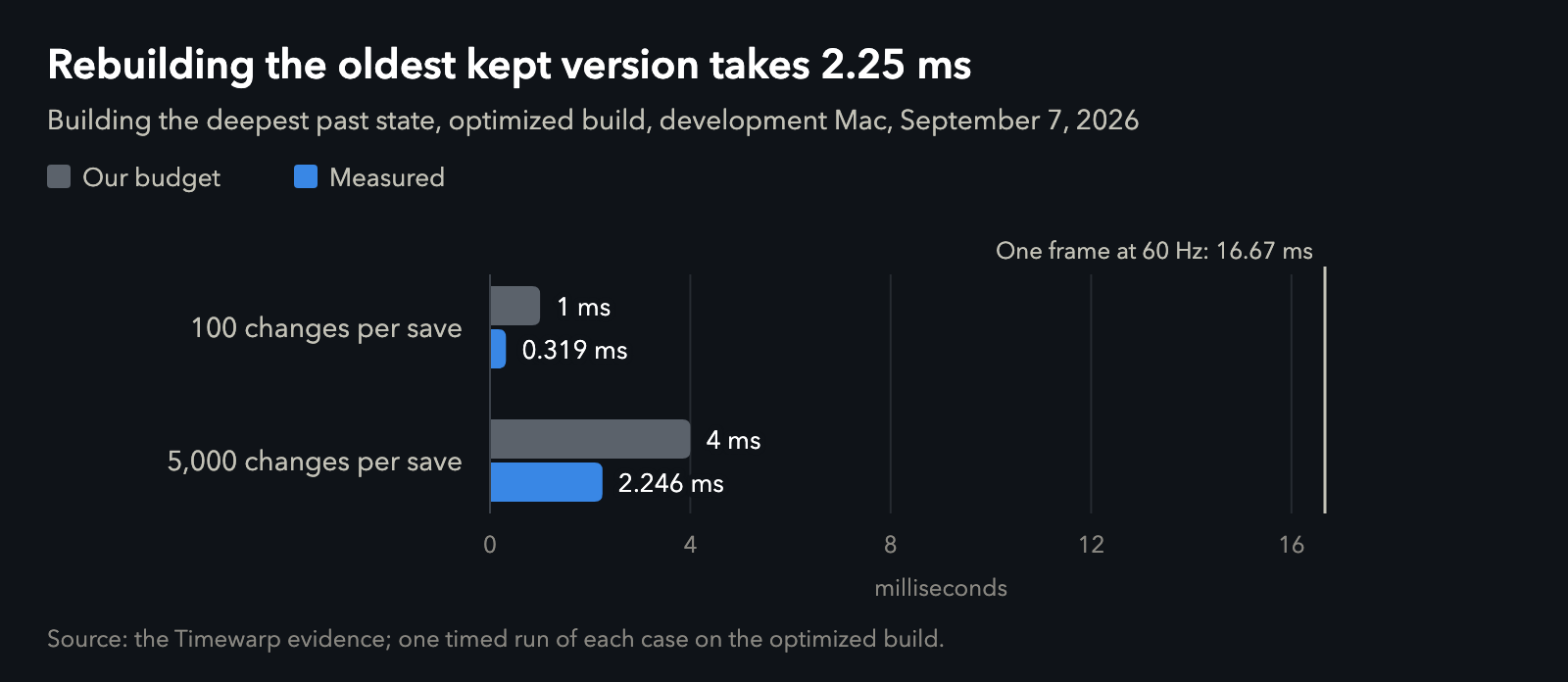
Measured with an optimized build on September 7. Data.
History can only be forgotten from one end
The first working Timewarp, from a written plan to a row of dots with its own tests, took a little over two hours on Monday, September 7. An hour later, a second read of the code, before Adam had even tried it, found a trap in how history gets forgotten, the kind that would have been miserable to meet in the wild.
Each recorded change is written in the coordinates of the version before it, the way directions might say "the third house after the bakery." When the row was full and one more version arrived, the code freed the oldest change it was allowed to, and if you happened to be looking at the oldest version, that was the second oldest. Removing a change from the middle, as the fix's commit message put it, "rebuilt every older state over the wrong bytes." Knock down the bakery, and every set of directions after it leads somewhere confidently wrong.
The rule is now part of the design: history is forgotten only from the oldest end, and never while you're looking at it. If you're reading an old version when new saves arrive, Mardo holds everything that version depends on until you leave, and only then trims the oldest. A test checks every version byte for byte as each new one arrives.
The named cost
A clone is nearly free when another program edits a file in place, because it shares every block except the ones that changed. Many tools don't save that way. They save atomically: write the whole new file under a temporary name, then rename it over the old one, so nobody ever sees a half-written file. It's the careful way to save, and it means the old file stops being the file. Nothing points at it anymore except Mardo's clone, which now holds every block of it alone.
So one changed line can cost one whole file. We measured it: an atomic one-line change to a 1 MiB file held exactly 1.0 MiB of disk, both times we ran it, and Timewarp's menu said "Holding up to 1 MB on disk." We call it the named cost, because we'd rather name a cost than have you find it in your disk usage. It lasts until that version's dot leaves the row.
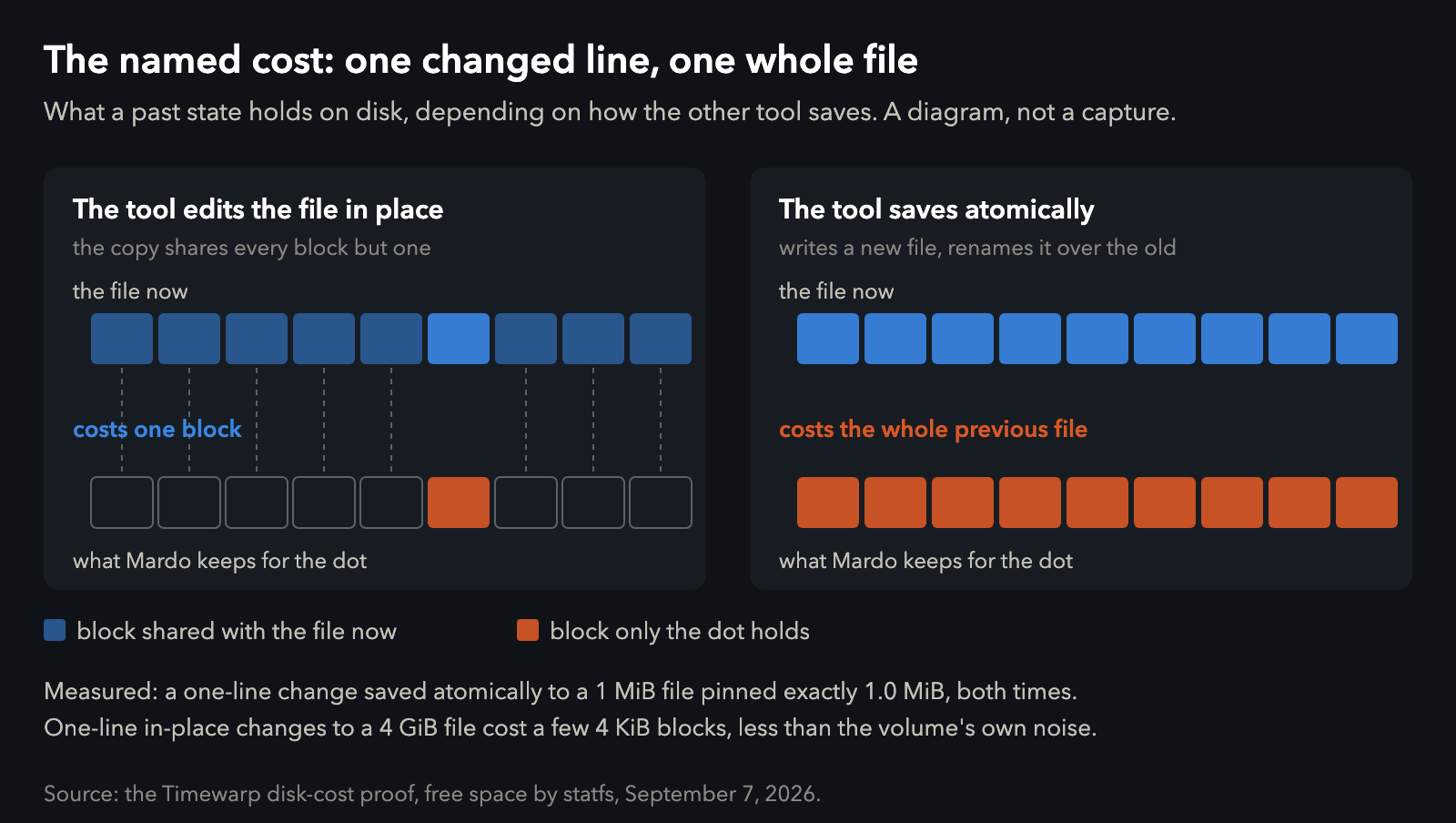
Why the way another tool saves decides what a past version costs. Data.
The other side of the same fact is lovely. Three one-line changes written in place to a 4 GB file cost a few 4 KB blocks each, less than the disk's own background traffic. Timewarp has no byte limit at all.
A week of opinions
That was Monday afternoon. Monday evening Adam tried it, and the next four days of the record are mostly the sound of a design meeting a person.
He turned down the Return key as the way to step through time and asked for Command and the arrows, which is how it works now. Then, in a 725-line document of his own, stepping to a change that began on a blank line selected it without scrolling to it, leaving an empty stretch of page on screen, which in the dark theme looks exactly like a black screen because it was one. Then returning to the present jumped back to wherever the caret had been, and the record keeps Adam's rule for that one: when you are going through time, you want to see things where you have them.
The next day he watched a save arrive from outside while he was typing. Mardo kept his words and his place in the text, but new paragraphs above his line pushed the caret down the screen. In the test we built from it, two paragraphs landing above the caret moved it 66 points, which is a long way for a line you're in the middle of writing. Now Mardo notes where your caret sits on screen before it takes in a save, and puts it back within half a point.
On Wednesday we tried marking changes with a thin blue line a point and a half above the text. After seeing it over a replaced sentence, an edited table and a rewritten section, Adam judged it worse than the highlight it was meant to replace, and it came out entirely instead of hiding behind a switch. What survived is a cool periwinkle wash, 13 percent over light themes and 18 over dark ones. When you step between versions, the same color briefly strengthens over whatever changed and fades in a little over a second. A change made only of blank lines has no letters to wash, so Mardo washes the gap between the lines instead.
When you and the agent change the same sentence
When a save from an agent doesn't touch what you're typing, Mardo folds it in around your unsaved work without asking. The hard case is when you both change the same sentence. Mardo keeps your words on screen and puts a small Conflict button beside them.
The first version of that button did nothing at all. It made its popover and didn't hold on to it, so the popover was gone before it could appear. Fixed, it opened your version and the incoming one side by side, each drawn by Mardo's own renderer with only the difference washed, and Adam gave it a two-word verdict: "feeling good." By Friday it had grown into a review panel that holds still while the agent keeps saving behind it.
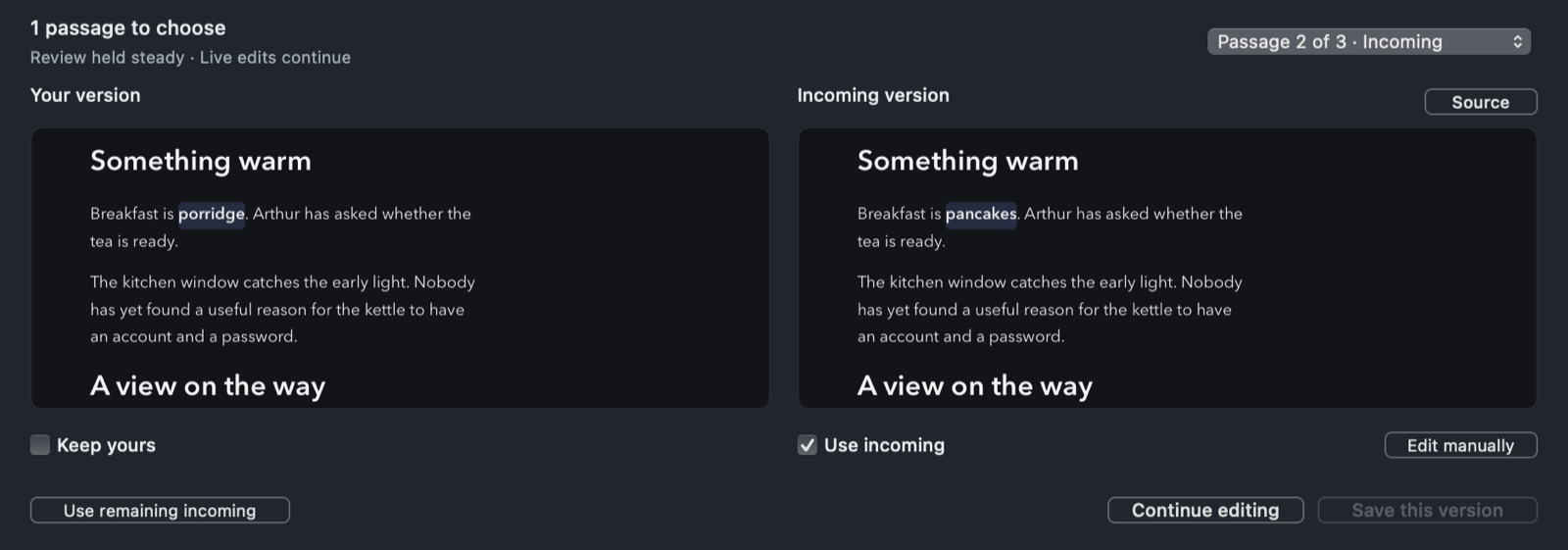
The conflict review, captured by our test harness on the afternoon of September 11 from the code that shipped that evening. Your version is on the left and the incoming save on the right.
You choose Keep yours, Use incoming or Edit manually for each passage, and Save waits until every conflict has an answer.
The row opens like an old television
Friday morning went to motion. Showing the row now opens a white point into a line, then into a curved aperture whose top edge leads its bottom, the way an old television came on. Opening takes 400 milliseconds and closing 280. A history row doesn't need to open like a television. Ours does. Good for no reason.
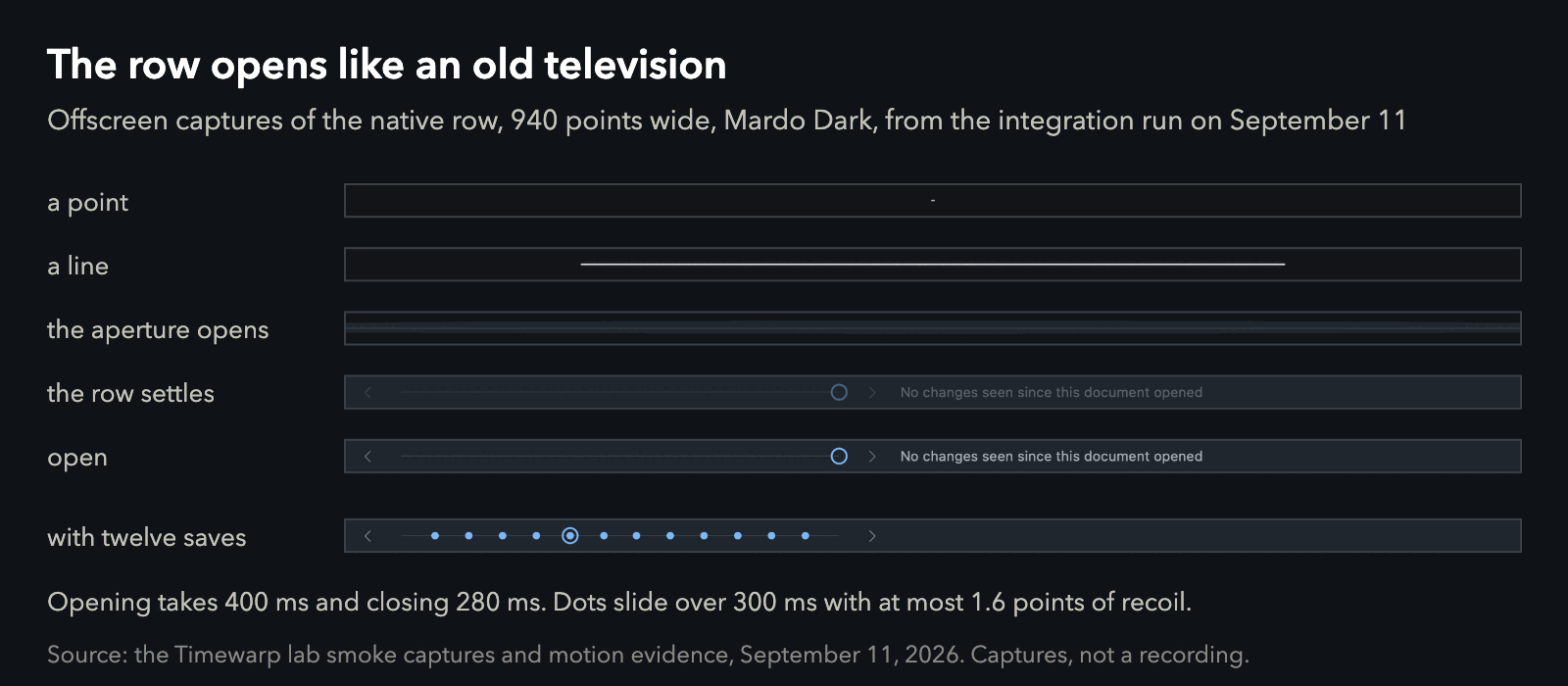
Offscreen captures of the row from our test run on the afternoon of September 11.
Adam rejected the first cut. About an hour later came a smoother one, and he noticed that opening and closing didn't happen at the same height: they were 26 points apart, about a whole row. The animation had been walking up the window's views and stopping one short of the titlebar's own container, which then jumped straight to its final place.
By mid-afternoon Adam ran the last check in the real app, with a script saving the file every few seconds while he stepped back through time, made an edit, undid it and saved. The record keeps his verdict in his own punctuation, which is to say none: "it looks great now what". The answer to "now what" was to ship it. Asked once more before the merge, he said, "Yes, it feels right." Timewarp went out in Mardo 0.9.19 at 9:27 that evening.
The engine was the small part.
Using it with an agent
Open the file your agent is writing in Mardo, or have Claude Code or Codex open it for you at the lines that matter. Leave it open while the agent works. Each save lands in place, washed where it changed, with your scroll position and your caret where you left them.
Press ⌘Y and the row opens under the titlebar, with one dot for every save that reached the disk, the agent's and yours. ⌘← and ⌘→ step between versions, ⌘↑ and ⌘↓ walk through the changes in the one on screen, and Escape brings you back to now. A past version is read-only, and new saves keep adding dots while you look. In our test on real windows, fifteen saves from outside, a fifth of a second apart, became fifteen versions, and the row kept the most recent ones. Your own unsaved typing isn't a version yet, so it gets no dot; it stays highlighted where you're typing.
Timewarp is the history of the file while it's open in Mardo. It writes no history file, and when you close the window the versions go with it, so it's for seeing what just happened, not a replacement for Git. It needs a saved file on APFS, which has been the Mac's default since macOS High Sierra, and Follow Live Edits, which is on for every saved file you open. It's part of free Mardo, with no Pro request anywhere in it.
What the other nineteen keep
That morning we finished reading the feature lists of nineteen other Markdown apps, every checkmark, from their own sites and READMEs. Three of them keep versions of a file too, and all three write those versions to disk, so theirs outlive the window, which Timewarp's don't. Timewarp is the only one of the four that writes nothing and copies nothing.
The bigger difference is the moment an agent saves over your unsaved typing. The editors that say what they do about it answer with a dialog, a view of both versions, or an automatic merge with open reports of lost text. Mardo folds in every change that doesn't touch yours and marks the one that does, and it was the only app in the survey with a written proof behind that: 24 scenarios that drive real Mardo windows.
| The numbers | Value |
|---|---|
| Bytes copied to record a version | 0 |
| Oldest kept version, 100 changes per save (budget) | 0.319 ms (1 ms) |
| Oldest kept version, 5,000 changes per save (budget) | 2.246 ms (4 ms) |
| Atomic one-line save to a 1 MiB file, disk held | 1.0 MiB, both runs |
| Three one-line in-place changes to a 4 GiB file | a few 4 KiB blocks each |
| Outside saves 0.2 s apart | 15 saves, 15 versions |
| Caret moved by two paragraphs arriving above it | 66 points before, under 0.5 after |
| Change wash over light and dark themes | 13% and 18% |
| Row opening and closing | 400 ms and 280 ms |
| Opening and closing heights, first smooth cut | 26 points apart |
| Other Markdown apps whose feature lists we read | 19 |
| Live-edit merge proof | 24 scenarios |
Footprints
Two hours after 0.9.19, Mardo 0.9.20 followed with one fix of its own: long lines in code blocks now wrap inside the document column in Rendered Edit and View, instead of running off the right edge.
Working with an agent means the file you're reading will keep changing under you. Now it leaves footprints, and you can walk back along them with ⌘Y and the arrow keys, and walk forward again to where you were.
How we measured
Every number here comes from our development Mac, an M4 MacBook Air with 32 GB running macOS 15.7.4, on development builds between Mardo 0.9.18 and 0.9.19.
The view-build times are one timed run of each case on an optimized build, from a test that builds the oldest version of a full history with 100 and then 5,000 changed regions per save. Disk cost is the change in the volume's free space, read with statfs before and after each step and settled until two readings agreed. The 4 GiB file is sparse, so it takes almost no room of its own, and what that run shows is how little each clone adds. The real-window test opens actual Mardo windows and drives them with saves from another process, Mardo's own saves and the keys, checking every version byte for byte. The caret figure comes from the live-edits test built from Adam's case. The 26 points come from sampling the row's layers offscreen during the motion. The survey read each app's own site or README on September 11, and took each claim as written.
About Mardo. Mardo is a native Mac app for reading and editing Markdown, made by Floof Logic and built on MarkEngineV3, its own Markdown engine, with no web view inside. It launches faster than Apple's own text view, and it opens a 50 GiB file ready to edit in about an eighth of a second. When an AI agent or another app saves the file you have open, Mardo adopts the new version in place, merges it under your unsaved edits when the two don't overlap, and keeps your place; Timewarp lets you step back through the file's past versions while it's open. Claude Code, Codex, ChatGPT and Claude Desktop can open a file in Mardo at the exact lines that matter, over a local MCP connection with no network port. Press Space on any Markdown file in Finder for a rendered Quick Look preview.
Reading, Quick Look, Find, Outline, Print, Follow Live Edits and Timewarp are free, with no time limit and no account. Mardo Pro adds editing and export for US $29.99, paid once, after a trial of 14 days of use that starts the first time you open Mardo. Documents never leave your Mac. Mardo runs on macOS 14 or later, on Apple silicon and Intel. Download it from mardo.app, or install it with brew install --cask flooflogic/tap/mardo.
Every Mardo release · Star Mardo on GitHub · Written in Markdown. Exported by Mardo. Good for no reason.