
800 MB to show an 8 MB file
Glance 0.1.0, renamed Mardo · August 3, 2026 · Adam and Truly Floof
Why our Mac Markdown reader needed 800 MB to show an 8 MB file, and how a bounded viewport brought it down to 27.
An 8 MB Markdown file is text, and not a great deal of it. It has no pictures in it, and it does not play music. You could email it to your mother.
On August 1, our Mac reader needed about 800 MB of memory to show it to you. That's a hundred times the size of the file, a ratio you normally only see in wedding budgets.
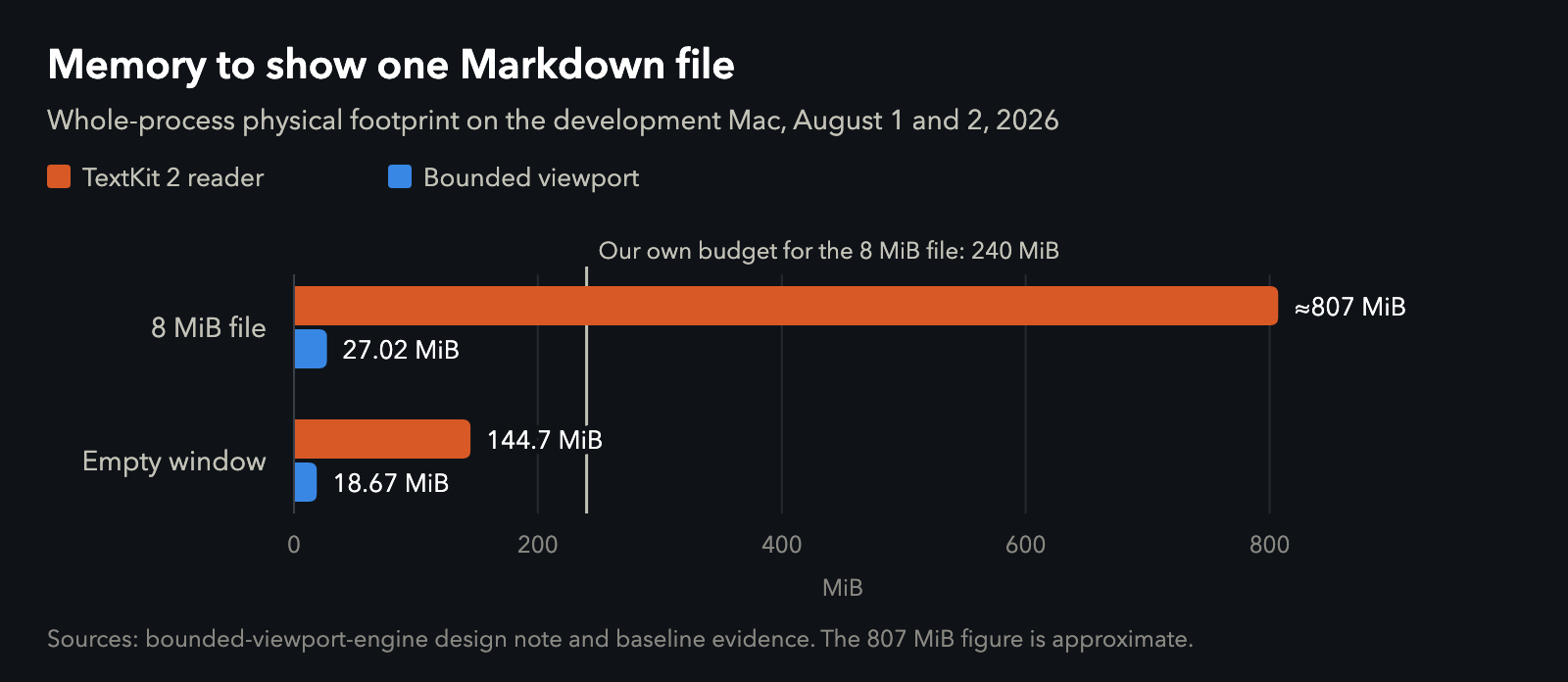
Glance before and after the bounded viewport, measured on our development Mac, an M4 MacBook Air with 32 GB. Data.
More than half of that memory went to about six thousand small caches inside Apple's text system, each one faithfully remembering how wide certain letters were. We had given that file a budget of 240 MB. We went over it by more than three times, on the largest file our Quick Look preview would agree to open at all.
I'd like to say we saw this coming. We did not.
If you keep Markdown on a Mac, you have files like this one: a long README, a spec, one of the plans an AI agent writes for you while you're getting coffee. You'd reasonably expect the size of a file not to decide how much of your computer the reader eats. We're Floof Logic, and the first thing we ever shipped was a talking dog that carried its own language model around inside an iPhone, so we take memory personally. This is the story of the three days it took to make the size of a file stop mattering, and of why the app didn't come out of those three days with the name it went in with.
A reader called Glance
The app was called Glance. It was a native Swift and AppKit program for reading and editing Markdown, and it was a good deal more ambitious than its name. It had its own Markdown parser, drew math and Mermaid diagrams natively, wrote PDFs, and came with two Quick Look extensions so you could press Space on a file in Finder and read it without opening anything. There was no web view in it anywhere. The first commit landed early on August 1, and the README set a house rule: keep everything small, boring, bounded and provable, and make it beautiful for no reason.
Bounded turned out to be the hard one.
Where TextKit's memory went
Glance did what the platform encourages. It read the whole file into a string, parsed it, built one enormous attributed string for the entire document, and handed that to TextKit 2. TextKit 2 is Apple's modern text system, the one designed to lay out only what's on screen, and we were counting on it to be sensible about everything else.
It was not sensible about everything else. When we looked inside the heap, the memory was sitting in glyph caches and attribute dictionaries and all the other furniture TextKit builds for a document it believes it owns completely. Nothing was leaking. TextKit was simply keeping everything, very carefully, for as long as the window stayed open.
So we did the sensible things, in the order sensible people do them. First we tuned it. We interned styles and put limits on native tables, and we found an accidental request to lay out the entire document and removed it. The number barely moved, and the design note we wrote that day admitted it with some dignity: "This is an architectural failure, not a cache-tuning task."
Then we looked for someone to blame. Every Mac developer has, at some point, said the words "framework overhead" out loud, so we built a control: a bare AppKit window in its own process, doing nothing at all. It used about 11 MB. Our empty window, showing nothing, used about 145. So the overhead was ours, and we wrote down a rule we still keep: no number counts as framework overhead until a bare control proves it.
Then we nearly trusted a bad measurement. Our first readings of the "empty" window weren't empty. macOS state restoration had politely reopened the previous 8 MB document before the probe ran, so the empty app was secretly holding the very file we were trying to measure. We fixed the probe before we believed anything else it told us.
By then it was clear that no setting would save us. We had handed AppKit a whole document and asked it to be clever about showing a little of it, and that request was the shape of the entire program.
So we stopped handing it a document.
Give it a viewport, not a document
A day and a half after the first commit, we threw the reader away. One commit deleted the 3,600-line view controller at its center and replaced it with something whose whole job description fits in one sentence: memory should follow what's on the screen, not the length of the file.
BEFORE: TextKit 2
file → String → Markdown snapshot → render plan
     → one NSMutableAttributedString for the whole document
     → NSTextContentStorage → NSTextLayoutManager → NSTextView

AFTER: bounded viewport
file → read-only memory map (bytes stay on disk until touched)
     + sparse index: one 32-byte checkpoint every 64 KiB
scroll position → nearest checkpoint → walk to the exact visual row
     → streaming scanner → fixed 1 MiB budget, reset every frame
     → Core Text shapes only the visible lines
     → Core Graphics draws into ONE window-sized canvas
Each part of the new machine exists to stop the size of the file from leaking into memory:
The file is never copied into memory. It's mapped read-only, so the bytes stay on disk and the kernel is free to drop pages and fetch them back whenever it likes.
A small index lets us jump anywhere. At one 32-byte checkpoint per 64 KiB, an 8 MiB document needs 4 KiB of index, and a 1 GiB document needs 512 KiB.
Every frame works from a fixed 1 MiB budget that's reset every frame. Quick Look gets a hard 1 MiB, and thumbnails get 512 KiB.
Nothing lays out the whole document just to size a scrollbar.
Only the lines on screen get shaped, by Core Text, and drawn into a single view the size of the window.
Editing lives under the same rule. Edits go into a piece table laid over the read-only file, so the file itself is never copied. TextKit kept exactly one small job, in one recycled 64 KiB window, so that dictation and every input method macOS offers keep working natively while you type. It's the only piece of TextKit we kept, and it earns its place.
Every frame starts from nothing, reads only the part of the file you're looking at, and throws away everything the next frame won't need. That's the whole idea.
The proof
With the new reader, the same 8 MiB file peaked at 27.02 MiB, about thirty times less, and the empty window fell from 144.7 MiB to 18.67 MiB.
The better number is the next one.
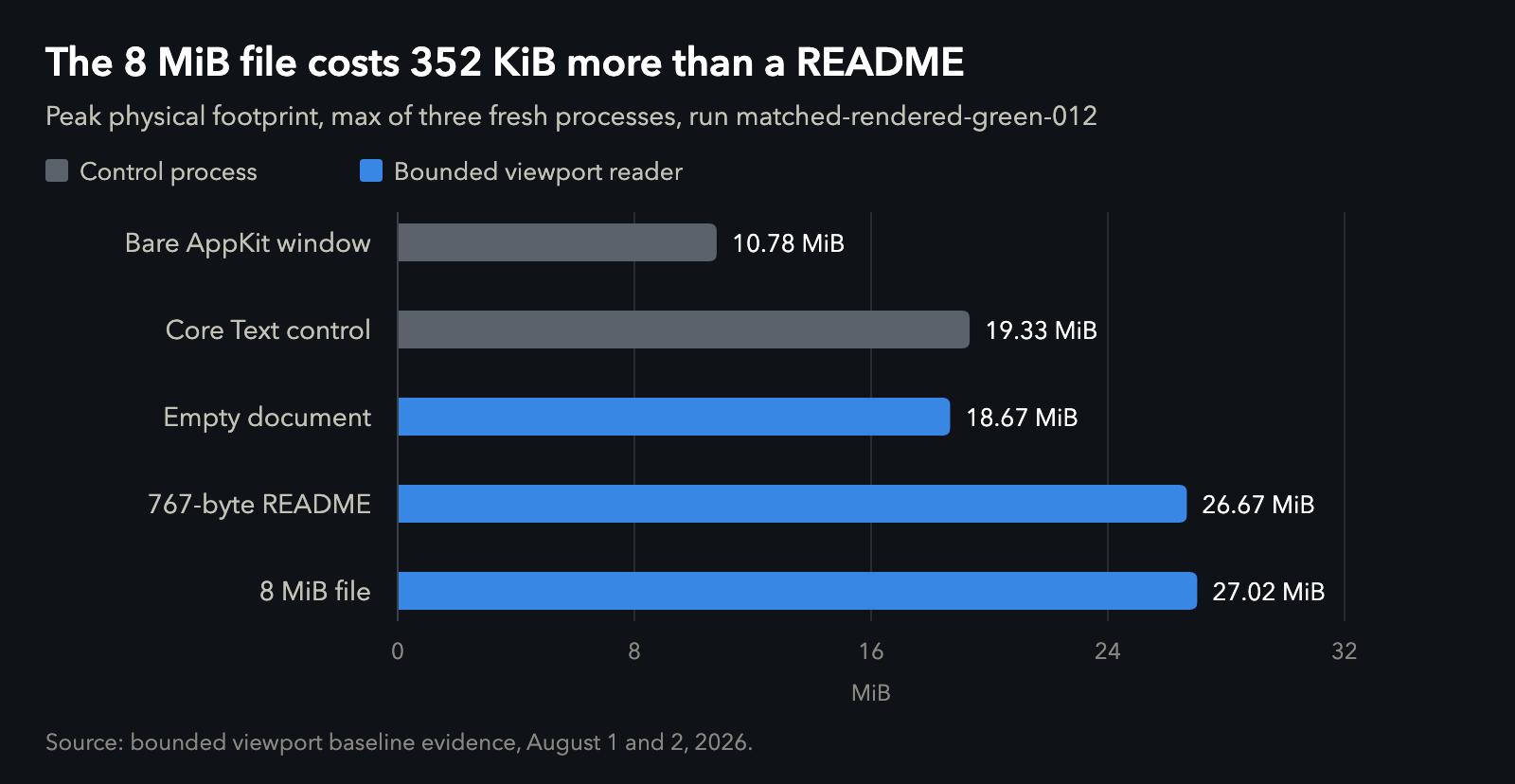
Every row is the highest of three fresh processes. Data.
A 767-byte README measured 26.67 MiB. The 8 MiB file measured 27.02 MiB. That's 352 KiB more for a file eleven thousand times larger, and in two other rounds of three the big file actually used less memory than the README (26.59 against 27.13 MiB, and 25.81 against 26.41). Once the size of the file stops mattering, what's left is noise, and noise is a lovely thing to have left.
The last stubborn bit of the gap belonged to Apple's rendering machinery rather than ours, in Core Animation and IOSurface backing stores. Two changes closed it. Pinning the window to sRGB removed an oversized color surface, and making the canvas the size of the window instead of the size of the document did the rest.
| The numbers | Value |
|---|---|
| 8 MiB file, TextKit 2 reader | ≈807 MiB |
| …of which glyph-advancement caches | 423 MiB, in 6,196 caches |
| Our original budget for that file | 240 MiB |
| 8 MiB file, bounded viewport | 27.02 MiB |
| 767-byte README, bounded viewport | 26.67 MiB |
| Empty window, before → after | 144.7 → 18.67 MiB |
| Bare AppKit window (control) | 10.78 MiB |
| Index cost | 32 bytes per 64 KiB of file |
| Frame budget | 1 MiB, reset every frame |
| Lines in the view controller we deleted | 3,605 |
Quick Look said "done" before it drew
Press Space on a Markdown file in Finder and Quick Look asks our extension for a preview, and the extension tells Quick Look when it's ready. Ours said so a beat too early, so for a moment you'd see nothing at all, which is a strange thing for a preview to show you.
Getting faster wouldn't have helped, because the problem was the promise. So the extension learned to keep quiet until it had actually drawn something. To draw that first screen it reads only the first 128 KB of the file, and it reports that it's finished from inside that draw.
We'd love to show you a screenshot of this. macOS won't hand one over: it marks Quick Look's windows as off limits to screenshots, so the one thing this section is about is the one thing we couldn't show you.
A 58 KB file with an empty ending
The same day, a real file broke the new engine. It was a 58 KB Markdown file from our own notes, and Quick Look showed the top of it and then nothing at all.
A huge file would have made sense. This one was smaller than the distance between two checkpoints, so it had exactly one, right at the start. Every time you scrolled down, the engine went back to the beginning and filled its fixed allowance of rows with lines you couldn't see, like a librarian who reads every book on the first shelf before going to look for yours.
A bigger budget would have hidden the problem, and a bigger budget is the one thing this whole design exists to refuse. What had actually gone wrong was subtler. The budget had quietly turned into a distance limit, when it was only ever meant to hold what's on the screen. Seeking became a binary search plus an exact walk to the row you're looking at, and the budget didn't grow by a single byte.
We took a rule from it: no document, and no single line, has to fit in the budget. And if nothing has to fit, there's no reason to have a maximum file size at all. The next morning we removed all three limits, for the app, for Quick Look and for thumbnails.
What it cost
None of this was free. Everything TextKit had been doing for us (selection, hit testing, accessibility, tables, scrolling) became our job. Our release audit from those days has a heading that simply reads "Trackpad flick direction was inverted," which tells you most of what you need to know about rebuilding scrolling from scratch.
More than a glance
On the morning of August 3, the tag went on: "Stable Glance 0.1.0 viewport-fixed release." It stayed Glance for less than two hours.
The name came from the first ambition, which was a file you could glance at. Somewhere between 800 MB and 27, that stopped being enough. I wanted the best Markdown preview ever made, and that meant more than a glance. By late morning the project was Mardo.
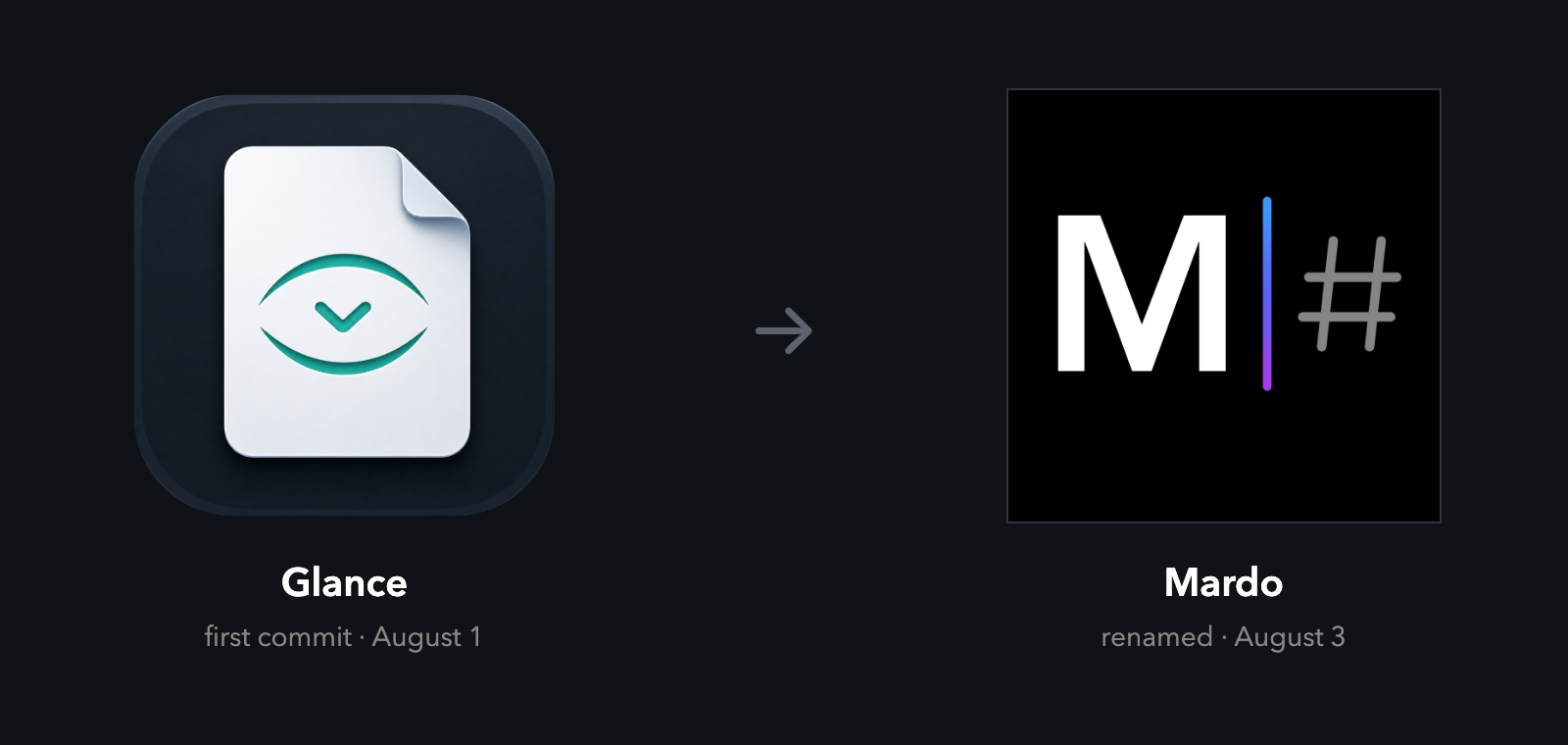
The icon from the first commit, and the one that replaced it that afternoon.
That afternoon the project charter gained a list called "What we must remember," and one rule on it is the one this whole story is about:
Never solve a large-file problem by raising a buffer and hoping the document fits. Seek, index, stream, recycle, and keep the viewport bounded.
A ten-page document and a ten-thousand-page document now go through the same machinery, and the screen only ever holds what you can see. The memory should follow your eyes, not the file.
How we measured
Every memory number here is the whole app's physical footprint as macOS reports it for the process, which counts the memory the app has written to, not the pages of the file that macOS can drop and read again from disk. We measured on our development Mac, an M4 MacBook Air with 32 GB.
The bounded-viewport numbers come from starting three fresh processes per case and keeping the highest reading, so the charts show the worst of three, not an average. The "before" numbers are single measurements. The bare AppKit window and the plain Core Text view are controls: tiny apps that do nothing but exist, so we know what macOS itself costs before we blame anyone.
The 8 MB test file is a 7.6 KB manual repeated until it's exactly 8 MiB, which makes it repeatable. Every number is in memory.csv.
About Mardo. Mardo is a native Mac app for reading and editing Markdown, made by Floof Logic and built on MarkEngineV3, its own Markdown engine, with no web view inside. It launches faster than Apple's own text view, and it opens a 50 GiB file ready to edit in about an eighth of a second. When an AI agent or another app saves the file you have open, Mardo adopts the new version in place, merges it under your unsaved edits when the two don't overlap, and keeps your place; Timewarp lets you step back through the file's past versions while it's open. Claude Code, Codex, ChatGPT and Claude Desktop can open a file in Mardo at the exact lines that matter, over a local MCP connection with no network port. Press Space on any Markdown file in Finder for a rendered Quick Look preview.
Reading, Quick Look, Find, Outline, Print, Follow Live Edits and Timewarp are free, with no time limit and no account. Mardo Pro adds editing and export for US $29.99, paid once, after a trial of 14 days of use that starts the first time you open Mardo. Documents never leave your Mac. Mardo runs on macOS 14 or later, on Apple silicon and Intel. Download it from mardo.app, or install it with brew install --cask flooflogic/tap/mardo.
Every Mardo release · Star Mardo on GitHub · Written in Markdown. Exported by Mardo. Good for no reason.